
Mingle Bingo Cards - Print Free or Customize
Print free Mingle bingo cards or customize, limitless prints! Pick from 41,500+ templates or use our bingo card generator. Add numbers, phrases, pictures, or any combination. Play using PDF printouts, virtual bingo cards, and our virtual bingo caller, or combine all formats.
About: This bingo card is perfect for a fun-filled holiday mixer or workplace networking event, especially for members of a local chamber of commerce. The card blends festive traditions with quirky personal stories and business connections, setting a lighthearted tone. It's designed to spark conversation, laughter, and plenty of shared holiday memories among colleagues and community members.
How To: To save a PDF to print, click the Print button. You can modify the card count and other printing options on the Print tab. Grid items and free space content can be edited on the Basic tab. Appearance can be exactly personalized on the relevant tabs, or you can easily find any preference on the 🔍 tab.
How to play Mingle Bingo Cards?
- Digital Players: Click on the Play button above, and then click on the 🎫 button.
- Paper Players: Print PDF bingo cards and physically write on the cards.
- Digital Caller: Click on the Play button above.
- Paper Caller: Print PDF calling list & calling slips and physically draw the slips.
- Mixed Mode: Select any combination above. For instance, caller can be either Printed or Digital. And players can be Printed or Digital or a combination of both.
Step-By-Step:
- Start by downloading the Mingle Bingo PDF by clicking on the "Print" button above.
- Open the PDF and print a hard copy.
- For random drawing, you can print another copy of the call list, cut, fold and then draw them randomly at play time.
- Cut the bingo cards at the cut lines if there are greater than 1 bingo cards per page.
- Distribute one card per player. For marking, you can use pencils. Crayons are the cheapest.
- Select one person to be the caller. If you are playing in a small group, the caller can also play along with their own Bingo card.
- The caller initiates the game by randomly picking an item from the call list and announcing it to all players.
- The players check their cards to see if they have the called word. If they do, they mark that word.
- The first player to finish a horizontal, vertical, or a diagonal line of marked items announces "Bingo!" and wins the game.
- The caller verifies that the items marked form a proper line as per the Bingo card and call list.
- You can play for different patterns or a full card blackout for an extended game.
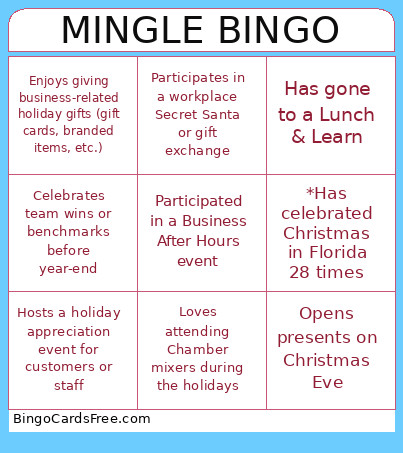 This Mingle Bingo Cards Game contains following Words or Phrases: Has already finished shopping, *Can't burp & never has, Has matching family pajamas, Decorates before Thanksgiving, *Cries when hears "Oh Holy Night" by Celen Dion, *Acquired a cat at a networking event, Forced to eat oyster stew every Christmas Eve, Has seen "Home Alone" more than 3 times, *Has celebrated Christmas in Florida 28 times, *Play Mary in her public schools Christmas Concert, *Was a baton twirler, *Favorite Christmas gift was Mrs. Beasley Doll, *Brings cannibal sandwiches to her family gatherings, *As a cheerleader, danced to Mariah Carey in 6th grade., Has more than three Christmas trees up, *Decorates the tree on her birthday every year, *Has a crush on Jessica (Mrs. Claus) from Santa Clause is Coming to Town put up your, Opens presents on Christmas Eve, Is hosting Christmas at their house, Prefers real trees over artificial, Participates in a workplace Secret Santa or gift exchange, Still has a childhood ornament on their tree, Has regifted a Christmas present, Has watched Elf more than once in a season, Loves Hallmark Christmas movies, Takes time off between Christmas and New Year's, Has attended a Chamber holiday event before, Has sponsored a community holiday initiative, Has volunteered for a local holiday charity or drive, Has collaborated on a holiday promotion with another business, Enjoys giving business-related holiday gifts (gift cards, branded items, etc.), Loves holiday-themed networking games or mixers, Has worked in their industry for more than five years, Offers holiday specials, sales, or packages, Has end-of-year goals they're currently working toward, Celebrates team wins or benchmarks before year-end, Has attended at least three networking events this year, Prefers morning networking over evening events, Has a favorite holiday tradition they share at work, Decorates their office or workspace for the holidays, Sends out client or customer holiday cards, Hosts a holiday appreciation event for customers or staff, Has attended a Biz & Brew this year, Has gone to a Lunch & Learn, Participated in a Business After Hours event, Has had a Ribbon Cutting or anniversary celebration with the Chamber, Shops or dines in downtown Hartland regularly, Has sponsored at least one Chamber event this year, Participates in local community events like concerts, markets, or parades, Has offered a donation or prize for a Chamber raffle or drawing, Has been a Hartland Chamber member for more than ten years, Has hired a local high school student, intern, or youth apprentice, Works with businesses in the Lake Country area regularly, Has a busy season that peaks during December, Loves attending Chamber mixers during the holidays.