Mingle Bingo Employee Connect Cards - Print Free or Customize
Print free Mingle bingo Employee Connect cards or personalize,
limitless prints! Choose from 41,500+ designs or use the bingo card generator.
Add numbers, words, pictures, or any combination.
Play using PDF printouts, digital bingo cards,
and the digital bingo caller, or mix physical and digital.
About: This bingo card is perfect for team-building at a company event, especially for organizations with multiple brands, international offices, and remote employees. The tone is lighthearted and fun, focusing on unique experiences, committees, and hidden talents across the workplace. It's a great way to break the ice and discover surprising connections among colleagues.
How To: To save a PDF to print, click the Print button.
You can change the number of cards and other
print options on the Print tab.
Grid items and free space text can be added on the Basic tab.
Appearance can be completely personalized on the
relevant tabs, or you can easily search any option
on the 🔍 tab.
How to play Mingle Bingo Employee Connect Cards?
Online Caller: Click on the Play button above.
Printed Players: Print PDF bingo cards and physically cross off the cards.
Online Players: Click on the Play button above, and then click on the 🎫 button.
Printed Caller: Print PDF calling list & calling slips and physically choose the slips.
Combo Mode: Pick any combination above.
For instance, caller can be either Paper or Online.
And players can be Paper or Online or a mix of both.
Step-By-Step:
Start by saving the Mingle Bingo Employee Connect PDF by clicking on the "Print" button above.
Open the PDF and print a hard copy.
For random calling, you can print another copy of the call list, cut, fold and then draw them randomly at play time.
Cut the bingo cards at the cut lines if there are more than 1 bingo cards per page.
Distribute one card per player. For marking, you can use crayons. Crayons cost the least.
Pick one person to be the caller. If you are playing in a small group, the caller can also play along with their own Bingo card.
The caller initiates the game by randomly pulling an item from the call list and calling out it to all players.
The players scan their cards to see if they have the announced word. If they do, they mark that word.
The first player to complete a horizontal, vertical, or a diagonal line of crossed items shouts "Bingo!" and wins the play.
The caller validates that the items marked form a correct line according to the Bingo card and call list.
You can play for different patterns or a full card blackout for a longer play.
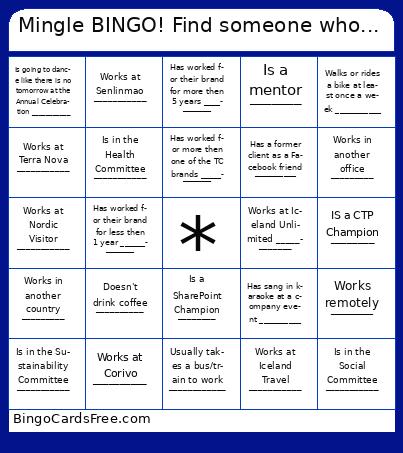
This Mingle Bingo Employee Connect Cards Game contains following Words or Phrases: Works in another office _________, Works in another country _________, Works remotely _______, Is an Asana Champion _________, Is a SharePoint Champion ________, IS a CTP Champion ________, Is a mentor _______, Has worked for their brand for more then 5 years ___________, Has worked for their brand for less then 1 year _____________, Has worked for more then one of the TC brands ____________, Is in the Social Committee ___________, Is in the Health Committee ___________, Is in the Sustainability Committee ___________, Is in the Safety Committee ____________, Works in one of the Travel Connect support departments ___________, Works at Iceland Travel ___________, Works at Nine Worlds ____________, Works at Nordic Visitor ___________, Works at Terra Nova ___________, Works at Iceland Tours ____________, Works at Iceland Unlimited ____________, Works at Corivo __________, Works at Senlinmao ___________, Usually takes a bus/train to work ____________, Walks or rides a bike at least once a week ___________, Is going to dance like there is no tomorrow at the Annual Celebration ___________, Has sang in karaoke at a company event __________, Doesn't drink coffee __________, Has a former client as a Facebook friend __________.

 This Mingle Bingo Employee Connect Cards Game contains following Words or Phrases: Works in another office _________, Works in another country _________, Works remotely _______, Is an Asana Champion _________, Is a SharePoint Champion ________, IS a CTP Champion ________, Is a mentor _______, Has worked for their brand for more then 5 years ___________, Has worked for their brand for less then 1 year _____________, Has worked for more then one of the TC brands ____________, Is in the Social Committee ___________, Is in the Health Committee ___________, Is in the Sustainability Committee ___________, Is in the Safety Committee ____________, Works in one of the Travel Connect support departments ___________, Works at Iceland Travel ___________, Works at Nine Worlds ____________, Works at Nordic Visitor ___________, Works at Terra Nova ___________, Works at Iceland Tours ____________, Works at Iceland Unlimited ____________, Works at Corivo __________, Works at Senlinmao ___________, Usually takes a bus/train to work ____________, Walks or rides a bike at least once a week ___________, Is going to dance like there is no tomorrow at the Annual Celebration ___________, Has sang in karaoke at a company event __________, Doesn't drink coffee __________, Has a former client as a Facebook friend __________.