MN State Fair Coupon Book Bingo Cards - Print Free or Customize
Print free MN State Fair Coupon Book bingo cards or personalize,
unlimited cards! Select from 42,200+ templates or use our bingo card generator.
Add numbers, words, pictures, or any combination.
Play using printable PDF, online bingo cards,
and our online bingo caller, or mix physical and digital.
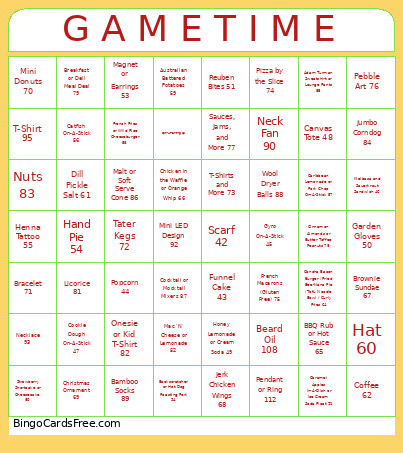
About: This bingo card perfectly captures the fun and flavor of a bustling fair or festival. With a playful mix of unique foods, quirky crafts, and creative gifts, it's ideal for groups attending a local fair, artisan market, or community event. The lighthearted vibe encourages players to explore, try new treats, and discover cool handmade finds together.
How To: To download a printable PDF, click the Print button.
You can alter the number of cards and other
print settings on the Print tab.
Grid items and free space text can be edited on the Basic tab.
Appearance can be completely customized on the
corresponding tabs, or you can quickly search any preference
on the 🔍 tab.
How to play MN State Fair Coupon Book Bingo Cards?
Online Caller: Click on the Play button above.
Printed Caller: Print PDF calling list & calling slips and physically draw the slips.
Printed Players: Print PDF bingo cards and physically cross off the cards.
Online Players: Click on the Play button above, and then click on the 🎫 button.
Mixed Mode: Pick any combination above.
For instance, caller can be either Printed or Online.
And players can be Printed or Online or a combination of both.
Step-By-Step:
Start by saving the MN State Fair Coupon Book PDF by clicking on the "Print" button above.
Open the PDF and print it.
For random drawing, you can print another copy of the call list, cut, fold and then pull them randomly at play time.
Cut the bingo cards at the cut marks if there are more than 1 bingo cards per page.
Distribute one card per player. For marking, you can use pens. Crayons are the cheapest.
Pick one person to be the caller. If you are playing in a small group, the caller can as well play along with their own Bingo card.
The caller starts the play by randomly picking an item from the call list and saying it to all players.
The players look at their cards to see if they have the called word. If they do, they cross off that word.
The first player to finish a horizontal, vertical, or a diagonal line of marked items announces "Bingo!" and wins the play.
The caller validates that the items marked form a correct line according to the Bingo card and call list.
You can play for varied patterns or a full card blackout for an extended play.
This MN State Fair Coupon Book Bingo Cards Game contains following Words or Phrases: Scarf 42, Funnel Cake 43, Popcorn 44, Gyro On-A-Stick 45, Kielbasa and Sauerkraut Sandwich 46, Cookie Dough On-A-Stick 47, Beard Oil 108, Pendant or Ring 112, Canvas Tote 48, Honey Lemonade or Cream Soda 49, Garden Gloves 50, Reuben Bites 51, Mac 'N' Cheese or Lemonade 52, Magnet or Earrings 53, Mini LED Design 92, Necklace 93, Hand Pie 54, Henna Tattoo 55, Catfish On-A-Stick 56, Caribbean Lemonade or Pork Chop On-A-Stick 57, French Fries or Wild Rice Cheeseburger 58, Australian Battered Potatoes 59, Wool Dryer Balls 88, Bamboo Socks 89, Hat 60, Dill Pickle Salt 61, Coffee 62, Spin-A-Painting 63, Concha Bacon Burger / Fried Bee-Nana Pie / Tofu Noodle Bowl / Curly Fries 64, BBQ Rub or Hot Sauce 65, Backscratcher or Hot Dog Roasting Fork 94, T-Shirt 95, Chicken in the Waffle or Orange Whip 66, Brownie Sundae 67, Jerk Chicken Wings 68, Christmas Ornament 69, Mini Donuts 70, Bracelet 71, Neck Fan 90, Caramel Apples In-A-Dish or Ice Cream Soda Float 91, Tater Kegs 72, T-Shirts and More 73, Pizza by the Slice 74, French Macarons (Gluten Free) 75, Pebble Art 76, Sauces, Jams, and More 77, Malt or Soft Serve Cone 86, Cocktail or Mocktail Mixers 87, Cinnamon Almonds or Butter Toffee Peanuts 78, Breakfast or Deli Meal Deal 79, Strawberry Shortcake or Cheesecake 80, Licorice 81, Onesie or Kid T-Shirt 82, Nuts 83, Jumbo Corndog 84, Adam Turman Sweatshirt or Lounge Pants 85.

 This MN State Fair Coupon Book Bingo Cards Game contains following Words or Phrases: Scarf 42, Funnel Cake 43, Popcorn 44, Gyro On-A-Stick 45, Kielbasa and Sauerkraut Sandwich 46, Cookie Dough On-A-Stick 47, Beard Oil 108, Pendant or Ring 112, Canvas Tote 48, Honey Lemonade or Cream Soda 49, Garden Gloves 50, Reuben Bites 51, Mac 'N' Cheese or Lemonade 52, Magnet or Earrings 53, Mini LED Design 92, Necklace 93, Hand Pie 54, Henna Tattoo 55, Catfish On-A-Stick 56, Caribbean Lemonade or Pork Chop On-A-Stick 57, French Fries or Wild Rice Cheeseburger 58, Australian Battered Potatoes 59, Wool Dryer Balls 88, Bamboo Socks 89, Hat 60, Dill Pickle Salt 61, Coffee 62, Spin-A-Painting 63, Concha Bacon Burger / Fried Bee-Nana Pie / Tofu Noodle Bowl / Curly Fries 64, BBQ Rub or Hot Sauce 65, Backscratcher or Hot Dog Roasting Fork 94, T-Shirt 95, Chicken in the Waffle or Orange Whip 66, Brownie Sundae 67, Jerk Chicken Wings 68, Christmas Ornament 69, Mini Donuts 70, Bracelet 71, Neck Fan 90, Caramel Apples In-A-Dish or Ice Cream Soda Float 91, Tater Kegs 72, T-Shirts and More 73, Pizza by the Slice 74, French Macarons (Gluten Free) 75, Pebble Art 76, Sauces, Jams, and More 77, Malt or Soft Serve Cone 86, Cocktail or Mocktail Mixers 87, Cinnamon Almonds or Butter Toffee Peanuts 78, Breakfast or Deli Meal Deal 79, Strawberry Shortcake or Cheesecake 80, Licorice 81, Onesie or Kid T-Shirt 82, Nuts 83, Jumbo Corndog 84, Adam Turman Sweatshirt or Lounge Pants 85.