
MN Valley Bingo Cards - Print Free or Customize
Print free MN Valley bingo cards or adjust them, limitless prints! Select from 42,200+ designs or use our bingo card generator. Add numbers, words, images, or mix them all. Play using PDF prints, online bingo cards, and our online bingo caller, or mix physical and digital.
About: This bingo card is all about sparking fun, lighthearted interactions and breaking the ice in a workplace or community setting, perfect for team-building events or new member orientations. You'll find yourself chatting, laughing, and making quirky connections with colleagues or fellow attendees as you complete playful challenges designed to encourage conversation and shared experiences.
How To: To download a printable PDF, click the Print button. You can change the card count and other print settings on the Print tab. Grid items and free space content can be edited on the Basic tab. Appearance can be fully customized on the corresponding tabs, or you can quickly locate any setting on the 🔍 tab.
How to play MN Valley Bingo Cards?
- Virtual Players: Click on the Play button above, and then click on the 🎫 button.
- Printed Players: Print PDF bingo cards and manually cross off the cards.
- Printed Caller: Print PDF calling list & calling slips and manually draw the slips.
- Virtual Caller: Click on the Play button above.
- Hybrid Play: Select any combination above. For instance, caller can be either Paper or Virtual. And players can be Paper or Virtual or a combo of both.
Step-By-Step:
- Start by getting the MN Valley PDF by clicking on the "Print" button above.
- Open the PDF and print it.
- For random drawing, you can print another copy of the call list, cut, fold and then pick them randomly at play time.
- Cut the bingo cards at the cut lines if there are more than 1 bingo cards per page.
- Give one card to each player. For marking, you can use markers. Crayons are the cheapest.
- Select one person to be the caller. If you are playing in a small group, the caller may as well play along with their own Bingo card.
- The caller begins the game by randomly drawing an item from the call list and saying it to all players.
- The players scan their cards to see if they have the called word. If they do, they mark that word.
- The first player to finish a horizontal, vertical, or a diagonal line of crossed items yells "Bingo!" and wins the game.
- The caller confirms that the items marked form a proper line according to the Bingo card and call list.
- You can play for varied patterns or a full card blackout for a longer game.
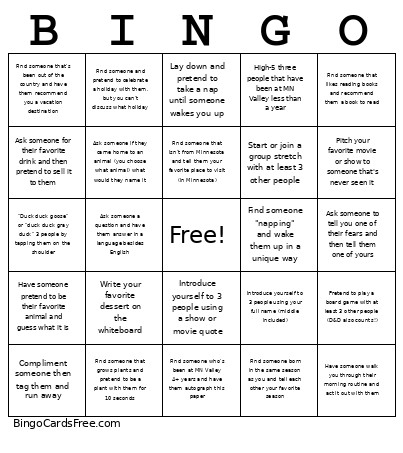 This MN Valley Bingo Cards Game contains following Words or Phrases: Find someone who's been at MN Valley 4+ years and have them autograph this paper, Compliment someone then tag them and run away, Find someone that likes reading books and recommend them a book to read, Find someone that likes the same sport as you and pretend to play it with them, Find someone that disagrees with you about pineapple on pizza and play rock paper scissors, Find someone that plays trivia and have them tell you a random fun fact, Find someone that has a tattoo and have them draw it on the back of this paper, Find someone born in the same season as you and tell each other your favorite season, Find someone that plays pickleball and do 5 jumping jacks with them, Have someone give you a description of their pet then try to draw their pet on the back of this paper, Pitch your favorite movie or show to someone that's never seen it, Write your favorite dessert on the whiteboard, Ask someone a question and have them answer in a language besides English, High-5 three people that have been at MN Valley less than a year, Find someone that grows plants and pretend to be a plant with them for 10 seconds, Find someone who's seen your favorite movie or show and have them rate it, Tell someone what you had for dinner last night, but add a weird or funny twist, Take someone's nametag and hold onto it until the game ends, Ask someone what nicknames their friends or family have for them, Have someone pretend to be their favorite animal and guess what it is, Find someone that likes music and have them sing their favorite nursery rhyme, Find someone that likes your favorite food and have them pretend to critique it, Lay down and pretend to take a nap until someone wakes you up, Find someone "napping" and wake them up in a unique way, Find someone that does an art or a craft and have them teach you something about it, Find someone that isn't from Minnesota and tell them your favorite place to visit (in Minnesota), Find someone and pretend to celebrate a holiday with them, but you can't discuss what holiday, Ask someone to tell you one of their fears and then tell them one of yours, Find someone that likes camping and give them a funny 3 item packing list, Introduce yourself to 3 people using your full name (middle included), Find someone that's been out of the country and have them recommend you a vacation destination, Find someone that owns a car and ask them for their license plate (if they don't know, that's okay!), Have someone walk you through their morning routine and act it out with them, "Duck duck goose" or "duck duck gray duck" 3 people by tapping them on the shoulder, Start or join a group stretch with at least 3 other people, Pretend to play a board game with at least 3 other people (D&D also counts!), Ask to see someone's lock screen and give them a complement about it, Share or make up a crazy fact about yourself and have someone guess if it's true, Introduce yourself to 3 people using a show or movie quote, Ask someone for their favorite drink and then pretend to sell it to them, Ask someone if they came home to an animal (you choose what animal) what would they name it.