Movie Bingo - Scenes Cards - Print Free or Customize
Print free Movie bingo - Scenes cards or modify,
limitless cards! Select from 42,600+ templates or use the bingo card generator.
Add numbers, words, pictures, or all of them.
Play using printed PDF, online bingo cards,
and the online bingo caller, or mix physical and digital.
About: This bingo card is a celebration of unforgettable movie moments and pop culture magic. Packed with iconic scenes from blockbuster films, cult classics, and animated hits, it’s perfect for movie marathons, trivia nights, or parties with film-loving friends. Expect lots of nostalgia, fun surprises, and plenty of chances to relive your favorite cinematic highlights.
How To: To download a printable PDF, click the Print button.
You can modify the card quantity and other
print options on the Print tab.
Grid items and free space content can be changed on the Basic tab.
Appearance can be exactly personalized on the
relevant tabs, or you can quickly locate any option
using the 🔍 tab.
How to play Movie Bingo - Scenes Cards?
Virtual Caller: Click on the Play button above.
Virtual Players: Click on the Play button above, and then click on the 🎫 button.
Paper Players: Print PDF bingo cards and physically write on the cards.
Paper Caller: Print PDF calling list & calling slips and physically pick the slips.
Hybrid Play: Select any combination above.
For example, caller can be either Printed or Virtual.
And players can be Printed or Virtual or a mix of both.
Step-By-Step:
Start by saving the Movie Bingo - Scenes PDF by clicking on the "Print" button above.
Open the PDF and print it.
For random drawing, you can print another copy of the call list, cut, fold and then pick them randomly at play time.
Cut the bingo cards at the cut lines if there are more than 1 bingo cards per page.
Give one card to each player. For marking, you can use crayons. Crayons cost the least.
Select one person to be the caller. If you are playing in a small group, the caller may as well play along with their own Bingo card.
The caller opens the game by randomly picking an item from the call list and calling out it to all players.
The players look at their cards to see if they have the called word. If they do, they dab that word.
The first player to finish a horizontal, vertical, or a diagonal line of marked items announces "Bingo!" and wins the game.
The caller validates that the items crossed off form a correct line as per the Bingo card and call list.
You can play for multiple patterns or a full card blackout for a longer game.
This Movie Bingo - Scenes Cards Game contains following Words or Phrases: Avengers Assemble, Stay Puft Appears, The Death Star Explodes, Toothless Dances, Mufasa Dies, Georgie meets Pennywise, Amaze, Amaze, Amaze!, Ferris Performs in the Parade, As You Wish, A Big Groot Hug, Sonic meets Dr. Robotnik, Miles Swings Through the City, Captain America lifts Mjolnir, Fat Amy gets hit by a Burrito, Mrs. Doubtfire Pies Herself, Nemo Touches the Butt, The Ewoks Rejoice, Jaws Dies, Hold on to your Butts!, Garfield meets Jon, Wile E. Coyote Touches Roadrunner, Heather Chandler Dies, Here's Johnny!, Bing Bong Dies, The Titanic Sinks, Truman Escapes, Juno Buys a Pregnancy Test, Regina gets hit by a Bus, Napoleon Dynamite Dances, She Doesn't Even go Here!, Ghostface Calls, Indiana Jones escapes the Boulder, Wilson Floats Away, Carrie Wins Prom Queen, Stitch Escapes, Ash meets Pikachu, Katniss Volunteers, More Room for Activities, Scott Pilgrim isn't Home, The Poison for Kuzco, The Tune Squad Wins, Totoro Catches the Bus, Charlie Wins a Golden Ticket, Sulley Says Goodbye to Boo, Harry Gets his Hogwarts Letter, Buzz & Woody Fly, Lightning Paves the Road, Rocky Training Montage, There's No Place Like Home, Dum Dum Give Me Gum Gum, Tallahassee Gets His Twinkie, Elle's Harvard Application, Singing Telegram, Spidey & MJ Kiss, Mark Zuckerberg Creates Facebook, Buddy Leaves the North Pole, Red or Blue Pill?, Run, Forrest, Run!, Batman meets the Joker.

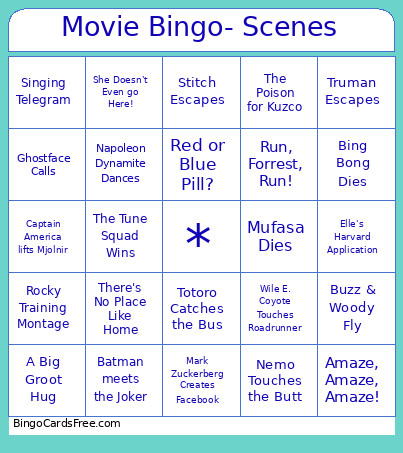 This Movie Bingo - Scenes Cards Game contains following Words or Phrases: Avengers Assemble, Stay Puft Appears, The Death Star Explodes, Toothless Dances, Mufasa Dies, Georgie meets Pennywise, Amaze, Amaze, Amaze!, Ferris Performs in the Parade, As You Wish, A Big Groot Hug, Sonic meets Dr. Robotnik, Miles Swings Through the City, Captain America lifts Mjolnir, Fat Amy gets hit by a Burrito, Mrs. Doubtfire Pies Herself, Nemo Touches the Butt, The Ewoks Rejoice, Jaws Dies, Hold on to your Butts!, Garfield meets Jon, Wile E. Coyote Touches Roadrunner, Heather Chandler Dies, Here's Johnny!, Bing Bong Dies, The Titanic Sinks, Truman Escapes, Juno Buys a Pregnancy Test, Regina gets hit by a Bus, Napoleon Dynamite Dances, She Doesn't Even go Here!, Ghostface Calls, Indiana Jones escapes the Boulder, Wilson Floats Away, Carrie Wins Prom Queen, Stitch Escapes, Ash meets Pikachu, Katniss Volunteers, More Room for Activities, Scott Pilgrim isn't Home, The Poison for Kuzco, The Tune Squad Wins, Totoro Catches the Bus, Charlie Wins a Golden Ticket, Sulley Says Goodbye to Boo, Harry Gets his Hogwarts Letter, Buzz & Woody Fly, Lightning Paves the Road, Rocky Training Montage, There's No Place Like Home, Dum Dum Give Me Gum Gum, Tallahassee Gets His Twinkie, Elle's Harvard Application, Singing Telegram, Spidey & MJ Kiss, Mark Zuckerberg Creates Facebook, Buddy Leaves the North Pole, Red or Blue Pill?, Run, Forrest, Run!, Batman meets the Joker.