Movie & TV Show Themes Bingo Cards - Print Free or Customize
Print free Movie & TV Show Themes bingo cards or adjust them,
limitless cards! Pick from 42,200+ designs or use our bingo card generator.
Add numbers, phrases, photos, or mix them all.
Play using PDF prints, online bingo cards,
and our online bingo caller, or combine all formats.
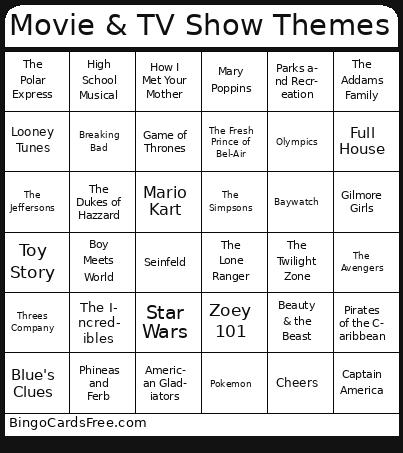
About: This bingo card is a nostalgic celebration of iconic movies and TV shows, perfect for trivia nights, family gatherings, or themed parties. With a mix of classic cartoons, blockbuster films, and unforgettable series from every era, it invites players of all ages to reminisce and compete over their favorite pop culture moments.
How To: To download a PDF to print, click the Print button.
You can alter the card count and other
print options on the Print tab.
Grid items and free space text can be edited on the Basic tab.
Appearance can be exactly personalized on the
corresponding tabs, or you can easily find any option
using the 🔍 tab.
How to play Movie & TV Show Themes Bingo Cards?
Printed Players: Print PDF bingo cards and manually mark the cards.
Printed Caller: Print PDF calling list & calling slips and manually choose the slips.
Virtual Players: Click on the Play button above, and then click on the 🎫 button.
Virtual Caller: Click on the Play button above.
Combo Play: Choose any combination above.
For example, caller can be either Printed or Virtual.
And players can be Printed or Virtual or a combination of both.
Step-By-Step:
Start by getting the Movie & TV Show Themes PDF by clicking on the "Print" button above.
Open the PDF and print it.
For random calling, you can print another copy of the call list, cut, fold and then pick them randomly at play time.
Cut the bingo cards at the cut lines if there are greater than 1 bingo cards per page.
Give one card to each player. For marking, you can use pens. Crayons are the cheapest.
Choose one person to be the caller. If you are playing in a small group, the caller can also play along with their own Bingo card.
The caller starts the play by randomly picking an item from the call list and calling out it to everyone.
The players scan their cards to see if they have the called word. If they do, they mark that word.
The first player to complete a horizontal, vertical, or a diagonal line of marked items announces "Bingo!" and wins the game.
The caller confirms that the items marked form a correct line according to the Bingo card and call list.
You can play for different patterns or a full card blackout for a longer game.
This Movie & TV Show Themes Bingo Cards Game contains following Words or Phrases: The A-Team, Aladdin, The Avengers, Batman: Animated Series, Baywatch, Beauty & the Beast, Beverly Hills 90210, Bewitched, Black Panther, Boy Meets World, SpongeBob SquarePants, The Office, Jurassic Park, Mission: Impossible, Monsters, Inc., Captain America, Indiana Jones, The Incredibles, Chariots of Fire, Breaking Bad, Toy Story, Superman, James Bond, Pirates of the Caribbean, Rocky, Harry Potter, NCIS, Cops, Law & Order, Full House, The Home Depot, Dirty Dancing, The Lone Ranger, The Good, the Bad and the Ugly, Mario Kart, Pokemon, John Cena, The Dukes of Hazzard, Up, High School Musical, Threes Company, Go Go Power Rangers, Scooby Doo, iCarly, Drake & Josh, Dawson's Creek, Jaws, Knight Rider, Lord of the Rings, Golden Girls, Cheers, Yu-Gi-Oh!, Super Mario, Taxi, The Simpsons, Family Guy, The Price is Right, Jeopardy, The Brady Bunch, Looney Tunes, Sesame Street, Barney, Teletubbies, Willy Wonka and the Chocolate Factory, The Fresh Prince of Bel-Air, American Gladiators, Victorious, Dora The Explorer, Blue's Clues, All That, Big Time Rush, The Family Feud, Monday Night Football, The Jeffersons, X-Men '97, The Big Bang Theory, How I Met Your Mother, Parks and Recreation, Mary Poppins, Cars, The Dark Knight, Star Wars, The Polar Express, The Flintstones, Psych, American Idol, Seinfeld, Gilligan's Island, The Walking Dead, Olympics, Malcolm in the Middle, Phineas and Ferb, Gilmore Girls, The Addams Family, The Sopranos, The Muppet Show, Game of Thrones, Mister Rogers Neighborhood, The Twilight Zone, Zoey 101.

 This Movie & TV Show Themes Bingo Cards Game contains following Words or Phrases: The A-Team, Aladdin, The Avengers, Batman: Animated Series, Baywatch, Beauty & the Beast, Beverly Hills 90210, Bewitched, Black Panther, Boy Meets World, SpongeBob SquarePants, The Office, Jurassic Park, Mission: Impossible, Monsters, Inc., Captain America, Indiana Jones, The Incredibles, Chariots of Fire, Breaking Bad, Toy Story, Superman, James Bond, Pirates of the Caribbean, Rocky, Harry Potter, NCIS, Cops, Law & Order, Full House, The Home Depot, Dirty Dancing, The Lone Ranger, The Good, the Bad and the Ugly, Mario Kart, Pokemon, John Cena, The Dukes of Hazzard, Up, High School Musical, Threes Company, Go Go Power Rangers, Scooby Doo, iCarly, Drake & Josh, Dawson's Creek, Jaws, Knight Rider, Lord of the Rings, Golden Girls, Cheers, Yu-Gi-Oh!, Super Mario, Taxi, The Simpsons, Family Guy, The Price is Right, Jeopardy, The Brady Bunch, Looney Tunes, Sesame Street, Barney, Teletubbies, Willy Wonka and the Chocolate Factory, The Fresh Prince of Bel-Air, American Gladiators, Victorious, Dora The Explorer, Blue's Clues, All That, Big Time Rush, The Family Feud, Monday Night Football, The Jeffersons, X-Men '97, The Big Bang Theory, How I Met Your Mother, Parks and Recreation, Mary Poppins, Cars, The Dark Knight, Star Wars, The Polar Express, The Flintstones, Psych, American Idol, Seinfeld, Gilligan's Island, The Walking Dead, Olympics, Malcolm in the Middle, Phineas and Ferb, Gilmore Girls, The Addams Family, The Sopranos, The Muppet Show, Game of Thrones, Mister Rogers Neighborhood, The Twilight Zone, Zoey 101.