Ms. Ringrose Bingo Cards - Print Free or Customize
Print free Ms. Ringrose bingo cards or personalize,
unlimited cards! Pick from 42,200+ designs or use the bingo card generator.
Add numbers, phrases, images, or mix them all.
Play using PDF printouts, online bingo cards,
and the online bingo caller, or combine all formats.
About: This bingo card perfectly captures the energy and relatable chaos of a fourth grade classroom. Filled with phrases teachers and students love, little mishaps, and those classic moments that make every day unique, it’s ideal for teachers, classroom aides, or students themselves looking to add some fun to daily routines or school events.
How To: To get a printable PDF, click the Print button.
You can alter the number of cards and other
printing options on the Print tab.
Grid items and free space content can be changed on the Basic tab.
Appearance can be fully customized on the
relevant tabs, or you can quickly locate any option
on the 🔍 tab.
How to play Ms. Ringrose Bingo Cards?
Online Caller: Click on the Play button above.
Paper Players: Print PDF bingo cards and manually write on the cards.
Online Players: Click on the Play button above, and then click on the 🎫 button.
Paper Caller: Print PDF calling list & calling slips and manually pick the slips.
Combo Mode: Pick any combination above.
For instance, caller can be either Printed or Online.
And players can be Printed or Online or a combo of both.
Step-By-Step:
Start by getting the Ms. Ringrose Bingo PDF by clicking on the "Print" button above.
Open the PDF and print it.
For random calling, you can print another copy of the call list, cut, fold and then pull them randomly at play time.
Cut the bingo cards at the cut marks if there are more than 1 bingo cards per page.
Distribute one card per player. For marking, you can use markers. Crayons cost the least.
Pick one person to be the caller. If you are playing in a small group, the caller can as well play along with their own Bingo card.
The caller starts the game by randomly picking an item from the call list and calling out it to everyone.
The players look at their cards to see if they have the announced word. If they do, they cross off that word.
The first player to complete a horizontal, vertical, or a diagonal line of crossed items shouts "Bingo!" and wins the play.
The caller confirms that the items crossed off form a proper line according to the Bingo card and call list.
You can play for different patterns or a full card blackout for a longer play.
This Ms. Ringrose Bingo Cards Game contains following Words or Phrases: "_______ minutes of recess", "Corgi Crew", "Don't be suss", "Get your life together", "How do you ask that?", "I'm going to Crash Out", "It Eats People", "Let me set the scene", "Line UP", "Lock in", "No Thank you", "Not yet", "One more minute", "Sit Right..", "Sorry", "Stop having side conversations", "Stop Talking over me", "That is actual baby behavior", "That sounds like a you problem", "That sounds like an issue, not an ish-me", "This is why we can't have nice things", "We are in a hallway", "We're in fourth grade now", "What voice level should we be?", "When I say go", "Who's is this?", "Zip It", Closes someone's tab on Go Guardian, Doesn't take medication, Forgets to change the date, Forgets to do attendance, Gets overwhelmed, Loses the vibe board pen, Makes a basket with a broken school supply, Sends someone to get cereal, Sends someone to the copier, Shows you a random video she's fixated on, Sings something randomly, Unzipping/Rezipping, or playing with my hair, Wears all black, When anyone says "It's Gonna be May..", When the following names are said: Bruce, Alan, Jhonnathan, Decklan, Juan, Micah.

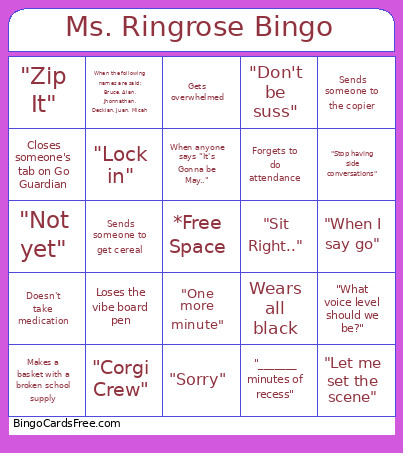 This Ms. Ringrose Bingo Cards Game contains following Words or Phrases: "_______ minutes of recess", "Corgi Crew", "Don't be suss", "Get your life together", "How do you ask that?", "I'm going to Crash Out", "It Eats People", "Let me set the scene", "Line UP", "Lock in", "No Thank you", "Not yet", "One more minute", "Sit Right..", "Sorry", "Stop having side conversations", "Stop Talking over me", "That is actual baby behavior", "That sounds like a you problem", "That sounds like an issue, not an ish-me", "This is why we can't have nice things", "We are in a hallway", "We're in fourth grade now", "What voice level should we be?", "When I say go", "Who's is this?", "Zip It", Closes someone's tab on Go Guardian, Doesn't take medication, Forgets to change the date, Forgets to do attendance, Gets overwhelmed, Loses the vibe board pen, Makes a basket with a broken school supply, Sends someone to get cereal, Sends someone to the copier, Shows you a random video she's fixated on, Sings something randomly, Unzipping/Rezipping, or playing with my hair, Wears all black, When anyone says "It's Gonna be May..", When the following names are said: Bruce, Alan, Jhonnathan, Decklan, Juan, Micah.