Print free Musical bingo cards or customize,
limitless cards! Choose from 41,500+ templates or use our bingo card generator.
Add numbers, phrases, images, or mix them all.
Play using PDF prints, online bingo cards,
and our online bingo caller, or go hybrid.
About: This bingo card is a musical theater lover’s dream, featuring iconic songs from Broadway hits and beloved stage classics. Perfect for theater parties, cast gatherings, or drama club events, it captures the energy, passion, and variety that make show tunes unforgettable. Expect lots of singing along and nostalgia as each square gets marked!
How To: To get a PDF to print, click the Print button.
You can change the number of cards and other
printing preferences on the Print tab.
Grid items and free space content can be edited on the Basic tab.
Appearance can be entirely customized on the
corresponding tabs, or you can easily search any preference
using the 🔍 tab.
How to play Musical Bingo Cards?
Printed Players: Print PDF bingo cards and manually scratch the cards.
Printed Caller: Print PDF calling list & calling slips and manually select the slips.
Online Caller: Click on the Play button above.
Online Players: Click on the Play button above, and then click on the 🎫 button.
Hybrid Play: Pick any combination above.
For example, caller can be either Paper or Online.
And players can be Paper or Online or a combo of both.
Step-By-Step:
Start by downloading the Musical Bingo PDF by clicking on the "Print" button above.
Open the PDF and print a hard copy.
For random drawing, you can print another copy of the call list, cut, fold and then pick them randomly at play time.
Cut the bingo cards at the cut lines if there are more than 1 bingo cards per page.
Distribute one card per player. For marking, you can use pens. Crayons are the cheapest.
Pick one person to be the caller. If you are playing in a small group, the caller can also play along with their own Bingo card.
The caller initiates the game by randomly picking an item from the call list and calling out it to all players.
The players check their cards to see if they have the announced word. If they do, they dab that word.
The first player to complete a horizontal, vertical, or a diagonal line of crossed items yells "Bingo!" and wins the game.
The caller validates that the items crossed off form a proper line as per the Bingo card and call list.
You can play for varied patterns or a full card blackout for an extended game.
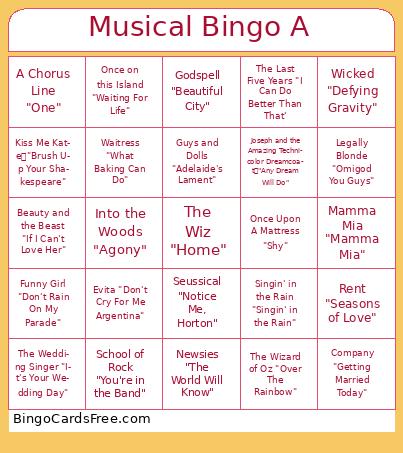
This Musical Bingo Cards Game contains following Words or Phrases: Newsies "The World Will Know", Oliver! "As Long As He Needs Me", Billy Elliot "Electricity", Seussical "Notice Me, Horton", Cats "Jellicle Songs for Jellicle Cats", Barnum "One Brick at a Time", Kiss Me Kate "Brush Up Your Shakespeare", The Pajama Game "Seven-and-a-Half-Cents", Assassins "Everybody's Got the Right', Wicked "Defying Gravity", Hello, Dolly! "Put On Your Sunday Clothes", School of Rock "You're in the Band", Rent "Seasons of Love", The Hunchback of Notre Dame "Out There", Funny Girl "Don't Rain On My Parade", Waitress "What Baking Can Do", A Chorus Line "One", Mamma Mia "Mamma Mia", Evita "Don't Cry For Me Argentina", Company "Getting Married Today", In the Heights "Breathe", Tick, Tick…BOOM! "Louder Than Words", Guys and Dolls "Adelaide's Lament", High School Musical "We're All In This Together", Hercules "Go The Distance', My Fair Lady "Wouldn't It Be Loverly", Children of Eden "Lost in the Wilderness", Once Upon A Mattress "Shy", Kinky Boots "Raise You Up / Just Be", Anastasia "Journey to the Past", Beetlejuice "Say My Name", Oklahoma "Oh, What A Beautiful Mornin'", Legally Blonde "Omigod You Guys", The Wizard of Oz "Over The Rainbow", Singin' in the Rain "Singin' in the Rain", Cinderella "Impossible", Joseph and the Amazing Technicolor Dreamcoat "Any Dream Will Do", Grease "You're The One That I Want", Sweeney Todd "The Worst Pies in London", Godspell "Beautiful City", Into the Woods "Agony", The Wedding Singer "It's Your Wedding Day", American Idiot "Holiday", Shrek "I Know It's Today", Beautiful: The Carole King Musical "You've Got a Friend", Annie "Tomorrow", The Last Five Years "I Can Do Better Than That', Once on this Island "Waiting For Life", Beauty and the Beast "If I Can't Love Her", The Wiz "Home".

 This Musical Bingo Cards Game contains following Words or Phrases: Newsies "The World Will Know", Oliver! "As Long As He Needs Me", Billy Elliot "Electricity", Seussical "Notice Me, Horton", Cats "Jellicle Songs for Jellicle Cats", Barnum "One Brick at a Time", Kiss Me Kate "Brush Up Your Shakespeare", The Pajama Game "Seven-and-a-Half-Cents", Assassins "Everybody's Got the Right', Wicked "Defying Gravity", Hello, Dolly! "Put On Your Sunday Clothes", School of Rock "You're in the Band", Rent "Seasons of Love", The Hunchback of Notre Dame "Out There", Funny Girl "Don't Rain On My Parade", Waitress "What Baking Can Do", A Chorus Line "One", Mamma Mia "Mamma Mia", Evita "Don't Cry For Me Argentina", Company "Getting Married Today", In the Heights "Breathe", Tick, Tick…BOOM! "Louder Than Words", Guys and Dolls "Adelaide's Lament", High School Musical "We're All In This Together", Hercules "Go The Distance', My Fair Lady "Wouldn't It Be Loverly", Children of Eden "Lost in the Wilderness", Once Upon A Mattress "Shy", Kinky Boots "Raise You Up / Just Be", Anastasia "Journey to the Past", Beetlejuice "Say My Name", Oklahoma "Oh, What A Beautiful Mornin'", Legally Blonde "Omigod You Guys", The Wizard of Oz "Over The Rainbow", Singin' in the Rain "Singin' in the Rain", Cinderella "Impossible", Joseph and the Amazing Technicolor Dreamcoat "Any Dream Will Do", Grease "You're The One That I Want", Sweeney Todd "The Worst Pies in London", Godspell "Beautiful City", Into the Woods "Agony", The Wedding Singer "It's Your Wedding Day", American Idiot "Holiday", Shrek "I Know It's Today", Beautiful: The Carole King Musical "You've Got a Friend", Annie "Tomorrow", The Last Five Years "I Can Do Better Than That', Once on this Island "Waiting For Life", Beauty and the Beast "If I Can't Love Her", The Wiz "Home".