Print free MvSA 26 bingo cards or customize,
limitless prints! Choose from 41,500+ designs or use the bingo card generator.
Add numbers, words, photos, or any combination.
Play using printed PDF, virtual bingo cards,
and the virtual bingo caller, or combine all formats.
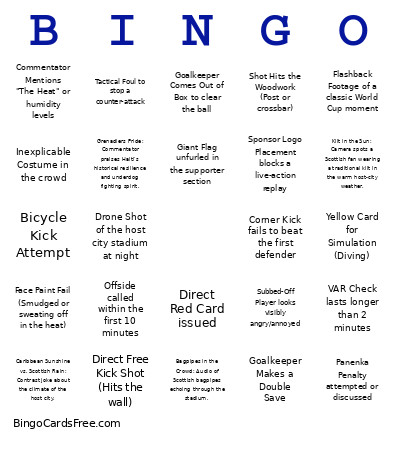
About: This bingo card perfectly captures the excitement, unpredictability, and colorful moments of a major international soccer match. Designed with both die-hard fans and casual viewers in mind, it’s ideal for watch parties or group gatherings during high-stakes tournaments. Expect plenty of laughs and cheers as everyone marks off these classic and quirky soccer sights!
How To: To get a printable PDF, click the Print button.
You can adjust the number of cards and other
printing settings on the Print tab.
Grid items and free space text can be added on the Basic tab.
Appearance can be fully customized on the
corresponding tabs, or you can quickly find any preference
using the 🔍 tab.
How to play MvSA 26 Bingo Cards?
Paper Caller: Print PDF calling list & calling slips and manually pick the slips.
Paper Players: Print PDF bingo cards and manually cross off the cards.
Virtual Caller: Click on the Play button above.
Virtual Players: Click on the Play button above, and then click on the 🎫 button.
Combo Mode: Choose any combination above.
For instance, caller can be either Paper or Virtual.
And players can be Paper or Virtual or a combo of both.
Step-By-Step:
Start by getting the MvSA 26 PDF by clicking on the "Print" button above.
Open the PDF and print a hard copy.
For random calling, you can print another copy of the call list, cut, fold and then pick them randomly at play time.
Cut the bingo cards at the cut lines if there are more than 1 bingo cards per page.
Distribute one card per player. For marking, you can use pens. Crayons are the cheapest.
Choose one person to be the caller. If you are playing in a small group, the caller can as well play along with their own Bingo card.
The caller initiates the game by randomly pulling an item from the call list and saying it to all players.
The players check their cards to see if they have the called word. If they do, they cross off that word.
The first player to finish a horizontal, vertical, or a diagonal line of marked items announces "Bingo!" and wins the game.
The caller checks that the items crossed off form a proper line according to the Bingo card and call list.
You can play for multiple patterns or a full card blackout for a longer game.
This MvSA 26 Bingo Cards Game contains following Words or Phrases: Yellow Card for Simulation (Diving), Shot Hits the Woodwork (Post or crossbar), VAR Check lasts longer than 2 minutes, Goalkeeper Makes a Double Save, Goal Scored via Header, Direct Free Kick Shot (Hits the wall), Subbed-Off Player looks visibly angry/annoyed, Tactical Foul to stop a counter-attack, Corner Kick fails to beat the first defender, Bicycle Kick Attempt, Goalkeeper Comes Out of Box to clear the ball, Offside called within the first 10 minutes, Physio Run: Trainer runs onto the pitch to treat a player, Direct Red Card issued, Panenka Penalty attempted or discussed, Fan Crying in the Stands, Celebrity Spotted in the VIP suite, Inexplicable Costume in the crowd, The Wave starts in the stadium, Fan Holding a Sign asking for a player's jersey, Giant Flag unfurled in the supporter section, Face Paint Fail (Smudged or sweating off in the heat), Unexpected Mascot or animal on the pitch (pitch invader), Commentator Mentions "The Heat" or humidity levels, Flashback Footage of a classic World Cup moment, Commentator Struggles with pronouncing a player's name, Sponsor Logo Placement blocks a live-action replay, Stats Graphic: "Distance Run" or "Passing Accuracy" shown, Drone Shot of the host city stadium at night, Grenadiers Pride: Commentator praises Haiti's historical resilience and underdog fighting spirit., Bagpipes in the Crowd: Audio of Scottish bagpipes echoing through the stadium., Kilt in the Sun: Camera spots a Scottish fan wearing a traditional kilt in the warm host-city weather., Caribbean Sunshine vs. Scottish Rain: Contrast joke about the climate of the host city..

 This MvSA 26 Bingo Cards Game contains following Words or Phrases: Yellow Card for Simulation (Diving), Shot Hits the Woodwork (Post or crossbar), VAR Check lasts longer than 2 minutes, Goalkeeper Makes a Double Save, Goal Scored via Header, Direct Free Kick Shot (Hits the wall), Subbed-Off Player looks visibly angry/annoyed, Tactical Foul to stop a counter-attack, Corner Kick fails to beat the first defender, Bicycle Kick Attempt, Goalkeeper Comes Out of Box to clear the ball, Offside called within the first 10 minutes, Physio Run: Trainer runs onto the pitch to treat a player, Direct Red Card issued, Panenka Penalty attempted or discussed, Fan Crying in the Stands, Celebrity Spotted in the VIP suite, Inexplicable Costume in the crowd, The Wave starts in the stadium, Fan Holding a Sign asking for a player's jersey, Giant Flag unfurled in the supporter section, Face Paint Fail (Smudged or sweating off in the heat), Unexpected Mascot or animal on the pitch (pitch invader), Commentator Mentions "The Heat" or humidity levels, Flashback Footage of a classic World Cup moment, Commentator Struggles with pronouncing a player's name, Sponsor Logo Placement blocks a live-action replay, Stats Graphic: "Distance Run" or "Passing Accuracy" shown, Drone Shot of the host city stadium at night, Grenadiers Pride: Commentator praises Haiti's historical resilience and underdog fighting spirit., Bagpipes in the Crowd: Audio of Scottish bagpipes echoing through the stadium., Kilt in the Sun: Camera spots a Scottish fan wearing a traditional kilt in the warm host-city weather., Caribbean Sunshine vs. Scottish Rain: Contrast joke about the climate of the host city..