Name Change Party Bingo Cards - Print Free or Customize
Print free Name Change Party bingo cards or modify,
limitless prints! Select from 41,500+ designs or use the bingo card generator.
Add numbers, words, pictures, or all of them.
Play using PDF prints, online bingo cards,
and the online bingo caller, or combine all formats.
About: This bingo card is designed for a lively social gathering—maybe a party or reunion—where making new connections and sharing fun facts is the goal. It sparks conversations with prompts about backgrounds, talents, life changes, and quirky stories. Perfect for breaking the ice in a diverse group, it encourages everyone to mingle and celebrate what makes them unique.
How To: To get a PDF to print, click the Print button.
You can modify the card quantity and other
printing settings on the Print tab.
Grid items and free space content can be added on the Basic tab.
Appearance can be exactly customized on the
relevant tabs, or you can quickly search any option
on the 🔍 tab.
How to play Name Change Party Bingo Cards?
Paper Caller: Print PDF calling list & calling slips and manually choose the slips.
Online Caller: Click on the Play button above.
Online Players: Click on the Play button above, and then click on the 🎫 button.
Paper Players: Print PDF bingo cards and manually cross off the cards.
Mixed Mode: Select any combination above.
For example, caller can be either Offline or Online.
And players can be Offline or Online or a combo of both.
Step-By-Step:
Start by saving the Name Change Party PDF by clicking on the "Print" button above.
Open the PDF and print a hard copy.
For random calling, you can print another copy of the call list, cut, fold and then draw them randomly at play time.
Cut the bingo cards at the cut lines if there are more than 1 bingo cards per page.
Give one card to each player. For marking, you can use pens. Crayons are the cheapest.
Select one person to be the caller. If you are playing in a small group, the caller may as well play along with their own Bingo card.
The caller begins the play by randomly pulling an item from the call list and announcing it to all players.
The players look at their cards to see if they have the announced word. If they do, they dab that word.
The first player to complete a horizontal, vertical, or a diagonal line of crossed items shouts "Bingo!" and wins the play.
The caller validates that the items crossed off form a correct line as per the Bingo card and call list.
You can play for different patterns or a full card blackout for a longer play.
This Name Change Party Bingo Cards Game contains following Words or Phrases: Someone who is engaged, Someone who is married, Someone who is single, Someone who has sky dived, Someone who is running the half marathon tomorrow, Someone who is from a state with a population of less than 3 million, Someone who has changed their first or last name, Someone who went to Purdue, Someone getting their MBA (nerd), Someone who has known Casey pre-Chicago, Someone who left the country this year, Someone who can do a party trick, Someone who knows the song that just played, Someone who plays on "Show Us Your Hitties", Someone who can recommend a great book, Someone who came from over 15 miles away, Someone who took the CTA here, Someone who has attended Pride in multiple cities, Someone who can name 3 LGBTQ historical figures, Someone who has a tattoo with a cool back story, Someone who's outfit you like, Someone who collects vinyl, Someone who can solve a Rubik's cube, Someone who makes incredible pottery, Someone who has won a dance battle, Someone who has swum with dolphins, Someone who is straight, Someone who is GAYYYYYY, Someone who can handle extremely spicy food, Someone who has played an elaborate prank on someone, Someone with a meaningful tradition that they cherish, Someone who has shifted careers, Someone who volunteers doing work they love, Someone who crafts, Someone with 2 or more pets (show a pic), Someone who moved to Chicago this year, Someone who is a lefty, Someone born the same month as you, Someone who correctly guesses your zodiac sign, Someone who has been to a place you want to visit, Someone with killer dance moves, Someone moving out of Chicago this year, Someone who is an ally, Someone who shares a controversial opinion, Someone who can teach you a phrase in a different language.

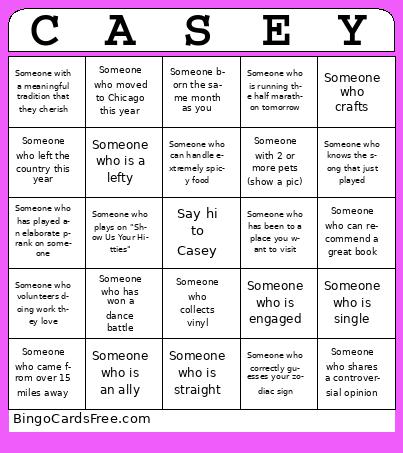 This Name Change Party Bingo Cards Game contains following Words or Phrases: Someone who is engaged, Someone who is married, Someone who is single, Someone who has sky dived, Someone who is running the half marathon tomorrow, Someone who is from a state with a population of less than 3 million, Someone who has changed their first or last name, Someone who went to Purdue, Someone getting their MBA (nerd), Someone who has known Casey pre-Chicago, Someone who left the country this year, Someone who can do a party trick, Someone who knows the song that just played, Someone who plays on "Show Us Your Hitties", Someone who can recommend a great book, Someone who came from over 15 miles away, Someone who took the CTA here, Someone who has attended Pride in multiple cities, Someone who can name 3 LGBTQ historical figures, Someone who has a tattoo with a cool back story, Someone who's outfit you like, Someone who collects vinyl, Someone who can solve a Rubik's cube, Someone who makes incredible pottery, Someone who has won a dance battle, Someone who has swum with dolphins, Someone who is straight, Someone who is GAYYYYYY, Someone who can handle extremely spicy food, Someone who has played an elaborate prank on someone, Someone with a meaningful tradition that they cherish, Someone who has shifted careers, Someone who volunteers doing work they love, Someone who crafts, Someone with 2 or more pets (show a pic), Someone who moved to Chicago this year, Someone who is a lefty, Someone born the same month as you, Someone who correctly guesses your zodiac sign, Someone who has been to a place you want to visit, Someone with killer dance moves, Someone moving out of Chicago this year, Someone who is an ally, Someone who shares a controversial opinion, Someone who can teach you a phrase in a different language.