Print free Music bingo cards or adjust them,
limitless cards! Pick from 42,200+ templates or use the bingo card generator.
Add numbers, phrases, images, or any combination.
Play using PDF printouts, digital bingo cards,
and the digital bingo caller, or combine all formats.
About: This bingo card is a nostalgic journey through some of the most recognizable and beloved TV theme songs across decades. Perfect for a retro-themed party, trivia night, or a fun team-building activity for TV fans, it’s sure to spark singalongs and laughter as players recall classic sitcoms, game shows, cartoons, and dramas that defined generations.
How To: To save a PDF to print, click the Print button.
You can adjust the number of cards and other
print preferences on the Print tab.
Grid items and free space text can be added on the Basic tab.
Appearance can be totally personalized on the
corresponding tabs, or you can easily find any setting
on the 🔍 tab.
How to play Music Bingo Cards?
Printed Caller: Print PDF calling list & calling slips and manually draw the slips.
Digital Players: Click on the Play button above, and then click on the 🎫 button.
Digital Caller: Click on the Play button above.
Printed Players: Print PDF bingo cards and manually write on the cards.
Combo Mode: Select any combination above.
For instance, caller can be either Offline or Digital.
And players can be Offline or Digital or a combo of both.
Step-By-Step:
Start by saving the Music Bingo PDF by clicking on the "Print" button above.
Open the PDF and print a hard copy.
For random calling, you can print another copy of the call list, cut, fold and then draw them randomly at play time.
Cut the bingo cards at the cut marks if there are greater than 1 bingo cards per page.
Distribute one card per player. For marking, you can use crayons. Crayons cost the least.
Select one person to be the caller. If you are playing in a small group, the caller may also play along with their own Bingo card.
The caller initiates the game by randomly drawing an item from the call list and announcing it to everyone.
The players scan their cards to see if they have the called word. If they do, they mark that word.
The first player to complete a horizontal, vertical, or a diagonal line of marked items shouts "Bingo!" and wins the game.
The caller validates that the items crossed off form a correct line according to the Bingo card and call list.
You can play for varied patterns or a full card blackout for a longer game.
This Music Bingo Cards Game contains following Words or Phrases: The Adams Family Theme Song, The Alvin Show Theme, The Andy Griffith Theme, As Long as We Got Each Other (Theme from "Growing Pains"), Bad Boys (Theme from Cops), Batman Theme, The Beverly Hillbillies, Beverly Hills 90210 Theme (Walsh Remix), Big Bang Theory Theme, Buffy the Vampire Slayer Theme, Casper the Friendly Ghost, Charlie's Angels Theme, Cheers Theme, The Cosby Show, Eight Is Enough Theme, Everybody Loves Raymond, Family Feud Theme, The Flintstones Main Theme, The Fresh Prince of Bel-Air, Frolic (Curb Your Enthusiasm Theme), Full House, Futurama Main Theme, General Hospital, The Golden Girls Theme, Good Ol' Boys (Theme from The Dukes of Hazzard), Good Times, Happy Days, Hawaii Five-0 Theme, Home Improvement, Honeymooners (You're My Greatest Hero), I Don't Want to Wait, I'll Be There for You (Theme from Friends), Jeopardy Theme, The Jetsons, King of the Hill Theme, Leave It to Beaver, Little Rascals, Looney Tunes Theme, The Love Boat, Knight Rider Theme, Manly Men (Two and a Half Men Theme), Mighty Mouse Theme Song, Movin' On Up (The Jeffersons Theme), Newlywed Game Theme, The Price Is Right Theme, Roseanne, Rugrats Theme, Sanford and Son Theme (The Streetbeater), Seinfeld Theme, Woke Up This Morning (The Sopranos Theme), South Park Theme, Superhero (Entourage Theme), Taxi Theme, That '70s Show Theme, The Nanny Named Fran, The Simpsons Theme, A Different World Theme, CHiPs Theme, The Facts of Life Theme, Who's the Boss Theme, Family Guy Theme, Law & Order Theme, Mister Rogers' Neighborhood Theme, Good Ol' Boys (Dukes of Hazzard Theme), The Muppet Show Theme, Bewitched Theme, How I Met Your Mother Theme, Jackass Theme (Corona), Miami Vice Theme, Scrubs Theme, The Brady Bunch, Tom and Jerry Theme, Wheel of Fortune Theme, Where You Lead (Gilmore Girls Theme), Without Us (Family Ties Theme).

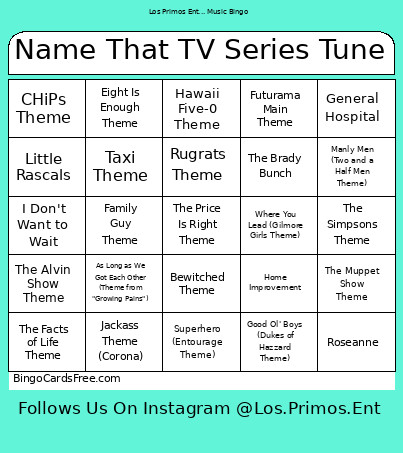 This Music Bingo Cards Game contains following Words or Phrases: The Adams Family Theme Song, The Alvin Show Theme, The Andy Griffith Theme, As Long as We Got Each Other (Theme from "Growing Pains"), Bad Boys (Theme from Cops), Batman Theme, The Beverly Hillbillies, Beverly Hills 90210 Theme (Walsh Remix), Big Bang Theory Theme, Buffy the Vampire Slayer Theme, Casper the Friendly Ghost, Charlie's Angels Theme, Cheers Theme, The Cosby Show, Eight Is Enough Theme, Everybody Loves Raymond, Family Feud Theme, The Flintstones Main Theme, The Fresh Prince of Bel-Air, Frolic (Curb Your Enthusiasm Theme), Full House, Futurama Main Theme, General Hospital, The Golden Girls Theme, Good Ol' Boys (Theme from The Dukes of Hazzard), Good Times, Happy Days, Hawaii Five-0 Theme, Home Improvement, Honeymooners (You're My Greatest Hero), I Don't Want to Wait, I'll Be There for You (Theme from Friends), Jeopardy Theme, The Jetsons, King of the Hill Theme, Leave It to Beaver, Little Rascals, Looney Tunes Theme, The Love Boat, Knight Rider Theme, Manly Men (Two and a Half Men Theme), Mighty Mouse Theme Song, Movin' On Up (The Jeffersons Theme), Newlywed Game Theme, The Price Is Right Theme, Roseanne, Rugrats Theme, Sanford and Son Theme (The Streetbeater), Seinfeld Theme, Woke Up This Morning (The Sopranos Theme), South Park Theme, Superhero (Entourage Theme), Taxi Theme, That '70s Show Theme, The Nanny Named Fran, The Simpsons Theme, A Different World Theme, CHiPs Theme, The Facts of Life Theme, Who's the Boss Theme, Family Guy Theme, Law & Order Theme, Mister Rogers' Neighborhood Theme, Good Ol' Boys (Dukes of Hazzard Theme), The Muppet Show Theme, Bewitched Theme, How I Met Your Mother Theme, Jackass Theme (Corona), Miami Vice Theme, Scrubs Theme, The Brady Bunch, Tom and Jerry Theme, Wheel of Fortune Theme, Where You Lead (Gilmore Girls Theme), Without Us (Family Ties Theme).