PRS Halloween Bingo Cards - Print Free or Customize
Print free PRS Halloween bingo cards or customize,
limitless prints! Select from 42,200+ designs or use the bingo card generator.
Add numbers, phrases, photos, or any combination.
Play using PDF printouts, virtual bingo cards,
and the virtual bingo caller, or go hybrid.
About: This bingo card blends Halloween fun with everyday experiences of working at U of U Health. It's made for a team gathering or staff party and encourages everyone to share quirky stories from work and spooky memories. Expect lots of laughs and icebreakers as colleagues connect over costumes, patient care, and fall festivities.
How To: To download a PDF to print, click the Print button.
You can alter the number of cards and other
printing settings on the Print tab.
Grid items and free space text can be changed on the Basic tab.
Appearance can be fully personalized on the
relevant tabs, or you can quickly find any preference
on the 🔍 tab.
How to play PRS Halloween Bingo Cards?
Online Caller: Click on the Play button above.
Paper Caller: Print PDF calling list & calling slips and manually draw the slips.
Paper Players: Print PDF bingo cards and manually cross off the cards.
Online Players: Click on the Play button above, and then click on the 🎫 button.
Mixed Mode: Pick any combination above.
For instance, caller can be either Printed or Online.
And players can be Printed or Online or a mix of both.
Step-By-Step:
Start by getting the PRS Halloween PDF by clicking on the "Print" button above.
Open the PDF and print it.
For random calling, you can print another copy of the call list, cut, fold and then pull them randomly at play time.
Cut the bingo cards at the cut lines if there are more than 1 bingo cards per page.
Give one card to each player. For marking, you can use markers. Crayons are the cheapest.
Pick one person to be the caller. If you are playing in a small group, the caller can as well play along with their own Bingo card.
The caller initiates the game by randomly drawing an item from the call list and calling out it to everyone.
The players check their cards to see if they have the announced word. If they do, they cross off that word.
The first player to finish a horizontal, vertical, or a diagonal line of crossed items yells "Bingo!" and wins the game.
The caller checks that the items marked form a proper line as per the Bingo card and call list.
You can play for varied patterns or a full card blackout for an extended game.
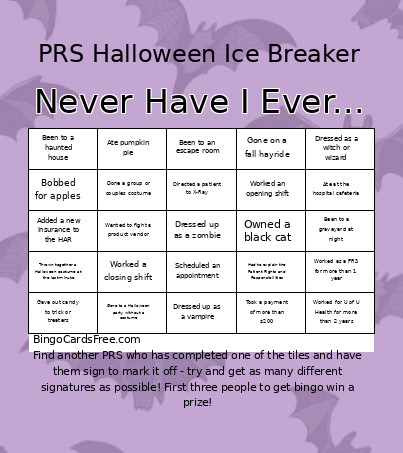
This PRS Halloween Bingo Cards Game contains following Words or Phrases: Worked for U of U Health for more than 2 years, Dressed up as a vampire, Scheduled an appointment, Seen the Rocky Horror Picture Show, Directed a patient to X-Ray, Went trick or treating, Worked at the Madsen clinic, Bobbed for apples, Asked the MSPQ questions, Been to a haunted house, Ate at the hospital cafeteria, Seen a ghost, Added a new insurance to the HAR, Dressed up as a zombie, Had to explain the Patient Rights and Responsibilities, Been to a graveyard at night, Took a payment of more than $200, Read a Stephen King novel, Worn a costume to work, Seen any of the It movies, Been to a full staff meeting before today, Dressed as a witch or wizard, Asked Noah a question on teams, Carved a pumpkin, Worked in Area E, Gave out candy to trick or treaters, Pushed the panic button, Done a group or couples costume, Worked an opening shift, Ate pumpkin pie, Worked a closing shift, Had a pumpkin spice latte, Worked as a PRS for more than 1 year, Been to an escape room, Worked on Halloween, Owned a black cat, Wanted to fight a product vendor, Gone to a Halloween party without a costume, Asked for assistance in the WQ Support chat, Gone on a fall hayride, Used teams to communicate with a clinic, Traded Halloween candy, Offered a patient a snack or drink, Thrown together a halloween costume at the last minute, Had to process a refund, Dressed up as a skeleton, Been to a pumpkin patch.

 This PRS Halloween Bingo Cards Game contains following Words or Phrases: Worked for U of U Health for more than 2 years, Dressed up as a vampire, Scheduled an appointment, Seen the Rocky Horror Picture Show, Directed a patient to X-Ray, Went trick or treating, Worked at the Madsen clinic, Bobbed for apples, Asked the MSPQ questions, Been to a haunted house, Ate at the hospital cafeteria, Seen a ghost, Added a new insurance to the HAR, Dressed up as a zombie, Had to explain the Patient Rights and Responsibilities, Been to a graveyard at night, Took a payment of more than $200, Read a Stephen King novel, Worn a costume to work, Seen any of the It movies, Been to a full staff meeting before today, Dressed as a witch or wizard, Asked Noah a question on teams, Carved a pumpkin, Worked in Area E, Gave out candy to trick or treaters, Pushed the panic button, Done a group or couples costume, Worked an opening shift, Ate pumpkin pie, Worked a closing shift, Had a pumpkin spice latte, Worked as a PRS for more than 1 year, Been to an escape room, Worked on Halloween, Owned a black cat, Wanted to fight a product vendor, Gone to a Halloween party without a costume, Asked for assistance in the WQ Support chat, Gone on a fall hayride, Used teams to communicate with a clinic, Traded Halloween candy, Offered a patient a snack or drink, Thrown together a halloween costume at the last minute, Had to process a refund, Dressed up as a skeleton, Been to a pumpkin patch.