Print free NEVERFIVE BINGO cards or customize,
unlimited cards! Choose from 41,500+ templates or use our bingo card generator.
Add numbers, phrases, images, or mix them all.
Play using PDF printouts, online bingo cards,
and our online bingo caller, or go hybrid.
About: This bingo card is perfect for fans eagerly awaiting the next installment in Jessica Townsend’s Nevermoor series. The prompts reflect popular predictions and hopes for Morrigan Crow’s journey, with a focus on character relationships, political intrigue, and magical developments. It’s an ideal activity for book clubs, fan events, or online communities anticipating new adventures in Nevermoor.
How To: To save a PDF to print, click the Print button.
You can adjust the card quantity and other
print options on the Print tab.
Grid items and free space text can be changed on the Basic tab.
Appearance can be highly personalized on the
relevant tabs, or you can easily find any option
using the 🔍 tab.
How to play NEVERFIVE BINGO Cards?
Digital Players: Click on the Play button above, and then click on the 🎫 button.
Paper Players: Print PDF bingo cards and physically cross off the cards.
Digital Caller: Click on the Play button above.
Paper Caller: Print PDF calling list & calling slips and physically pick the slips.
Hybrid Play: Select any combination above.
For example, caller can be either Paper or Digital.
And players can be Paper or Digital or a mix of both.
Step-By-Step:
Start by getting the NEVERFIVE BINGO PDF by clicking on the "Print" button above.
Open the PDF and print it.
For random calling, you can print another copy of the call list, cut, fold and then pull them randomly at play time.
Cut the bingo cards at the cut marks if there are more than 1 bingo cards per page.
Distribute one card per player. For marking, you can use pencils. Crayons are the cheapest.
Select one person to be the caller. If you are playing in a small group, the caller may as well play along with their own Bingo card.
The caller begins the play by randomly picking an item from the call list and calling out it to everyone.
The players check their cards to see if they have the called word. If they do, they cross off that word.
The first player to complete a horizontal, vertical, or a diagonal line of marked items announces "Bingo!" and wins the play.
The caller checks that the items marked form a proper line according to the Bingo card and call list.
You can play for different patterns or a full card blackout for an extended play.
This NEVERFIVE BINGO Cards Game contains following Words or Phrases: Morrigan masters a third art on top of Nocturne, Squall and Jupiter will have to work together at some point in the book, Morrigan's apprenticeship continues to drive a wedge into her relationship with Hawthorne, This book will have a very Wunsoc/political centered plot, concerning Morrigan's Nevermoorian persona, Another member of Unit 895 will be a key player in the book's A-plot, Jupiter and Squall tolerate each other for Morrigan's sake, Morrigan's apprenticeship is accidentally revealed to 919, Morrigan will meet Olly Wainwright, Jupiter is going to very present in this book, The title will be an organisation/career of some kind, Squall is going to continue to be a positive influence in Morrigan's life (we won't see him acting evil), We meet someone close to Jack (friend, love interest, who knows!), Jupiter and Morrigan finally go to the Bazaar together (╥﹏╥), There will be a twist villain (as usual), Sofia specifically will be suspicious of Morrigan's improvements in the Arts, We will find out one of the two unknown Arts, We will delve a bit into to Jupiter's backstory, A LOT OF JACK AND JUPITER PARALLELS, The book's colour will be orange or pink, Laurent St James will make an alliance of some sort, Noelle, Louis and Lottie will all make an appearance (at the same time), The book will end in Spring of Five, The book will be roughly equal in length to Hollowpox (within 30 pages), Fenestra will find out about the apprenticeship.

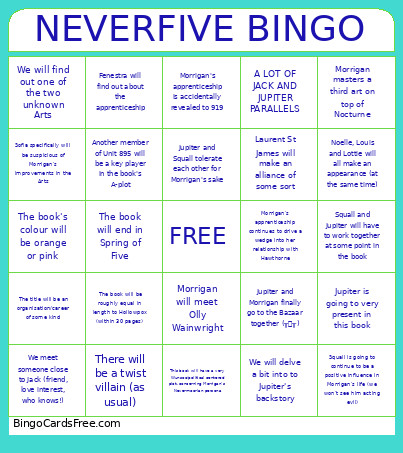 This NEVERFIVE BINGO Cards Game contains following Words or Phrases: Morrigan masters a third art on top of Nocturne, Squall and Jupiter will have to work together at some point in the book, Morrigan's apprenticeship continues to drive a wedge into her relationship with Hawthorne, This book will have a very Wunsoc/political centered plot, concerning Morrigan's Nevermoorian persona, Another member of Unit 895 will be a key player in the book's A-plot, Jupiter and Squall tolerate each other for Morrigan's sake, Morrigan's apprenticeship is accidentally revealed to 919, Morrigan will meet Olly Wainwright, Jupiter is going to very present in this book, The title will be an organisation/career of some kind, Squall is going to continue to be a positive influence in Morrigan's life (we won't see him acting evil), We meet someone close to Jack (friend, love interest, who knows!), Jupiter and Morrigan finally go to the Bazaar together (╥﹏╥), There will be a twist villain (as usual), Sofia specifically will be suspicious of Morrigan's improvements in the Arts, We will find out one of the two unknown Arts, We will delve a bit into to Jupiter's backstory, A LOT OF JACK AND JUPITER PARALLELS, The book's colour will be orange or pink, Laurent St James will make an alliance of some sort, Noelle, Louis and Lottie will all make an appearance (at the same time), The book will end in Spring of Five, The book will be roughly equal in length to Hollowpox (within 30 pages), Fenestra will find out about the apprenticeship.