Print free new girl bingo cards or adjust them,
unlimited prints! Choose from 41,900+ designs or use our bingo card generator.
Add numbers, words, pictures, or mix them all.
Play using PDF prints, digital bingo cards,
and our digital bingo caller, or go hybrid.
About: This bingo card captures all the quirky, awkward, and relatable moments that come with starting a new job in a busy office. Perfect for onboarding sessions or team icebreakers, it highlights the mix of confusion, friendly warnings, technical hiccups, and inside jokes that define those first days at work. New hires and seasoned employees alike will get a laugh as they find themselves recognizing these classic workplace experiences.
How To: To save a printable PDF, click the Print button.
You can adjust the number of cards and other
printing preferences on the Print tab.
Grid items and free space text can be added on the Basic tab.
Appearance can be highly customized on the
corresponding tabs, or you can easily search any option
on the 🔍 tab.
How to play new girl Bingo Cards?
Digital Caller: Click on the Play button above.
Paper Caller: Print PDF calling list & calling slips and manually select the slips.
Paper Players: Print PDF bingo cards and manually scratch the cards.
Digital Players: Click on the Play button above, and then click on the 🎫 button.
Combo Mode: Select any combination above.
For example, caller can be either Offline or Digital.
And players can be Offline or Digital or a combination of both.
Step-By-Step:
Start by saving the new girl PDF by clicking on the "Print" button above.
Open the PDF and print it.
For random calling, you can print another copy of the call list, cut, fold and then pull them randomly at play time.
Cut the bingo cards at the cut lines if there are greater than 1 bingo cards per page.
Give one card to each player. For marking, you can use crayons. Crayons cost the least.
Select one person to be the caller. If you are playing in a small group, the caller can also play along with their own Bingo card.
The caller begins the play by randomly drawing an item from the call list and calling out it to all players.
The players look at their cards to see if they have the called word. If they do, they dab that word.
The first player to complete a horizontal, vertical, or a diagonal line of crossed items announces "Bingo!" and wins the play.
The caller checks that the items crossed off form a correct line according to the Bingo card and call list.
You can play for different patterns or a full card blackout for an extended play.
This new girl Bingo Cards Game contains following Words or Phrases: lupe says that she is not a legal assistant, Brianna is used to help train, Laura ends up training her, Cecilee tell her she's so excited she's here, she figures out we all hate on BBR, someone warns her about LRF, bridge comes up, Mark having been to Columbia comes up, She asks how we like to work here, she doesn't get added to the team meeting before the meeting, webcam doesn't work, BBR is the in-office IT, forced to help legal assistants even though she is NOT a legal assistant, Furat doesn't help, Lupe tells her some personal information about one of us, Mark gives her attitude, Eric asks her to share something about herself, FAN goes over her "it's very important to..." points, LRF, JEF, or LBL tell her not to suffer in silence, LBL says not to ask Laura or Brian anything, they don't explain employment potentials, no one helps her get started, they leave her alone with the paperwork for too long, MAH tells her he is available in the afternoons, FN tells her she doesn't have time, someone brags about how much LRF does.

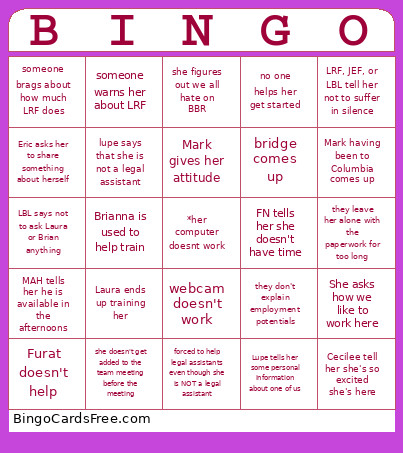 This new girl Bingo Cards Game contains following Words or Phrases: lupe says that she is not a legal assistant, Brianna is used to help train, Laura ends up training her, Cecilee tell her she's so excited she's here, she figures out we all hate on BBR, someone warns her about LRF, bridge comes up, Mark having been to Columbia comes up, She asks how we like to work here, she doesn't get added to the team meeting before the meeting, webcam doesn't work, BBR is the in-office IT, forced to help legal assistants even though she is NOT a legal assistant, Furat doesn't help, Lupe tells her some personal information about one of us, Mark gives her attitude, Eric asks her to share something about herself, FAN goes over her "it's very important to..." points, LRF, JEF, or LBL tell her not to suffer in silence, LBL says not to ask Laura or Brian anything, they don't explain employment potentials, no one helps her get started, they leave her alone with the paperwork for too long, MAH tells her he is available in the afternoons, FN tells her she doesn't have time, someone brags about how much LRF does.