New Member's Bingo Cards - Print Free or Customize
Print free New Member's bingo cards or adjust them,
unlimited cards! Pick from 42,200+ designs or use the bingo card generator.
Add numbers, words, photos, or all of them.
Play using PDF printouts, digital bingo cards,
and the digital bingo caller, or combine all formats.
About: This bingo card is a fun and engaging icebreaker designed for participants at a feminist economics conference, especially those involved with IAFFE events. It celebrates diversity, activism, and scholarly work from global voices and encourages networking among attendees who are passionate about gender equality, economic justice, and collaborative learning. Perfect for sparking conversations and connecting international scholars, students, practitioners, and policy makers in an inclusive environment.
How To: To download a PDF to print, click the Print button.
You can adjust the card count and other
print options on the Print tab.
Grid items and free space content can be edited on the Basic tab.
Appearance can be entirely customized on the
corresponding tabs, or you can easily search any preference
using the 🔍 tab.
How to play New Member's Bingo Cards?
Virtual Players: Click on the Play button above, and then click on the 🎫 button.
Printed Caller: Print PDF calling list & calling slips and manually pick the slips.
Virtual Caller: Click on the Play button above.
Printed Players: Print PDF bingo cards and manually mark the cards.
Mixed Mode: Select any combination above.
For instance, caller can be either Offline or Virtual.
And players can be Offline or Virtual or a combination of both.
Step-By-Step:
Start by saving the New Member's Bingo PDF by clicking on the "Print" button above.
Open the PDF and print a hard copy.
For random drawing, you can print another copy of the call list, cut, fold and then draw them randomly at play time.
Cut the bingo cards at the cut lines if there are more than 1 bingo cards per page.
Give one card to each player. For marking, you can use crayons. Crayons cost the least.
Select one person to be the caller. If you are playing in a small group, the caller can also play along with their own Bingo card.
The caller begins the play by randomly pulling an item from the call list and saying it to everyone.
The players look at their cards to see if they have the announced word. If they do, they mark that word.
The first player to complete a horizontal, vertical, or a diagonal line of marked items shouts "Bingo!" and wins the game.
The caller validates that the items marked form a proper line according to the Bingo card and call list.
You can play for multiple patterns or a full card blackout for an extended game.
This New Member's Bingo Cards Game contains following Words or Phrases: A Young Scholar from the Global South, From Argentina, Speaks French, Published in Feminist Economics, Working on debt, Working on care issues, Considers themselves a practioner, From Subsaharan Africa, Was part of an IAFFE Feminist Economics School, First IAFFE Conference, Teaches undergraduates, Is part of the Mentoring Program, Speaks more than three languages, Went to the Capetown 2023 Conference, Who is working on their first book, This is their second conference, Is part of a regional network, Knows the conference theme by heart, Has emailed Mayra (the Conference Coordinator) more than once, Has volunteered for a committee this year, Has served on an IAFFE committee, Has attended an Online Event, Has listened to a podcast episode, Works on Taxation issues, Is an Activist, Policy Maker, Is a doctorate student, Working on gender budgeting, Working on gender based violence, Attended the pre-conference, Is from South Asia, Is from Colombia, Is from India, Speaks Spanish, Works on fiscal justice, Presented at a conference this year, Attended the IAFFE remote conference.

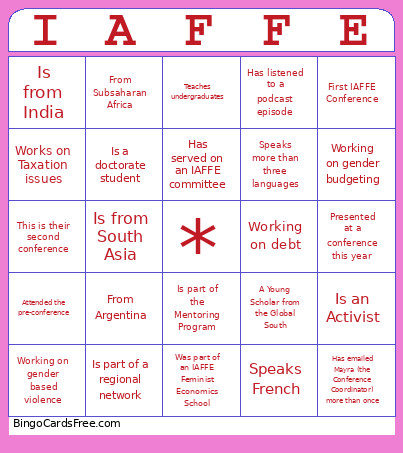 This New Member's Bingo Cards Game contains following Words or Phrases: A Young Scholar from the Global South, From Argentina, Speaks French, Published in Feminist Economics, Working on debt, Working on care issues, Considers themselves a practioner, From Subsaharan Africa, Was part of an IAFFE Feminist Economics School, First IAFFE Conference, Teaches undergraduates, Is part of the Mentoring Program, Speaks more than three languages, Went to the Capetown 2023 Conference, Who is working on their first book, This is their second conference, Is part of a regional network, Knows the conference theme by heart, Has emailed Mayra (the Conference Coordinator) more than once, Has volunteered for a committee this year, Has served on an IAFFE committee, Has attended an Online Event, Has listened to a podcast episode, Works on Taxation issues, Is an Activist, Policy Maker, Is a doctorate student, Working on gender budgeting, Working on gender based violence, Attended the pre-conference, Is from South Asia, Is from Colombia, Is from India, Speaks Spanish, Works on fiscal justice, Presented at a conference this year, Attended the IAFFE remote conference.