
NO JOKES SPOOKY BINGO Cards - Print Free or Customize
Print free NO JOKES SPOOKY BINGO cards or customize, limitless cards! Choose from 42,200+ designs or use our bingo card generator. Add numbers, phrases, pictures, or all of them. Play using PDF prints, online bingo cards, and our online bingo caller, or mix physical and digital.
About: Get ready for a bingo card packed with inside jokes, recurring improv antics, and character quirks perfect for a comedy show or troupe night. This card captures the spontaneity and hilarity of group improv sessions, complete with signature moves, wild accents, and memorable cast moments that fans and performers alike will love spotting during the show.
How To: To save a PDF to print, click the Print button. You can modify the card count and other print preferences on the Print tab. Grid items and free space content can be changed on the Basic tab. Appearance can be exactly customized on the relevant tabs, or you can easily locate any setting on the 🔍 tab.
How to play NO JOKES SPOOKY BINGO Cards?
- Printed Players: Print PDF bingo cards and manually write on the cards.
- Virtual Caller: Click on the Play button above.
- Virtual Players: Click on the Play button above, and then click on the 🎫 button.
- Printed Caller: Print PDF calling list & calling slips and manually choose the slips.
- Hybrid Mode: Select any combination above. For instance, caller can be either Offline or Virtual. And players can be Offline or Virtual or a combination of both.
Step-By-Step:
- Start by getting the NO JOKES SPOOKY BINGO PDF by clicking on the "Print" button above.
- Open the PDF and print it.
- For random calling, you can print another copy of the call list, cut, fold and then pick them randomly at play time.
- Cut the bingo cards at the cut lines if there are more than 1 bingo cards per page.
- Distribute one card per player. For marking, you can use markers. Crayons are the cheapest.
- Select one person to be the caller. If you are playing in a small group, the caller can as well play along with their own Bingo card.
- The caller opens the game by randomly pulling an item from the call list and announcing it to all players.
- The players check their cards to see if they have the called word. If they do, they dab that word.
- The first player to complete a horizontal, vertical, or a diagonal line of marked items yells "Bingo!" and wins the game.
- The caller checks that the items crossed off form a proper line as per the Bingo card and call list.
- You can play for different patterns or a full card blackout for a longer game.
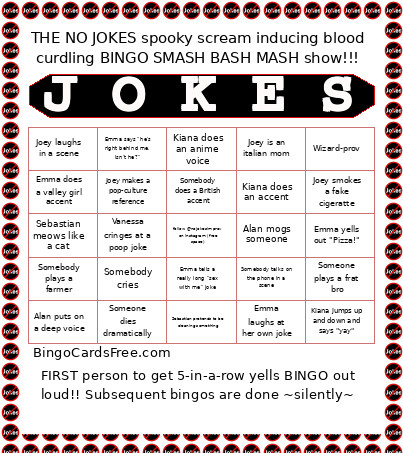 This NO JOKES SPOOKY BINGO Cards Game contains following Words or Phrases: Your prompt gets chosen, You are a baddie 🫦, Wizard-prov, Venessa crashes out in a scene, Vanessa says "what?!!", Vanessa cringes at a poop joke, Throuple scene!, The scene has religious themes, Someone plays an animal, Someone plays a frat bro, Someone is named Jessica or Todd, Someone dies dramatically, Someone breaks character, Somebody talks on the phone in a scene, Somebody prompts the audience for a "non-geographical location", Somebody plays a grandparent, Somebody plays a farmer, Somebody is scared in a scene, Somebody falls against the wall or floor laughing, Somebody does a French accent, Somebody does a dramatic hair flip, Somebody does a country accent, Somebody does a British accent, Somebody cries, Somebody stammers instead of a real response, Sebastian slams his hands on a table, Sebastian pretends to be cleaning something, Sebastian meows like a cat, Sebastian makes a pun, Poop/fart joke is made, Kiana jumps up and down and says "yay", Kiana does an anime voice, Kiana does an accent, Kiana Cries, Kaveesh makes a scene business-y, Kaveesh giggles, Joey talks about greek mythology, Joey smokes a fake cigeratte, Joey says a bad word, Joey makes out with someone, Joey makes a pop-culture reference, Joey looks like Benson Boon, Joey laughs in a scene, Joey is an italian mom, French accent, Emma yells out "Pizza!", Emma tells a really long "sex with me" joke, Emma spins in a circle, Emma says "he's right behind me, isn't he?", Emma says "bazinga", Emma laughs at her own joke, Emma does a valley girl accent, Chris ominously taps his fingers together, Chris does something wholesome and heartwarming, Chris does a silly high pitched voice, Awkward pause as they try to figure out who should be in the game, Any mention of Goblins, Alan puts on a deep voice, Alan plays an evil henchman, Alan mogs someone, Alan goes uhhhhhh, Alan does something maniacal with his hands.