Print free Nokapi bingo cards or modify,
unlimited cards! Pick from 41,500+ designs or use our bingo card generator.
Add numbers, words, photos, or all of them.
Play using PDF printouts, digital bingo cards,
and our digital bingo caller, or combine all formats.
Similar Bingo Cards: Ecologia, Reciclaje, Sustentabilidad
How To: To download a printable PDF, click the Print button.
You can modify the card count and other
printing preferences on the Print tab.
Grid items and free space text can be added on the Basic tab.
Appearance can be completely personalized on the
corresponding tabs, or you can quickly find any setting
on the 🔍 tab.
How to play Nokapi Bingo Cards?
Virtual Caller: Click on the Play button above.
Virtual Players: Click on the Play button above, and then click on the 🎫 button.
Printed Caller: Print PDF calling list & calling slips and physically select the slips.
Printed Players: Print PDF bingo cards and physically write on the cards.
Mixed Mode: Pick any combination above.
For instance, caller can be either Printed or Virtual.
And players can be Printed or Virtual or a combo of both.
Step-By-Step:
Start by getting the Nokapi Bingo PDF by clicking on the "Print" button above.
Open the PDF and print a hard copy.
For random drawing, you can print another copy of the call list, cut, fold and then pull them randomly at play time.
Cut the bingo cards at the cut marks if there are greater than 1 bingo cards per page.
Give one card to each player. For marking, you can use markers. Crayons cost the least.
Pick one person to be the caller. If you are playing in a small group, the caller may as well play along with their own Bingo card.
The caller begins the game by randomly picking an item from the call list and saying it to all players.
The players look at their cards to see if they have the called word. If they do, they mark that word.
The first player to finish a horizontal, vertical, or a diagonal line of marked items announces "Bingo!" and wins the game.
The caller checks that the items marked form a proper line as per the Bingo card and call list.
You can play for varied patterns or a full card blackout for an extended game.
This Nokapi Bingo Cards Game contains following Words or Phrases: Apaga la televisión si no la estás viendo, Apaga las luces que no usas, Aprende sobre el cuidado del medio ambiente, Ayuda a limpiar áreas verdes cercanas, Cierra la llave del agua cuando te cepillas los dientes, Clasifica la basura en diferentes contenedores, Coloca cada residuo en su lugar correcto, Comparte juguetes usados con otros niños, Compra productos con menos envoltorio plástico, Cuida las plantas regándolas con agua reciclada, Cuida los animales y su entorno natural, Deposita el plástico en el contenedor adecuado, Desconecta los electrodomésticos que no uses, Dibuja usando hojas ya usadas por un lado, Dona ropa que ya no uses, Elige mochilas hechas con materiales reciclados, Enciende solo las luces necesarias en casa, Evita usar platos desechables de plástico, Guarda pilas usadas para llevarlas a reciclar, Haz compost con restos orgánicos de comida, Haz manualidades con material reciclado en casa, Invita a tus amigos a reciclar contigo, Junta botellas plásticas para proyectos escolares, Lava y recicla envases plásticos, Lleva tu propia bolsa al supermercado, Mantén limpia tu habitación y separa los residuos, No desperdicies hojas, usa ambos lados al escribir, No olvides apagar la luz al salir, No tires basura en la calle ni parques, No tires pilas a la basura común, Organiza concursos de reciclaje entre tus amigos, Participa en campañas escolares de reciclaje, Pide ayuda a tus padres para separar residuos, Planta un árbol en tu jardín o escuela, Prefiere lápices ecológicos hechos de materiales reciclados, Prefiere productos sin envoltorios innecesarios, Promueve el uso responsable del agua y energía, Recicla botellas plásticas después de usarlas, Recoge papel y cartón para reciclarlos, Recoge tapitas plásticas para reciclarlas también, Reduce el uso de botellas plásticas, Reutiliza bolsas varias veces antes de desecharlas, Reutiliza frascos de vidrio como recipientes, Separa papel, vidrio y plástico correctamente, Separa residuos en casa todos los días, Usa bolsa reutilizable al hacer compras, Usa cuadernos hechos con papel reciclado, Utiliza bolsas de tela para tus compras, Utiliza botellas reutilizables para el agua diaria, Utiliza cajas viejas para guardar juguetes.

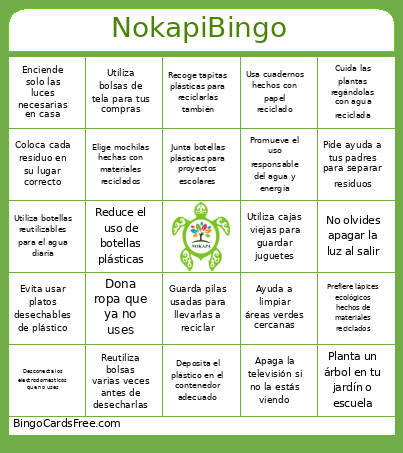 This Nokapi Bingo Cards Game contains following Words or Phrases: Apaga la televisión si no la estás viendo, Apaga las luces que no usas, Aprende sobre el cuidado del medio ambiente, Ayuda a limpiar áreas verdes cercanas, Cierra la llave del agua cuando te cepillas los dientes, Clasifica la basura en diferentes contenedores, Coloca cada residuo en su lugar correcto, Comparte juguetes usados con otros niños, Compra productos con menos envoltorio plástico, Cuida las plantas regándolas con agua reciclada, Cuida los animales y su entorno natural, Deposita el plástico en el contenedor adecuado, Desconecta los electrodomésticos que no uses, Dibuja usando hojas ya usadas por un lado, Dona ropa que ya no uses, Elige mochilas hechas con materiales reciclados, Enciende solo las luces necesarias en casa, Evita usar platos desechables de plástico, Guarda pilas usadas para llevarlas a reciclar, Haz compost con restos orgánicos de comida, Haz manualidades con material reciclado en casa, Invita a tus amigos a reciclar contigo, Junta botellas plásticas para proyectos escolares, Lava y recicla envases plásticos, Lleva tu propia bolsa al supermercado, Mantén limpia tu habitación y separa los residuos, No desperdicies hojas, usa ambos lados al escribir, No olvides apagar la luz al salir, No tires basura en la calle ni parques, No tires pilas a la basura común, Organiza concursos de reciclaje entre tus amigos, Participa en campañas escolares de reciclaje, Pide ayuda a tus padres para separar residuos, Planta un árbol en tu jardín o escuela, Prefiere lápices ecológicos hechos de materiales reciclados, Prefiere productos sin envoltorios innecesarios, Promueve el uso responsable del agua y energía, Recicla botellas plásticas después de usarlas, Recoge papel y cartón para reciclarlos, Recoge tapitas plásticas para reciclarlas también, Reduce el uso de botellas plásticas, Reutiliza bolsas varias veces antes de desecharlas, Reutiliza frascos de vidrio como recipientes, Separa papel, vidrio y plástico correctamente, Separa residuos en casa todos los días, Usa bolsa reutilizable al hacer compras, Usa cuadernos hechos con papel reciclado, Utiliza bolsas de tela para tus compras, Utiliza botellas reutilizables para el agua diaria, Utiliza cajas viejas para guardar juguetes.