Print free North MS IT bingo cards or alter them,
limitless prints! Pick from 41,500+ templates or use the bingo card generator.
Add numbers, phrases, pictures, or all of them.
Play using PDF prints, virtual bingo cards,
and the virtual bingo caller, or combine all formats.
About: This bingo card perfectly captures the hectic, humorous world of IT support in a healthcare setting, filled with quirky coworker moments, tech troubles, and those classic office inside jokes. It's an ideal icebreaker for team meetings or staff celebrations, especially among IT professionals who appreciate the chaos and camaraderie that come with supporting hospital systems.
How To: To download a printable PDF, click the Print button.
You can adjust the number of cards and other
printing settings on the Print tab.
Grid items and free space content can be added on the Basic tab.
Appearance can be totally personalized on the
corresponding tabs, or you can quickly search any preference
on the 🔍 tab.
How to play North MS IT Bingo Cards?
Paper Players: Print PDF bingo cards and physically write on the cards.
Online Caller: Click on the Play button above.
Paper Caller: Print PDF calling list & calling slips and physically pick the slips.
Online Players: Click on the Play button above, and then click on the 🎫 button.
Combo Play: Select any combination above.
For instance, caller can be either Printed or Online.
And players can be Printed or Online or a combo of both.
Step-By-Step:
Start by getting the North MS IT Bingo PDF by clicking on the "Print" button above.
Open the PDF and print it.
For random drawing, you can print another copy of the call list, cut, fold and then draw them randomly at play time.
Cut the bingo cards at the cut marks if there are more than 1 bingo cards per page.
Give one card to each player. For marking, you can use pencils. Crayons are the cheapest.
Select one person to be the caller. If you are playing in a small group, the caller may as well play along with their own Bingo card.
The caller initiates the game by randomly pulling an item from the call list and calling out it to all players.
The players look at their cards to see if they have the called word. If they do, they mark that word.
The first player to complete a horizontal, vertical, or a diagonal line of marked items yells "Bingo!" and wins the play.
The caller verifies that the items crossed off form a proper line according to the Bingo card and call list.
You can play for multiple patterns or a full card blackout for an extended play.
This North MS IT Bingo Cards Game contains following Words or Phrases: Dennis Says Something Inappropriate, Daniel Roasts Dennis, Setting Up a Personal Apple Device, Bizarre Request, Argument over a Superhero, User's Explanation of Problem Clarifies Nothing, Incomprehensible Email or Ticket, Dumpster Trip, Telehealth Cart Problem, "That's why they pay [pronoun] the big bucks", Typo in Email, Code Blue, Corporate announces something nonsensical, Nursing Informatics Drops By to Visit, Eddie Tells A Story, Voalte Phone Problem, Zebra Printer Problem, Patient Room Phone, "Are There Any Question?" ... Silence, Long Phone Call (10+ minutes), PEBKAC, Insulting Question, More Than Three Patient Room Phone Issues in One Day, Dennis Picks on Daniel, Obviously Fake Phish Attempt, A Wild Steve Appears, Magnolia Room Trouble, Summoned by Toni, Dennis refers to "The Office", Dennis distracts someone else, Steve mentions one of his previous jobs, Someone else gets a Bingo, Code Red, Code Purple, Someone leaves early, Someone comes in late, Someone mentions D&D, Someone mentions a video game, Disagreement over bingo rules, Mouse Problem, Keyboard Problem, Adding Something to the Bible, TMI, Ticket kicked back to us, More than 3 Access Requests in One Day, Trip to Calhoun/Grenada, Trip to the Cancer Center, Someone isn't here, New Age Slang, New local policy, Steve/Dennis lunch with wife/gf, Gossip, More than 3 terminations in one day.

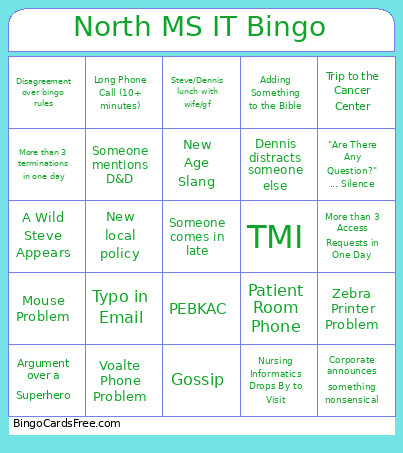 This North MS IT Bingo Cards Game contains following Words or Phrases: Dennis Says Something Inappropriate, Daniel Roasts Dennis, Setting Up a Personal Apple Device, Bizarre Request, Argument over a Superhero, User's Explanation of Problem Clarifies Nothing, Incomprehensible Email or Ticket, Dumpster Trip, Telehealth Cart Problem, "That's why they pay [pronoun] the big bucks", Typo in Email, Code Blue, Corporate announces something nonsensical, Nursing Informatics Drops By to Visit, Eddie Tells A Story, Voalte Phone Problem, Zebra Printer Problem, Patient Room Phone, "Are There Any Question?" ... Silence, Long Phone Call (10+ minutes), PEBKAC, Insulting Question, More Than Three Patient Room Phone Issues in One Day, Dennis Picks on Daniel, Obviously Fake Phish Attempt, A Wild Steve Appears, Magnolia Room Trouble, Summoned by Toni, Dennis refers to "The Office", Dennis distracts someone else, Steve mentions one of his previous jobs, Someone else gets a Bingo, Code Red, Code Purple, Someone leaves early, Someone comes in late, Someone mentions D&D, Someone mentions a video game, Disagreement over bingo rules, Mouse Problem, Keyboard Problem, Adding Something to the Bible, TMI, Ticket kicked back to us, More than 3 Access Requests in One Day, Trip to Calhoun/Grenada, Trip to the Cancer Center, Someone isn't here, New Age Slang, New local policy, Steve/Dennis lunch with wife/gf, Gossip, More than 3 terminations in one day.