Print free Reunion bingo cards or adjust them,
limitless prints! Choose from 41,500+ designs or use our bingo card generator.
Add numbers, phrases, photos, or all of them.
Play using printable PDF, digital bingo cards,
and our digital bingo caller, or go hybrid.
About: This bingo card is perfect for a college reunion or alumni gathering, capturing the mix of nostalgia and shared experiences that come with student life. Its tone is lighthearted and reflective, encouraging people to remember their academic quirks, friendships, campus adventures, and how those years shaped them. Great for sparking conversations and laughter among former classmates!
How To: To download a printable PDF, click the Print button.
You can adjust the card count and other
printing preferences on the Print tab.
Grid items and free space text can be changed on the Basic tab.
Appearance can be fully customized on the
corresponding tabs, or you can quickly find any setting
on the 🔍 tab.
How to play Reunion Bingo Cards?
Printed Caller: Print PDF calling list & calling slips and physically pick the slips.
Virtual Players: Click on the Play button above, and then click on the 🎫 button.
Virtual Caller: Click on the Play button above.
Printed Players: Print PDF bingo cards and physically scratch the cards.
Mixed Play: Choose any combination above.
For instance, caller can be either Paper or Virtual.
And players can be Paper or Virtual or a mix of both.
Step-By-Step:
Start by getting the Reunion PDF by clicking on the "Print" button above.
Open the PDF and print a hard copy.
For random drawing, you can print another copy of the call list, cut, fold and then draw them randomly at play time.
Cut the bingo cards at the cut marks if there are greater than 1 bingo cards per page.
Give one card to each player. For marking, you can use pencils. Crayons are the cheapest.
Choose one person to be the caller. If you are playing in a small group, the caller may also play along with their own Bingo card.
The caller opens the game by randomly drawing an item from the call list and calling out it to all players.
The players look at their cards to see if they have the announced word. If they do, they mark that word.
The first player to complete a horizontal, vertical, or a diagonal line of crossed items announces "Bingo!" and wins the game.
The caller confirms that the items marked form a correct line as per the Bingo card and call list.
You can play for different patterns or a full card blackout for an extended game.
This Reunion Bingo Cards Game contains following Words or Phrases: I bunked at least one class, I never bunked a class, I studied mostly before exams, I studied consistently through the semester, I still remember my roll number, I forgot my ID card at least once, I got lost on campus in the first weeks, I knew campus shortcuts well, I attended class mainly for attendance, I genuinely enjoyed some classes, I panicked during at least one exam, I finished an exam early and felt confident, I finished an exam early and felt worried, I depended on last-minute notes, I left an answer blank intentionally, I made close friends in the first semester, I took time to find my people, I lost touch with many classmates, I'm reconnecting with someone today, I didn't expect to feel nostalgic, I attended college fests mostly as audience, I volunteered during a fest, I avoided stage activities, I loved being on stage, I joined a club and quit, I stayed in a hostel or PG, I was a day scholar, I travelled long distances daily, I survived mostly on snacks, I actually liked college food, I was scared of at least one professor, I was comfortable approaching teachers, I got warned at least once, I never got into any trouble, I broke a minor rule, I followed rules strictly, I learned more outside class than inside, I enjoyed group projects, I hated group projects, I regret not participating more, I changed a lot during college, I was confused for most of college, I found clarity about my future here, I still use college slang, I remember a classroom or bench clearly, I noticed changes on campus today, Being back feels strange, Being back feels familiar, I almost didn't come for this reunion, I'm glad I came today.

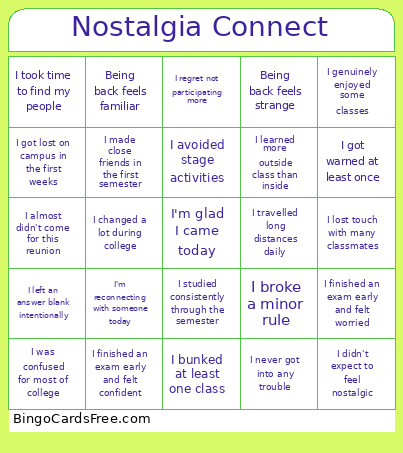 This Reunion Bingo Cards Game contains following Words or Phrases: I bunked at least one class, I never bunked a class, I studied mostly before exams, I studied consistently through the semester, I still remember my roll number, I forgot my ID card at least once, I got lost on campus in the first weeks, I knew campus shortcuts well, I attended class mainly for attendance, I genuinely enjoyed some classes, I panicked during at least one exam, I finished an exam early and felt confident, I finished an exam early and felt worried, I depended on last-minute notes, I left an answer blank intentionally, I made close friends in the first semester, I took time to find my people, I lost touch with many classmates, I'm reconnecting with someone today, I didn't expect to feel nostalgic, I attended college fests mostly as audience, I volunteered during a fest, I avoided stage activities, I loved being on stage, I joined a club and quit, I stayed in a hostel or PG, I was a day scholar, I travelled long distances daily, I survived mostly on snacks, I actually liked college food, I was scared of at least one professor, I was comfortable approaching teachers, I got warned at least once, I never got into any trouble, I broke a minor rule, I followed rules strictly, I learned more outside class than inside, I enjoyed group projects, I hated group projects, I regret not participating more, I changed a lot during college, I was confused for most of college, I found clarity about my future here, I still use college slang, I remember a classroom or bench clearly, I noticed changes on campus today, Being back feels strange, Being back feels familiar, I almost didn't come for this reunion, I'm glad I came today.