Print free Nytt RKV-bingo cards or personalize,
unlimited prints! Select from 41,500+ designs or use our bingo card generator.
Add numbers, phrases, photos, or any combination.
Play using PDF printouts, online bingo cards,
and our online bingo caller, or combine all formats.
How To: To download a printable PDF, click the Print button.
You can modify the card quantity and other
printing preferences on the Print tab.
Grid items and free space content can be changed on the Basic tab.
Appearance can be totally customized on the
relevant tabs, or you can easily search any preference
on the 🔍 tab.
How to play Nytt RKV-bingo Cards?
Paper Caller: Print PDF calling list & calling slips and physically choose the slips.
Online Players: Click on the Play button above, and then click on the 🎫 button.
Paper Players: Print PDF bingo cards and physically scratch the cards.
Online Caller: Click on the Play button above.
Hybrid Mode: Choose any combination above.
For example, caller can be either Paper or Online.
And players can be Paper or Online or a mix of both.
Step-By-Step:
Start by downloading the Nytt RKV-bingo PDF by clicking on the "Print" button above.
Open the PDF and print a hard copy.
For random drawing, you can print another copy of the call list, cut, fold and then pull them randomly at play time.
Cut the bingo cards at the cut lines if there are greater than 1 bingo cards per page.
Distribute one card per player. For marking, you can use pencils. Crayons cost the least.
Choose one person to be the caller. If you are playing in a small group, the caller can also play along with their own Bingo card.
The caller starts the game by randomly picking an item from the call list and announcing it to all players.
The players look at their cards to see if they have the called word. If they do, they cross off that word.
The first player to complete a horizontal, vertical, or a diagonal line of marked items shouts "Bingo!" and wins the game.
The caller checks that the items marked form a proper line as per the Bingo card and call list.
You can play for different patterns or a full card blackout for a longer game.
This Nytt RKV-bingo Cards Game contains following Words or Phrases: Første intranettmelding om at det IKKE er lov å holde av plass i flere dager., Noen mister noe i flyttelasset, Det kommer lapp om at alle må ta med kantinekopper ned igjen i kantina, Et personlig skap lar seg ikke låse opp av app., En seksjon etablerer seg faste plasser, Åpenbar svakhet kan ikke rettes pga. «frysperiode», Kaffemaskin slutter å virke, Stillesone flyttes vekk fra sosial sone., Noen i seksjonen har glemt kort, og må bære RKV-adgangskort med skammens blylenke, Det klages over støy fra sosial sone, Noen stanger hodet i skrått glasstak, Første PC-veske ryker, Vann i vask på toalettet slutter å virke (>10 minutter), Treningsrommet åpner >2 uker etter innflytting, Noen flytter inn ekstra skap/oppbevaring., Kantina i nytt RKV lager «gelékylling» (kjent fra Kongens gate), Noen setter seg på samme plass > 5 dager på rad., Det kommer skohyller., PANTUS er ute av drift., Noen får kjeft for å ha med seg for mye greier til nytt RKV, Noen får kjeft for å oppbevare (surt) treningstøy på jobb, Noen i KLD får skjenn fra DSS for å være mindre enn én byråkrat per fire møtedeltakere., Det trådløse nettverket slutter å virke (>10 minutter), Garderobeskapene i tre får vannskader, Senior overfyller skapet og må «kjøpe» skapplass av yngre kollega.

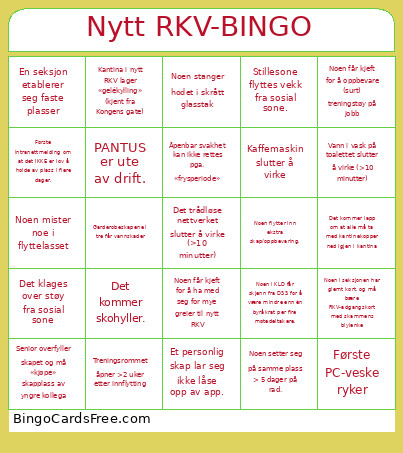 This Nytt RKV-bingo Cards Game contains following Words or Phrases: Første intranettmelding om at det IKKE er lov å holde av plass i flere dager., Noen mister noe i flyttelasset, Det kommer lapp om at alle må ta med kantinekopper ned igjen i kantina, Et personlig skap lar seg ikke låse opp av app., En seksjon etablerer seg faste plasser, Åpenbar svakhet kan ikke rettes pga. «frysperiode», Kaffemaskin slutter å virke, Stillesone flyttes vekk fra sosial sone., Noen i seksjonen har glemt kort, og må bære RKV-adgangskort med skammens blylenke, Det klages over støy fra sosial sone, Noen stanger hodet i skrått glasstak, Første PC-veske ryker, Vann i vask på toalettet slutter å virke (>10 minutter), Treningsrommet åpner >2 uker etter innflytting, Noen flytter inn ekstra skap/oppbevaring., Kantina i nytt RKV lager «gelékylling» (kjent fra Kongens gate), Noen setter seg på samme plass > 5 dager på rad., Det kommer skohyller., PANTUS er ute av drift., Noen får kjeft for å ha med seg for mye greier til nytt RKV, Noen får kjeft for å oppbevare (surt) treningstøy på jobb, Noen i KLD får skjenn fra DSS for å være mindre enn én byråkrat per fire møtedeltakere., Det trådløse nettverket slutter å virke (>10 minutter), Garderobeskapene i tre får vannskader, Senior overfyller skapet og må «kjøpe» skapplass av yngre kollega.