Ocarina of time remake predictions 6/8/2026 Bingo Cards - Print Free or Customize
Print free Ocarina of time remake predictions 6/8/2026 bingo cards or adjust them,
limitless cards! Choose from 41,500+ designs or use our bingo card generator.
Add numbers, words, photos, or all of them.
Play using printable PDF, virtual bingo cards,
and our virtual bingo caller, or combine all formats.
About: Get ready for some tongue-in-cheek fun with this Zelda speculation bingo card! Perfect for fans following every rumor and leak about the next big Zelda release, this card pokes fun at fan anxieties and wishlists while capturing all the hilarious, over-the-top predictions you’ll hear during game reveal streams or community watch parties.
How To: To save a PDF to print, click the Print button.
You can change the card quantity and other
printing options on the Print tab.
Grid items and free space content can be edited on the Basic tab.
Appearance can be entirely personalized on the
relevant tabs, or you can quickly locate any option
on the 🔍 tab.
How to play Ocarina of time remake predictions 6/8/2026 Bingo Cards?
Online Players: Click on the Play button above, and then click on the 🎫 button.
Paper Caller: Print PDF calling list & calling slips and physically pick the slips.
Online Caller: Click on the Play button above.
Paper Players: Print PDF bingo cards and physically cross off the cards.
Hybrid Mode: Select any combination above.
For example, caller can be either Paper or Online.
And players can be Paper or Online or a mix of both.
Step-By-Step:
Start by getting the Ocarina of time remake predictions 6/8/2026 PDF by clicking on the "Print" button above.
Open the PDF and print a hard copy.
For random drawing, you can print another copy of the call list, cut, fold and then draw them randomly at play time.
Cut the bingo cards at the cut marks if there are more than 1 bingo cards per page.
Give one card to each player. For marking, you can use pens. Crayons are the cheapest.
Select one person to be the caller. If you are playing in a small group, the caller can also play along with their own Bingo card.
The caller starts the play by randomly drawing an item from the call list and calling out it to everyone.
The players look at their cards to see if they have the called word. If they do, they mark that word.
The first player to complete a horizontal, vertical, or a diagonal line of crossed items yells "Bingo!" and wins the game.
The caller verifies that the items crossed off form a proper line according to the Bingo card and call list.
You can play for different patterns or a full card blackout for a longer game.
This Ocarina of time remake predictions 6/8/2026 Bingo Cards Game contains following Words or Phrases: "wait. we have one more announcement." > *snaps* > *screen fades to black* > *Navi's wings sfx*, "you can go defeat Ganondorf as soon as the timeskip happens if you want", Can make custom ocarina songs that will be more powerful/useful than the actual ones, endless scrolling for items, Game repeats copy and pasted cutscene every time you awaken a Sage with nothing personal, just "The Demon King...", gonna have voice acting and ganondorf's gonna sound like a generic villain voiced by matt mercer again, Link overlooking the land of Hyrule in trailer/towards beginning of game, Navi's removed completely, Ocarina songs can be played automatically, Shadow Temple/Bottom of the Well will remove the torture devices/blood, Sheik is obviously female and game even uses she/her pronouns, Sheik will give cryptic poetry in a forced british accent, Weird focus and reminder constantly throughout the game that Link is male, will be huge open air open world with little to no linearity or proper dungeon puzzles/structure, You can't pet the dogs, Zonai.

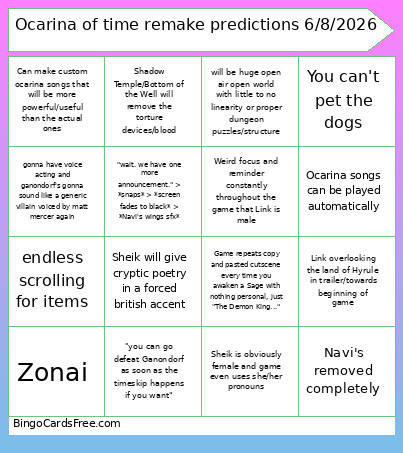 This Ocarina of time remake predictions 6/8/2026 Bingo Cards Game contains following Words or Phrases: "wait. we have one more announcement." > *snaps* > *screen fades to black* > *Navi's wings sfx*, "you can go defeat Ganondorf as soon as the timeskip happens if you want", Can make custom ocarina songs that will be more powerful/useful than the actual ones, endless scrolling for items, Game repeats copy and pasted cutscene every time you awaken a Sage with nothing personal, just "The Demon King...", gonna have voice acting and ganondorf's gonna sound like a generic villain voiced by matt mercer again, Link overlooking the land of Hyrule in trailer/towards beginning of game, Navi's removed completely, Ocarina songs can be played automatically, Shadow Temple/Bottom of the Well will remove the torture devices/blood, Sheik is obviously female and game even uses she/her pronouns, Sheik will give cryptic poetry in a forced british accent, Weird focus and reminder constantly throughout the game that Link is male, will be huge open air open world with little to no linearity or proper dungeon puzzles/structure, You can't pet the dogs, Zonai.