Olympics Watch Party Bingo Cards - Print Free or Customize
Print free Olympics Watch Party bingo cards or adjust them,
unlimited cards! Choose from 41,500+ designs or use the bingo card generator.
Add numbers, phrases, photos, or mix them all.
Play using PDF prints, virtual bingo cards,
and the virtual bingo caller, or go hybrid.
About: This bingo card captures all the drama, excitement, and unique moments of the Winter Olympics, making it a perfect fit for fans watching the games together. With an eye for both iconic traditions and unexpected scenes, this card brings energy and anticipation to Olympic watch parties or sports-themed events, keeping everyone engaged from start to finish.
How To: To get a PDF to print, click the Print button.
You can alter the card quantity and other
print settings on the Print tab.
Grid items and free space text can be added on the Basic tab.
Appearance can be highly customized on the
corresponding tabs, or you can easily search any option
using the 🔍 tab.
How to play Olympics Watch Party Bingo Cards?
Paper Caller: Print PDF calling list & calling slips and physically choose the slips.
Virtual Players: Click on the Play button above, and then click on the 🎫 button.
Virtual Caller: Click on the Play button above.
Paper Players: Print PDF bingo cards and physically mark the cards.
Mixed Play: Pick any combination above.
For example, caller can be either Printed or Virtual.
And players can be Printed or Virtual or a combo of both.
Step-By-Step:
Start by getting the Olympics Watch Party PDF by clicking on the "Print" button above.
Open the PDF and print a hard copy.
For random drawing, you can print another copy of the call list, cut, fold and then pick them randomly at play time.
Cut the bingo cards at the cut lines if there are greater than 1 bingo cards per page.
Give one card to each player. For marking, you can use markers. Crayons are the cheapest.
Pick one person to be the caller. If you are playing in a small group, the caller may as well play along with their own Bingo card.
The caller initiates the game by randomly picking an item from the call list and announcing it to everyone.
The players check their cards to see if they have the announced word. If they do, they dab that word.
The first player to complete a horizontal, vertical, or a diagonal line of crossed items yells "Bingo!" and wins the game.
The caller checks that the items crossed off form a correct line as per the Bingo card and call list.
You can play for varied patterns or a full card blackout for an extended game.
This Olympics Watch Party Bingo Cards Game contains following Words or Phrases: Athlete cries during interview, Close-up of nervous coach, "This is for my country", Slow-motion replay, Commentator says "history in the making", Athlete kisses medal, Flag wrapped around shoulders, Personal Best announced, Olympic record broken, World record broken, Snow spray in slow motion, Skates need tightening adjustment, Helmet/goggle malfunction, Biathlon penalty loop, Photo finish, "On the world stage", "Years of preparation", "Leaving it all out there", "You can see the emotion", "Veteran presence", "The youngster from…", "A statement performance", "Ice in their veins", "That's going to be tough to beat", Awkward silence after a fall, USA win, Switzerland win, USA athlete featured backstory, American flag graphic transition, "Team USA" chant in crowd, USA athlete hugging family, Drone shot of venue, Crowd wave, Celebrity in audience, Athlete's family shown crying, Split-screen replay, Score graphic glitch/delay, National anthem played, Tie score, Coach challenges a call, Slow clap from crowd, Athlete looks shocked at score, Underdog upset, Leaderboard reshuffle, Matching team outfits, Athlete dancing during intro, Mascot on screen, Teammates jumping in celebration, Someone bundled in an absurd amount of winter gear, Athlete says "surreal", Cold breath visible in interview.

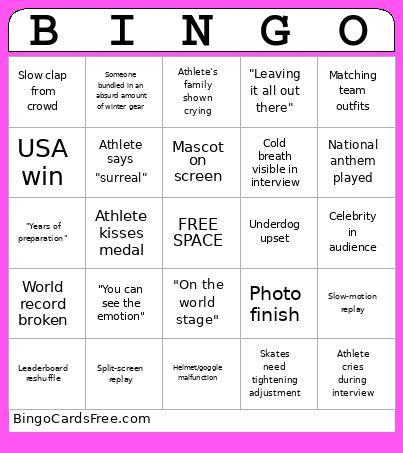 This Olympics Watch Party Bingo Cards Game contains following Words or Phrases: Athlete cries during interview, Close-up of nervous coach, "This is for my country", Slow-motion replay, Commentator says "history in the making", Athlete kisses medal, Flag wrapped around shoulders, Personal Best announced, Olympic record broken, World record broken, Snow spray in slow motion, Skates need tightening adjustment, Helmet/goggle malfunction, Biathlon penalty loop, Photo finish, "On the world stage", "Years of preparation", "Leaving it all out there", "You can see the emotion", "Veteran presence", "The youngster from…", "A statement performance", "Ice in their veins", "That's going to be tough to beat", Awkward silence after a fall, USA win, Switzerland win, USA athlete featured backstory, American flag graphic transition, "Team USA" chant in crowd, USA athlete hugging family, Drone shot of venue, Crowd wave, Celebrity in audience, Athlete's family shown crying, Split-screen replay, Score graphic glitch/delay, National anthem played, Tie score, Coach challenges a call, Slow clap from crowd, Athlete looks shocked at score, Underdog upset, Leaderboard reshuffle, Matching team outfits, Athlete dancing during intro, Mascot on screen, Teammates jumping in celebration, Someone bundled in an absurd amount of winter gear, Athlete says "surreal", Cold breath visible in interview.