
bingo breach Cards - Print Free or Customize
Print free bingo breach cards or alter them, limitless cards! Pick from 41,500+ templates or use our bingo card generator. Add numbers, words, images, or all of them. Play using printed PDF, virtual bingo cards, and our virtual bingo caller, or mix physical and digital.
About: This bingo card is a hilarious and spot-on snapshot of daily life at a public library, perfect for staff team-building events or a lighthearted meeting. If you work in circulation or public services, you'll laugh and nod as you recognize quirky patron questions, oddball tech mishaps, and those one-in-a-million staff moments that only happen in libraries.
How To: To download a printable PDF, click the Print button. You can change the card quantity and other print settings on the Print tab. Grid items and free space text can be edited on the Basic tab. Appearance can be highly customized on the corresponding tabs, or you can easily locate any setting using the 🔍 tab.
How to play bingo breach Cards?
- Paper Players: Print PDF bingo cards and manually scratch the cards.
- Virtual Caller: Click on the Play button above.
- Paper Caller: Print PDF calling list & calling slips and manually select the slips.
- Virtual Players: Click on the Play button above, and then click on the 🎫 button.
- Hybrid Play: Select any combination above. For example, caller can be either Printed or Virtual. And players can be Printed or Virtual or a combo of both.
Step-By-Step:
- Start by getting the bingo breach PDF by clicking on the "Print" button above.
- Open the PDF and print a hard copy.
- For random drawing, you can print another copy of the call list, cut, fold and then pick them randomly at play time.
- Cut the bingo cards at the cut lines if there are more than 1 bingo cards per page.
- Give one card to each player. For marking, you can use crayons. Crayons cost the least.
- Select one person to be the caller. If you are playing in a small group, the caller may as well play along with their own Bingo card.
- The caller opens the play by randomly pulling an item from the call list and announcing it to everyone.
- The players look at their cards to see if they have the called word. If they do, they mark that word.
- The first player to complete a horizontal, vertical, or a diagonal line of marked items shouts "Bingo!" and wins the play.
- The caller verifies that the items marked form a correct line according to the Bingo card and call list.
- You can play for multiple patterns or a full card blackout for a longer play.
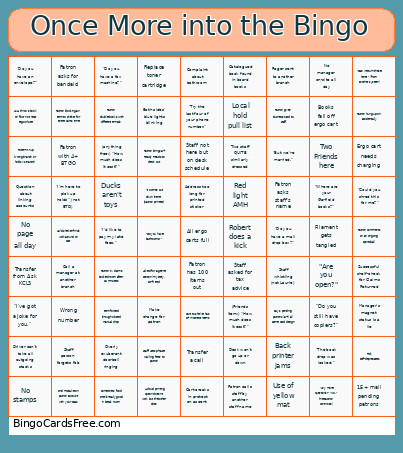 This bingo breach Cards Game contains following Words or Phrases: Successful shelf-check for Claims Returned, "I'd like to pay my late fees.", "Do you still have copiers?", (anything free:) "How much does it cost?", (Friends item:) "How much does it cost?", Staff not here but on desk schedule, "I've got a joke for you.", Filament gets tangled, Staff uses phrase 'walking feet' to patron, Patron double-books with different emails, "The book drop was locked.", Use of yellow mat, All ergo carts full, Tote mix-up (wrong branch or holds vs transit), Back printer jams, Red light AMH, Catalogued book found in board books, Ducks aren't toys, Item forced through closed manual drop, Desk won't go up or down, Manager's magnet status is a lie, AMH throws book on floor not near ergo chute, Make change for patron, Patron asks staff's name, Ergo cart needs charging, Overly exuberant doorbell ringing, "Try the last four of your phone number.", "Can I return these here?" (from another system), "Are you open?", "Do you have a fax machine?", Staff whistling (not Laurie), Complaint about bathroom, "It comes out down there" (patron printers), Staff asked for tax advice, A cloud printing option doesn't work but the other does, Find mistake on patron account with your DIBs, Patron hung up on accidentally, 15+ mail pending patrons, No stamps, Address too long for printed sticker, Patron Irv claims booked room after 15 minutes, Hold shelver finds workaround on cart, Day's pending patrons (3+) all same card design, Wrong number, Both sides' blue lights blinking, Cart creaks in protest on ascent, Rick self-deprecates, Driver can't take all outgoing stacks, No manager on-site all day, Patron asks for bandaid, Patron gives business card to staff, Patron calls staff by another staff name, No page all day, Someone's food smells really good in break room, Transfer a call, Call a manager at another branch, Replace toner cartridge, "Do you have bathrooms?", "Any more questions?" "No." (interaction continues), Roger sent to another branch, Two Friends here, "Do you have an envelope?", "Could you shred this for me?", "Do you have a mail drop box?", Cart to shelve has 2+ incorrect items, "I'm here to pick up holds" (not BTD), Patron blocking an item to shelve for entire cart's time, Staff person forgets fob, Robert does a kick, "Where are your Garfield books?", Asked for a genre section (mystery, sci-fi, etc), Books fall off ergo cart, Patron brings 3+ Ready Reads to check out, Patron has 100 items out, Question about linking accounts, "But we're married.", Two staff QUITE similarly dressed, Patron comments on an ongoing sportsball, Transfer from Ask KCLS, Patron with 4+ BTGO, Local hold pull list.