🔍
Advertisement

optical Bingo Cards - Print Free or Customize

Print free optical bingo cards or personalize, unlimited prints! Pick from 42,600+ designs or use our bingo card generator. Add numbers, words, pictures, or all of them. Play using PDF printouts, digital bingo cards, and our digital bingo caller, or go hybrid.

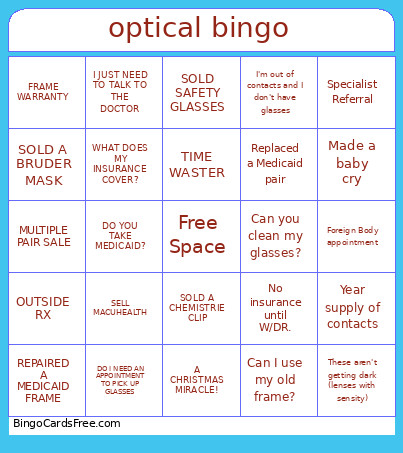
optical bingo
MULTIPLE PAIR SALENO SHOWCOULD I GET TRIAL CONTACTS?ARE MY GLASSES IN?I DIDN'T BRING MY WALLET
DO I NEED AN APPOINTMENT TO PICK UP GLASSESWANTS CONTACTS RX IS EXPIREDI JUST NEED TO TALK TO THE DOCTORDO YOU TAKE MEDICAID?CAN I USE MY OLD FRAME?
I DON'T KNOW WHO MY INSURANCE ISA CHRISTMAS MIRACLE!SOLD SAFETY GLASSESUHHH...ESPANOL?SPECIALIST REFERRAL
NEW CL FITTINGCan you clean my glasses?No insurance until W/DR.I can't see out of my new glassesI need new nosepads
Year supply of contactsSell MacuHealthglasses adjustmentMade a baby crySpecialist Referral
This is shown at the top of the template and game pages.
Optional. If this template makes to the front page, you will be credited for creating it.
Shown at the top of each bingo card.

This can be text or an image. Images larger than 50 KB may be compressed and may lose transparency.
If words on a line are separated by this text, then:
  • Bingo card will only show the text on the right side of the separator.
  • The PDF call list will show the full text.
  • To disable this feature, clear this field.
Quiz Mode ON
Select which side of the quiz separator to show on the card preview on this page. When printing or playing, calling cards always show the right side only.
If words on a line are separated by this text, then:
  • The text on the right side of the separator will be spoken by the online game play.
  • Bingo card will only show the text on the left side of the separator.
  • The PDF call list will show the full text.
  • To disable this feature, clear this field.
Audio Mode ON
Use separate item lists for each column. This is useful for american traditional 75 ball number bingo or cards where each column should draw from a different set of items.
Enter numbers, words or phrases, each one on a new line. Up to 255 items are supported.

Items Per Column:
To specify items per column, eg for 75 ball bingo, turn ON the "Items Per Column" setting.
Sort   |   No Dups
Supports:
  1. Up to 99 images.
  2. Single or multiple image uploads.
  3. Up to 5 MB file size per image.
  4. You can use both Grid Items and Grid Images.
  5. Click an image or label to edit the label or delete the image.
  6. If an image background changes to white, remove transparency or reduce the image size to < 10KB.
    Choose whether image labels appear on bingo cards. Image labels are always shown on the calling card.
    Grid size in Columns x Rows format.
    Free space is usually the center square of the card. It is like a joker or a wild square, and counts towards the winning pattern.
    • Shows text or an image in the Free Space cell.
    • Make sure Free Space Cell is not set to "None".
    • To show text, enter text.
    • To show an image, click the button on the right and select an image.
    • If the image background changes to white, remove transparency or reduce the image size to < 10KB.
    Select Yes to generate unique random cards.

    If No is selected, all cards will have the same text in the same order, which might be useful in educational or quiz settings.
    Text is automatically resized to fit inside each cell. Shorter text may appear very large. Choose a smaller maximum font size to limit how large the text can get.
    Title text color.

    * Applicable when Card Title is text.
    Title background shape.

    * Requires Title Back Opacity to be > 0%.
    Title background opacity.

    * Requires Title Back Shape.
    Title background shape color.

    * Requires Title Back Shape.
    * Requires Title Back Opacity to be > 0%.
    Title background border color.

    * Requires Title Back Shape.
    * Requires Title Back Opacity to be > 0%.
    Grid Text color.
    Grid background color.
    Grid line color.
    • Background shape for cells.
    • Select a stock image or upload your own custom image.
    • You can use Cell Transparency setting to change how prominently the background shape shows.
    • If you select a shape other than Grid, you may have to increase Cell Padding if you want to fit the text inside the shape.
    • Don't see the selected image?
      Set Cell Transparency <50.
    Empty space inside each cell between border and text.
    Space between any 2 cells.
    0% makes grid background opaque. Higher setting makes grid background transparent allowing card background image or card background color to show.
    Outside border width.
    Card outside border color.

    * Requires Card Border Width > 0%
    Yes makes the card corners rounded.
    Empty space between card border and card contents.
    Card background color.
    • Background image for the whole card.
    • Select a stock image or upload your own custom image.
    • Use Card Transparency and Cell Transparency to control how much of the image shows through.
    Don't see the selected image?
    • Set Card Transparency >50.
    • Set Card Border Width >0 or Card Padding >0.
    • Set Cell Transparency >50.
    Select how the background image covers the whole card. You can also choose to repeat the image.
    Controls the transparency of the card background color. Higher values make the card background more transparent, allowing the card background image or outer background to show through.
    This mode uses rapid animations. It may cause dizziness, nausea, or trigger sensitive individuals. Please use responsibly.
    Warning! 
    Public: Anyone can see your card template, including search engines

    Private: Only you can see and edit the card template. You will need to be signed in.

    Click to Sign-Up « Free!!!

    Click to Sign-In
    Number of cards to generate and include in the Full PDF. The Preview button will always generate only 1 card.
    Choose whether to include a call list in the Full PDF. Grid prints the call list as a grid; List prints it as a text list.
    Printer paper size.
    Paper orientation for printing. Some card layouts may look better in portrait or landscape.
    Arrangement of cards on each page of paper.
    Horizontal margin on left and right sides of each card.
    Vertical margin on top and bottom sides of each card.
    Colors: Removes background to save ink for printing.

    B&W: Removes background & changes colors to black & white to save ink for printing.
    Select amount of empty space to keep in each cell for participants to write something.

    This feature is also called human bingo, people bingo, social bingo, get-to-know bingo or ice breaker bingo.
    Starting card number. Change if you need to reprint a set of cards starting with a specific card number.

    Note: If this is not 1, then call list (index card) will not be printed.
    Header height. Header is shown only when there is 1 or more characters.
    Instructions or any other message(s) at the top of each card.
    Footer height. Footer is shown only when there is 1 or more characters.
    Instructions or any other message(s) at the bottom of each card.
    All fonts support English.

    For non-English support in PDF, please try FreeSans, FreeSerif, DejaVuSans, DejaVuSerif or NotoSans
    ✉

    Suggestions | Feedback | Bug

    Similar Bingo Cards: , ,

    About: This bingo card captures the everyday quirks and common requests you’ll hear at any busy optometry practice. It’s packed with patient questions, eyewear sales moments, and those unpredictable curveballs eye care teams handle with a smile. Perfect for staff meetings or optometry office parties, it turns your daily routine into a fun, relatable game everyone can enjoy.

    How To: To get a PDF to print, click the Print button. You can modify the card count and other printing options on the Print tab. Grid items and free space text can be changed on the Basic tab. Appearance can be completely customized on the corresponding tabs, or you can quickly locate any option on the 🔍 tab.

    How to play optical Bingo Cards?

    • Paper Caller: Print PDF calling list & calling slips and physically draw the slips.
    • Virtual Caller: Click on the Play button above.
    • Paper Players: Print PDF bingo cards and physically mark the cards.
    • Virtual Players: Click on the Play button above, and then click on the 🎫 button.
    • Hybrid Mode: Choose any combination above. For instance, caller can be either Offline or Virtual. And players can be Offline or Virtual or a combination of both.

    Step-By-Step:

    1. Start by downloading the optical PDF by clicking on the "Print" button above.
    2. Open the PDF and print it.
    3. For random drawing, you can print another copy of the call list, cut, fold and then pull them randomly at play time.
    4. Cut the bingo cards at the cut lines if there are more than 1 bingo cards per page.
    5. Distribute one card per player. For marking, you can use pencils. Crayons are the cheapest.
    6. Choose one person to be the caller. If you are playing in a small group, the caller may as well play along with their own Bingo card.
    7. The caller begins the game by randomly picking an item from the call list and saying it to everyone.
    8. The players scan their cards to see if they have the announced word. If they do, they mark that word.
    9. The first player to finish a horizontal, vertical, or a diagonal line of marked items yells "Bingo!" and wins the game.
    10. The caller checks that the items crossed off form a correct line as per the Bingo card and call list.
    11. You can play for varied patterns or a full card blackout for an extended game.

    optical Bingo CardsThis optical Bingo Cards Game contains following Words or Phrases: MULTIPLE PAIR SALE, NO SHOW, COULD I GET TRIAL CONTACTS?, ARE MY GLASSES IN?, I DIDN'T BRING MY WALLET, I HAVE A QUESTION, SOLD A BRUDER MASK, REPAIRED A MEDICAID FRAME, OUTSIDE RX, FRAME WARRANTY, -c-, DO I NEED AN APPOINTMENT TO PICK UP GLASSES, WANTS CONTACTS RX IS EXPIRED, I JUST NEED TO TALK TO THE DOCTOR, DO YOU TAKE MEDICAID?, CAN I USE MY OLD FRAME?, CAN YOU FILL MY SPRAY?, SELL MACUHEALTH, DOESN'T HAVE GLASSES, HIGH RX, DOES THIS COME IN OTHER COLORS?, WHAT DOES MY INSURANCE COVER?, -c-, I DON'T KNOW WHO MY INSURANCE IS, A CHRISTMAS MIRACLE!, SOLD SAFETY GLASSES, UHHH...ESPANOL?, SPECIALIST REFERRAL, SOLD A CHEMISTRIE CLIP, TIME WASTER, SCHEDULED RED EYE APPOINTMENT, SCHEDULED FLASHES AND FLOATERS, SOLD RX SUNGLASSES, -c-, NEW CL FITTING, Can you clean my glasses?, No insurance until W/DR., I can't see out of my new glasses, I need new nosepads, I'm out of contacts and I don't have glasses, Picking up contacts, Replaced a Medicaid pair, Sold an OVVO, Can I use my old frame?, -c-, Year supply of contacts, Sell MacuHealth, glasses adjustment, Made a baby cry, Specialist Referral, Foreign Body appointment, Is that with my insurance?, These aren't getting dark (lenses with sensity), I'm stuck at the train, Can I get a copy of my RX?.

    Advertisement