
oSCARS 2026 Bingo Cards - Print Free or Customize
Print free oSCARS 2026 bingo cards or customize, unlimited cards! Select from 42,200+ templates or use our bingo card generator. Add numbers, words, photos, or any combination. Play using printable PDF, digital bingo cards, and our digital bingo caller, or go hybrid.
About: This bingo card is perfect for an Oscars watch party or any pop culture-themed gathering. It captures the unpredictable mix of heartfelt speeches, trending jokes, celebrity moments, and timely social commentary that make awards shows so entertaining. Expect plenty of laughs and knowing nods as you check off classic Hollywood antics and memorable surprises with friends.
How To: To get a PDF to print, click the Print button. You can adjust the card count and other printing settings on the Print tab. Grid items and free space text can be added on the Basic tab. Appearance can be fully customized on the corresponding tabs, or you can easily find any preference on the 🔍 tab.
How to play oSCARS 2026 Bingo Cards?
- Digital Caller: Click on the Play button above.
- Paper Players: Print PDF bingo cards and manually cross off the cards.
- Digital Players: Click on the Play button above, and then click on the 🎫 button.
- Paper Caller: Print PDF calling list & calling slips and manually draw the slips.
- Combo Play: Select any combination above. For instance, caller can be either Paper or Digital. And players can be Paper or Digital or a mix of both.
Step-By-Step:
- Start by downloading the oSCARS 2026 PDF by clicking on the "Print" button above.
- Open the PDF and print it.
- For random calling, you can print another copy of the call list, cut, fold and then pick them randomly at play time.
- Cut the bingo cards at the cut lines if there are more than 1 bingo cards per page.
- Give one card to each player. For marking, you can use pencils. Crayons are the cheapest.
- Select one person to be the caller. If you are playing in a small group, the caller may as well play along with their own Bingo card.
- The caller opens the play by randomly drawing an item from the call list and announcing it to all players.
- The players check their cards to see if they have the announced word. If they do, they cross off that word.
- The first player to complete a horizontal, vertical, or a diagonal line of crossed items shouts "Bingo!" and wins the game.
- The caller checks that the items marked form a proper line according to the Bingo card and call list.
- You can play for varied patterns or a full card blackout for an extended game.
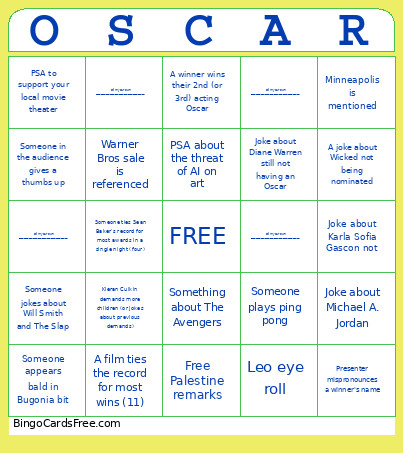 This oSCARS 2026 Bingo Cards Game contains following Words or Phrases: Leo eye roll, Award winner apologies to thank everyone, Award winner is cut short by the orchestra, Someone plays ping pong, Joke about Timothee Chalement aggressive marketing tactics, Joke about how handsome Michael B. Jordan is, Someone in the audience gives a thumbs up, 6-7 Reference, Award winner tells children to go to bed, Minneapolis is mentioned, Anti-ICE remarks, Free Palestine remarks, Someone appears bald in Bugonia bit, Award winner names everyone else who was nominated, Kieran Culkin demands more children (or jokes about previous demands), Warner Bros sale is referenced, PSA to support your local movie theater, Someone jokes about Will Smith and The Slap, Something about The Avengers, Someone runs like the kids in Weapons, A joke about how Conan should have been nominated, Somone dresses as Aunt Gladys for a bit, PSA about the threat of AI on art, Heated Rivarly joke, Rob Reiner tribute, Robert Redford tribute, Diane Keaton tribute, Joke about Karla Sofia Gascon not, Anti war in Iran remarks, Some jokes about Coleman Domingo's outfit/wardrobe, Joke about adding a best podcast category, A joke where Conan plays an irish vampire, A joke about Wicked not being nominated, Presenter mispronounces a winner's name, Joke about Michael A. Jordan, A winner curses during their acceptance speech, Joke about Diane Warren still not having an Oscar, Some makes a joke about Blake Lively-Justin Baldoni controversy, Joke about Sidney Sweeney, A winner wins their 2nd (or 3rd) acting Oscar, Someone ties Sean Baker's record for most awards in a single night (four), A film ties the record for most wins (11), Trailer for Devil Wears Prada 2, Trailer for The Odyssey, Trailer for Dune 3, Fill in your own ______________________________________, Fill in your own ______________________________________, Fill in your own ______________________________________, Fill in your own ______________________________________, Fill in your own ______________________________________.