Print free OSCARS bingo cards or personalize,
unlimited prints! Select from 42,200+ designs or use our bingo card generator.
Add numbers, phrases, images, or all of them.
Play using PDF prints, digital bingo cards,
and our digital bingo caller, or combine all formats.
About: This bingo card captures all the unscripted, hilarious, and heartfelt moments that make live awards shows unforgettable. Perfect for a watch party with friends or Hollywood enthusiasts, it spotlights everything from celebrity antics and awkward speeches to surprise political references and social media shout-outs. Get ready for laughs, surprises, and maybe some popcorn on your couch as you play along!
How To: To download a PDF to print, click the Print button.
You can alter the card quantity and other
printing settings on the Print tab.
Grid items and free space text can be added on the Basic tab.
Appearance can be fully customized on the
corresponding tabs, or you can quickly locate any option
using the 🔍 tab.
How to play OSCARS Bingo Cards?
Online Players: Click on the Play button above, and then click on the 🎫 button.
Online Caller: Click on the Play button above.
Paper Caller: Print PDF calling list & calling slips and physically select the slips.
Paper Players: Print PDF bingo cards and physically write on the cards.
Mixed Mode: Choose any combination above.
For example, caller can be either Offline or Online.
And players can be Offline or Online or a mix of both.
Step-By-Step:
Start by downloading the OSCARS PDF by clicking on the "Print" button above.
Open the PDF and print a hard copy.
For random drawing, you can print another copy of the call list, cut, fold and then pull them randomly at play time.
Cut the bingo cards at the cut lines if there are greater than 1 bingo cards per page.
Distribute one card per player. For marking, you can use pens. Crayons cost the least.
Choose one person to be the caller. If you are playing in a small group, the caller can as well play along with their own Bingo card.
The caller opens the play by randomly drawing an item from the call list and calling out it to all players.
The players check their cards to see if they have the called word. If they do, they mark that word.
The first player to complete a horizontal, vertical, or a diagonal line of marked items announces "Bingo!" and wins the play.
The caller confirms that the items crossed off form a correct line according to the Bingo card and call list.
You can play for multiple patterns or a full card blackout for an extended play.
This OSCARS Bingo Cards Game contains following Words or Phrases: A direct message to President Trump, A misprouncation of a nominee's name, A shoutout to movie theaters is made, A sports team is mentioned, A streaming service gets mentioned, A TikTok reference, A WFF alumni wins [instert catagory], A WFF Alumni wins in three categories, acceptance Speech goes on too long & music cuts them off, Adam Sandler wears a suit, Adam Sandler wears athleisure, AI is brought up, Amy Poehler presents an award, Camera cuts to seat filler, Catherine O'Hara is Mentioned, Celeb wears Anti-ICE pin, Celebrity drinking water mid-speech, Celebrity laughs at a joke about them, Celebrity not amused by a joke about themselves, Censored profanity, Conan roasts one of the winners, Dick Van Dyke in attendance, Diddy joke/reference, Historic win (first time for...), Host makes political reference, In memoriam misses a crucial name, Joke About There Being 2 Michael B Jordans, KPOP DEMON HUNTERS SINGERS PERFORM SONG, Matching couple outfits, Nobody wins bingo [contingency plan], Ozempic mentioned, Popcorn is used in a gag during the ceremony, Selfie on stage, Someone anounces their retierment, Someone eating during the ceremony, Someone tells their kids to go to bed, Someone wears sunglasses indoors, Someone yawns on camera, Spielberg is mentioned or thanked during the ceremony, Standing ovation, Standing ovation for a nominee who doesn't win, The Slap is referenced, Timothée Chalamet asked to play ping pong, Wardrobe Malfunction, Winner cries during their acceptance speech, Winner says they didn't prepare a speech, Winner takes out a note for their speech, Winner trips up stairs when accepting award.

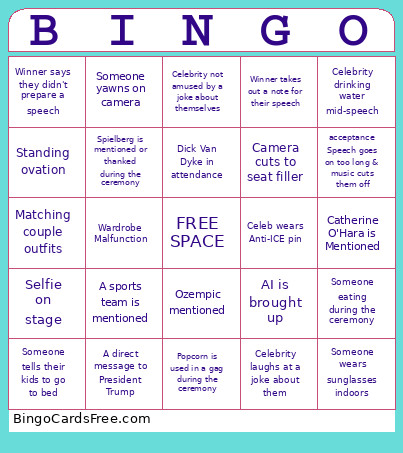 This OSCARS Bingo Cards Game contains following Words or Phrases: A direct message to President Trump, A misprouncation of a nominee's name, A shoutout to movie theaters is made, A sports team is mentioned, A streaming service gets mentioned, A TikTok reference, A WFF alumni wins [instert catagory], A WFF Alumni wins in three categories, acceptance Speech goes on too long & music cuts them off, Adam Sandler wears a suit, Adam Sandler wears athleisure, AI is brought up, Amy Poehler presents an award, Camera cuts to seat filler, Catherine O'Hara is Mentioned, Celeb wears Anti-ICE pin, Celebrity drinking water mid-speech, Celebrity laughs at a joke about them, Celebrity not amused by a joke about themselves, Censored profanity, Conan roasts one of the winners, Dick Van Dyke in attendance, Diddy joke/reference, Historic win (first time for...), Host makes political reference, In memoriam misses a crucial name, Joke About There Being 2 Michael B Jordans, KPOP DEMON HUNTERS SINGERS PERFORM SONG, Matching couple outfits, Nobody wins bingo [contingency plan], Ozempic mentioned, Popcorn is used in a gag during the ceremony, Selfie on stage, Someone anounces their retierment, Someone eating during the ceremony, Someone tells their kids to go to bed, Someone wears sunglasses indoors, Someone yawns on camera, Spielberg is mentioned or thanked during the ceremony, Standing ovation, Standing ovation for a nominee who doesn't win, The Slap is referenced, Timothée Chalamet asked to play ping pong, Wardrobe Malfunction, Winner cries during their acceptance speech, Winner says they didn't prepare a speech, Winner takes out a note for their speech, Winner trips up stairs when accepting award.