
Oscar Bingo Cards - Print Free or Customize
Print free Oscar bingo cards or personalize, limitless prints! Choose from 42,200+ designs or use our bingo card generator. Add numbers, phrases, photos, or any combination. Play using PDF printouts, virtual bingo cards, and our virtual bingo caller, or combine all formats.
About: This bingo card is perfect for anyone tuning in to a star-studded, unpredictable awards show—think Oscars or Emmys with a dose of comedy and celebrity antics. From onstage hijinks to iconic presenters and pop culture references, it captures the energy and surprises that make live television so fun. Great for watch parties and fans who love tracking every memorable moment.
How To: To get a PDF to print, click the Print button. You can modify the card count and other printing settings on the Print tab. Grid items and free space content can be edited on the Basic tab. Appearance can be fully customized on the corresponding tabs, or you can quickly search any setting using the 🔍 tab.
How to play Oscar Bingo Cards?
- Printed Caller: Print PDF calling list & calling slips and physically draw the slips.
- Virtual Players: Click on the Play button above, and then click on the 🎫 button.
- Virtual Caller: Click on the Play button above.
- Printed Players: Print PDF bingo cards and physically write on the cards.
- Hybrid Mode: Choose any combination above. For example, caller can be either Paper or Virtual. And players can be Paper or Virtual or a combo of both.
Step-By-Step:
- Start by getting the Oscar Bingo PDF by clicking on the "Print" button above.
- Open the PDF and print a hard copy.
- For random calling, you can print another copy of the call list, cut, fold and then draw them randomly at play time.
- Cut the bingo cards at the cut lines if there are greater than 1 bingo cards per page.
- Distribute one card per player. For marking, you can use crayons. Crayons cost the least.
- Choose one person to be the caller. If you are playing in a small group, the caller may as well play along with their own Bingo card.
- The caller begins the play by randomly picking an item from the call list and announcing it to all players.
- The players check their cards to see if they have the called word. If they do, they cross off that word.
- The first player to finish a horizontal, vertical, or a diagonal line of marked items announces "Bingo!" and wins the game.
- The caller confirms that the items marked form a proper line according to the Bingo card and call list.
- You can play for varied patterns or a full card blackout for a longer game.
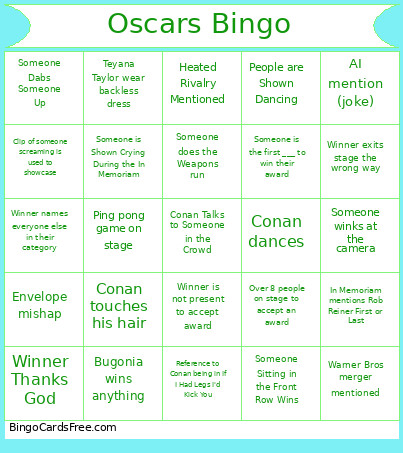 This Oscar Bingo Cards Game contains following Words or Phrases: Name Mispronounced, "I didn't write a speech", Someone Dabs Someone Up, a man and woman high five, Adam Sandler, AI mention (joke), AI mention (serious), Dwayne "The Rock" Johnson is Shown on Screen, an ad for a truck, an ICE ad plays, Bugonia wins anything, Camera pans to Meryl Streep or Jimmy Kimmel, Clip of someone screaming is used to showcase, Commercial for New Avengers Film, Conan dances, Conan Gets Sweaty, Conan makes a self-deprecating joke, Conan Talks to Someone in the Crowd, Conan touches his hair, Emma Stone bald head joke, Train Dreams wins any award, Envelope mishap, F1 wins anything, Heated Rivalry Mentioned, ICE mentioned, In Memoriam mentions Rob Reiner First or Last, Kylie and Timothée wear the same color, Leo's noticeably younger than him date is shown on camera, Man shown crying, Music cuts off a speech, One Battle After Another wins 5 awards, Over 8 people on stage to accept an award, People are Shown Dancing, Person gets ass smacked by ping pong paddle, Ping pong game on stage, Reference of Timmy C. not liking ballet or opera, Reference to Adrien Brody's long ass speech, Reference to Conan being in If I Had Legs I'd Kick You, Robert Downey Jr. Presents an Award wearing Glasses, Secret Agent Wins any Award, Sinners Wins 5 Awards, Sketch where Conan plays one of the Irish vampires in Sinners, Some person shows up wearing a cape, Someone does the Weapons run, Someone gets censored, Someone is Shown Crying During the In Memoriam, someone is shown not clapping while everyone else is, Someone is the first ___ to win their award, Someone Sitting in the Front Row Wins, someone thanks their grandma, someone throws punches in the air, Someone winks at the camera, Someone Does Finger Guns, Standing Ovation, Teyana Taylor wear backless dress, Timothee Chalamet loses best actor, Warner Bros merger mentioned, Winner exits stage the wrong way, Winner is not present to accept award, Winner Kisses Date, Diane Warren Loses 17th Time a the Oscars, Win goes "woooooooooo", Winner names everyone else in their category, Winner Thanks God, Winner Thanks Mom.