
Palworld Board Bingo Cards - Print Free or Customize
Print free Palworld Board bingo cards or alter them, unlimited cards! Pick from 42,600+ designs or use the bingo card generator. Add numbers, phrases, photos, or mix them all. Play using PDF printouts, online bingo cards, and the online bingo caller, or mix physical and digital.
About: This bingo card is perfect for dedicated Palworld fans, mixing achievements across building, crafting, battling, and collecting rare creatures. The tasks cover everything from assembling tricky equipment to conquering major bosses. It’s great for a group game night, streaming challenge, or a community event where players want to show off their Palworld mastery and creativity.
How To: To download a PDF to print, click the Print button. You can adjust the card quantity and other print preferences on the Print tab. Grid items and free space content can be edited on the Basic tab. Appearance can be totally personalized on the relevant tabs, or you can easily locate any preference using the 🔍 tab.
How to play Palworld Board Bingo Cards?
- Digital Caller: Click on the Play button above.
- Digital Players: Click on the Play button above, and then click on the 🎫 button.
- Printed Players: Print PDF bingo cards and physically mark the cards.
- Printed Caller: Print PDF calling list & calling slips and physically select the slips.
- Mixed Mode: Pick any combination above. For instance, caller can be either Paper or Digital. And players can be Paper or Digital or a combination of both.
Step-By-Step:
- Start by downloading the Palworld Board PDF by clicking on the "Print" button above.
- Open the PDF and print it.
- For random calling, you can print another copy of the call list, cut, fold and then pull them randomly at play time.
- Cut the bingo cards at the cut lines if there are greater than 1 bingo cards per page.
- Give one card to each player. For marking, you can use pens. Crayons cost the least.
- Pick one person to be the caller. If you are playing in a small group, the caller may as well play along with their own Bingo card.
- The caller begins the play by randomly drawing an item from the call list and announcing it to all players.
- The players check their cards to see if they have the called word. If they do, they mark that word.
- The first player to finish a horizontal, vertical, or a diagonal line of marked items shouts "Bingo!" and wins the play.
- The caller confirms that the items crossed off form a correct line according to the Bingo card and call list.
- You can play for varied patterns or a full card blackout for an extended play.
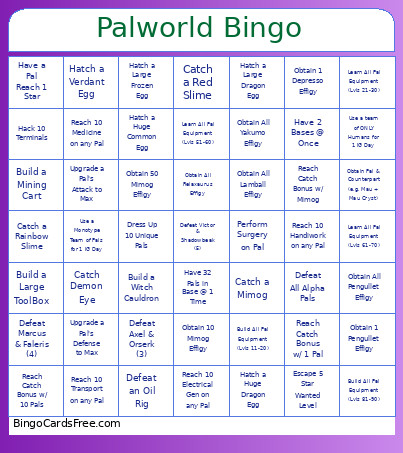 This Palworld Board Bingo Cards Game contains following Words or Phrases: (Do you wanna) Build a Snowman!?, Activate 1 Watchtower, Activate 10 Watchtowers, Activate 20 Watchtowers, Activate 5 Watchtowers, Activate All Watchtowers, Build a Flame Cauldron, Build a Flower Bed, Build a Large ToolBox, Build a Lockpick v1, Build a Lockpick v2, Build a Lockpick v3, Build a Mining Cart, Build a Silo, Build a Stump & Axe, Build a Water Fountain, Build a Witch Cauldron, Build All Pal Equipment (Lvls 1-10), Build All Pal Equipment (Lvls 11-20), Build All Pal Equipment (Lvls 21-30), Build All Pal Equipment (Lvls 31-40), Build All Pal Equipment (Lvls 41-50), Build All Pal Equipment (Lvls 51-60), Build All Pal Equipment (Lvls 61-70), Build All Pal Equipment (Lvls 71-80), Build All Pal Equipment (Lvls 81-90), Build All Pal Equipment (Lvls 91-100), Build an Electic Pylon, Catch a Blue Slime, Catch a Cave Bat + Illuminant Bat, Catch a Green Slime, Catch a Illuminant Slime, Catch a Lucky Pal, Catch a Mimog, Catch a Purple Slime, Catch a Rainbow Slime, Catch a Red Slime, Catch an Enchanted Sword, Catch Demon Eye, Catch Everything in a Dungeon, Catch Everything in a Raid, Catch Eye of Cthulhu, Defeat a Watchtower, Defeat All Alpha Pals, Defeat All Sacred Realm Pal Bosses, Defeat an Oil Rig, Defeat Auri & Shaolong (8), Defeat Axel & Orserk (3), Defeat Bjorn & Bastigor (7), Defeat Lily & Lyleen (2), Defeat Marcus & Faleris (4), Defeat Saya & Selyne (6), Defeat Victor & Shadowbeak (5), Defeat Zenara & Astralym (9), Defeat Zoe & Grizzbolt (1), Dress Up 1 Pal, Dress Up 10 Unique Pals, Enter Coal Era (Refined Metal), Enter Copper Era, Enter Pal Metal Era, Enter Paloxite Era, Enter Quartz Era (Circuit Boards), Enter Soralite Era, Enter Sulfer Era (Gunpowder), Equip Depresso Outfit to Player, Escape 1 Star Wanted Level, Escape 2 Star Wanted Level, Escape 3 Star Wanted Level, Escape 4 Star Wanted Level, Escape 5 Star Wanted Level, Hack 1 Terminal, Hack 10 Terminals, Hack 20 Terminals, Hack 30 Terminals, Hack 5 Terminals, Hatch a Common Egg, Hatch a Damp Egg, Hatch a Dark Egg, Hatch a Dragon Egg, Hatch a Frozen Egg, Hatch a Huge Common Egg, Hatch a Huge Damp Egg, Hatch a Huge Dark Egg, Hatch a Huge Dragon Egg, Hatch a Huge Electric Egg, Hatch a Huge Frozen Egg, Hatch a Huge Rocky Egg, Hatch a Huge Scorching Egg, Hatch a Huge Verdant Egg, Hatch a Large Common Egg, Hatch a Large Damp Egg, Hatch a Large Dark Egg, Hatch a Large Dragon Egg, Hatch a Large Electric Egg, Hatch a Large Frozen Egg, Hatch a Large Rocky Egg, Hatch a Large Scorching Egg, Hatch a Large Verdant Egg, Hatch a Rocky Egg, Hatch a Scorching Egg, Hatch a Verdant Egg, Hatch an Electric Egg, Have 10 types of Pal Spheres at one time, Have 15 Pals in Base @ 1 Time, Have 2 Bases @ Once, Have 25 Pals in Base @ 1 Time, Have 3 Bases @ Once, Have 30 Pals in Base @ 1 Time, Have 31 Pals in Base @ 1 Time, Have 32 Pals in Base @ 1 Time, Have 4 Bases @ Once, Have 5 types of Pal Spheres at one time, Have 8 Pals in Base @ 1 Time, Have a Pal Reach 1 Star, Have a Pal Reach 2 Stars, Have a Pal Reach 3 Stars, Have a Pal Reach 4 Stars, Have a Pal w/ 10 Trust Levels, Have a Pal w/ 5 Trust Levels, Have a Pal w/ Rainbow Passive, Have a Pal w/ Serenity Passive, Learn a Full Row of Tech Tree, Learn All Pal Equipment (Lvls 1-10), Learn All Pal Equipment (Lvls 11-20), Learn All Pal Equipment (Lvls 21-30), Learn All Pal Equipment (Lvls 31-40), Learn All Pal Equipment (Lvls 41-50), Learn All Pal Equipment (Lvls 51-60), Learn All Pal Equipment (Lvls 61-70), Learn All Pal Equipment (Lvls 71-80), Learn All Pal Equipment (Lvls 81-90), Learn All Pal Equipment (Lvls 91-100), Obtain 1 Cattiva Effigy, Obtain 1 Depresso Effigy, Obtain 1 Effigy (Any Kind), Obtain 1 Herbil Effigy, Obtain 1 Lamball Effigy, Obtain 1 Lifmunk Effigy, Obtain 1 Lunaris Effigy, Obtain 1 Mimog Effigy, Obtain 1 Munchill Effigy, Obtain 1 Pengullet Effigy, Obtain 1 Relaxaurus Effigy, Obtain 1 Rooby Effigy, Obtain 1 Tanzee Effigy, Obtain 1 Yakumo Effigy, Obtain 10 Mimog Effigy, Obtain 100 Mimog Effigy, Obtain 20 Mimog Effigy, Obtain 50 Mimog Effigy, Obtain All Cattiva Effigy, Obtain All Depresso Effigy, Obtain All Herbil Effigy, Obtain All Lamball Effigy, Obtain All Lifmunk Effigy, Obtain All Lunaris Effigy, Obtain All Munchill Effigy, Obtain All Pengullet Effigy, Obtain All Relaxaurus Effigy, Obtain All Rooby Effigy, Obtain All Tanzee Effigy, Obtain All Yakumo Effigy, Obtain Pal & Counterpart (e.g. Mau + Mau Cryst), Perform Surgery on Pal, Reach 10 Cooling on any Pal, Reach 10 Electrical Gen on any Pal, Reach 10 Farming on any Pal, Reach 10 Gathering on any Pal, Reach 10 Handiwork on any Pal, Reach 10 Kindling on any Pal, Reach 10 Lumbering on any Pal, Reach 10 Medicine on any Pal, Reach 10 Mining on any Pal, Reach 10 Planting on any Pal, Reach 10 Transport on any Pal, Reach 10 Watering on any Pal, Reach Catch Bonus w/ 1 Pal, Reach Catch Bonus w/ 10 Pals, Reach Catch Bonus w/ Mimog, Reach Max Base Level, Reach Max Player Level, Rebuild Ancient Whale Instrument, Research a Full Tree on Lab, Successfully Breed Pals for Egg, Summon & Defeat/Catch Bellanoir, Summon & Defeat/Catch Bellanoir Libero, Take Lethal Fall Damage, Unlock 3 Accessory Slots, Unlock 4 Accessory Slots, Unlock 5 Weapon Slots, Unlock 6 Weapon Slots, Unlock Every Expedition, Upgrade a Pal's Attack to Max, Upgrade a Pal's Defense to Max, Upgrade a Pal's Health to Max, Upgrade a Pal's Work Speed to Max, Upgrade All of 1 Pal's stats to Max, Use a Monotype Team of Pals for 1 IG Day, Use a team of ONLY Humans for 1 IG Day.