Print free Party bingo cards or alter them,
unlimited prints! Select from 41,500+ designs or use the bingo card generator.
Add numbers, phrases, images, or all of them.
Play using printed PDF, virtual bingo cards,
and the virtual bingo caller, or go hybrid.
How To: To download a printable PDF, click the Print button.
You can alter the number of cards and other
print settings on the Print tab.
Grid items and free space content can be edited on the Basic tab.
Appearance can be totally customized on the
relevant tabs, or you can easily find any option
on the 🔍 tab.
How to play Party Bingo Cards?
Online Players: Click on the Play button above, and then click on the 🎫 button.
Printed Players: Print PDF bingo cards and physically cross off the cards.
Printed Caller: Print PDF calling list & calling slips and physically draw the slips.
Online Caller: Click on the Play button above.
Hybrid Play: Choose any combination above.
For example, caller can be either Printed or Online.
And players can be Printed or Online or a combo of both.
Step-By-Step:
Start by getting the Party PDF by clicking on the "Print" button above.
Open the PDF and print it.
For random calling, you can print another copy of the call list, cut, fold and then draw them randomly at play time.
Cut the bingo cards at the cut lines if there are more than 1 bingo cards per page.
Distribute one card per player. For marking, you can use pens. Crayons cost the least.
Choose one person to be the caller. If you are playing in a small group, the caller may as well play along with their own Bingo card.
The caller begins the play by randomly drawing an item from the call list and announcing it to all players.
The players scan their cards to see if they have the announced word. If they do, they dab that word.
The first player to finish a horizontal, vertical, or a diagonal line of crossed items announces "Bingo!" and wins the play.
The caller confirms that the items crossed off form a proper line as per the Bingo card and call list.
You can play for different patterns or a full card blackout for an extended play.
This Party Bingo Cards Game contains following Words or Phrases: singt im selben Chor wie die Geburtstagskinder, spielt mehr als ein Instrument, war schon mal auf einem Konzert der Geburtstagskinder (als Zuhörer), ist mit einem der Geburtstagskinder verwandt, war schon mal mit einem der Geburtstagskinder im Urlaub, ist mit einem der Geburtstagskinder zur Schule gegangen, hat mit mehr als 5 Personen für ein Geschenk zusammengelegt, ist schon mal einen Halbmarathon oder Marathon gelaufen, ist mehr als 50km angereist, hat die exakt gleiche Schuhgröße wie du, ist mit dem Fahrrad zur Party gekommen, trägt Kontaktlinsen statt einer Brille, kann mit der Zunge die Nasenspitze berühren, spricht mindestens drei Sprachen fließend, hatte schon mal einen Knochen gebrochen, besitzt ein Haustier in seiner eigenen Wohnung, hat schon in mehr als drei verschiedenen Städten gewohnt, ist im exakt selben Jahr geboren wie du, besitzt absolut keinen TikTok-Account, hat ein Tattoo, das man gerade nicht sehen kann, ist ein Einzelkind, ist beim ersten Mal durch die Führerscheinprüfung gefallen, war schon mal auf einem anderen Kontinent, hat schon mal eine Nacht unter freiem Sternenhimmel geschlafen, war schon mal im Fernsehen, ist schon mal völlig spontan in ein anderes Land gereist, hatte oder hat einen aktiven Youtube-Kanal oder Podcast, hatte auf einem Roadtrip oder im Urlaub schon mal eine Autopanne, wurde in der Schulzeit schon mal richtig beim Schummeln erwischt, hat schon mal einen Fallschirmsprung oder Bungee-Jump gemacht, hat schon mal in der Gastronomie gearbeitet, hatte in freier Wildbahn schon mal eine unheimliche Begegnung mit einem Tier, hat einen schwarzen oder braunen Gürtel in einer Kampfsportart, hat schon mal einen Berg bestiegen, der höher als 3.000 Meter ist, war in einem echten Prozess schon mal als Zeuge vor Gericht, hat einen echten Asteroiden- oder Meteoritensplitter berührt, hat sich schon mal mit einem falschen Namen aus einer unangenehmen Situation gerettet, hat einen 1.X Abitur-Durchschnitt, ist schon mal auf einem Kamel geritten, ist schön / attraktiv.

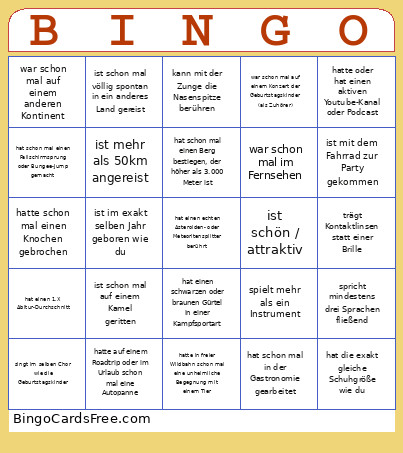 This Party Bingo Cards Game contains following Words or Phrases: singt im selben Chor wie die Geburtstagskinder, spielt mehr als ein Instrument, war schon mal auf einem Konzert der Geburtstagskinder (als Zuhörer), ist mit einem der Geburtstagskinder verwandt, war schon mal mit einem der Geburtstagskinder im Urlaub, ist mit einem der Geburtstagskinder zur Schule gegangen, hat mit mehr als 5 Personen für ein Geschenk zusammengelegt, ist schon mal einen Halbmarathon oder Marathon gelaufen, ist mehr als 50km angereist, hat die exakt gleiche Schuhgröße wie du, ist mit dem Fahrrad zur Party gekommen, trägt Kontaktlinsen statt einer Brille, kann mit der Zunge die Nasenspitze berühren, spricht mindestens drei Sprachen fließend, hatte schon mal einen Knochen gebrochen, besitzt ein Haustier in seiner eigenen Wohnung, hat schon in mehr als drei verschiedenen Städten gewohnt, ist im exakt selben Jahr geboren wie du, besitzt absolut keinen TikTok-Account, hat ein Tattoo, das man gerade nicht sehen kann, ist ein Einzelkind, ist beim ersten Mal durch die Führerscheinprüfung gefallen, war schon mal auf einem anderen Kontinent, hat schon mal eine Nacht unter freiem Sternenhimmel geschlafen, war schon mal im Fernsehen, ist schon mal völlig spontan in ein anderes Land gereist, hatte oder hat einen aktiven Youtube-Kanal oder Podcast, hatte auf einem Roadtrip oder im Urlaub schon mal eine Autopanne, wurde in der Schulzeit schon mal richtig beim Schummeln erwischt, hat schon mal einen Fallschirmsprung oder Bungee-Jump gemacht, hat schon mal in der Gastronomie gearbeitet, hatte in freier Wildbahn schon mal eine unheimliche Begegnung mit einem Tier, hat einen schwarzen oder braunen Gürtel in einer Kampfsportart, hat schon mal einen Berg bestiegen, der höher als 3.000 Meter ist, war in einem echten Prozess schon mal als Zeuge vor Gericht, hat einen echten Asteroiden- oder Meteoritensplitter berührt, hat sich schon mal mit einem falschen Namen aus einer unangenehmen Situation gerettet, hat einen 1.X Abitur-Durchschnitt, ist schon mal auf einem Kamel geritten, ist schön / attraktiv.