PASCAL Hybrid Work Bingo Cards - Print Free or Customize
Print free PASCAL Hybrid Work bingo cards or adjust them,
limitless cards! Choose from 41,500+ designs or use the bingo card generator.
Add numbers, words, images, or any combination.
Play using PDF printouts, virtual bingo cards,
and the virtual bingo caller, or combine all formats.
About: This bingo card perfectly captures the awkward, funny, and relatable moments of a hybrid workplace where in-person and remote life collide. With inside jokes about coworkers, technical hiccups, and office quirks, it’s ideal for an all-hands meeting, team-building session, or staff reunion looking to break the ice and spark some laughs among colleagues.
How To: To download a printable PDF, click the Print button.
You can modify the card count and other
print settings on the Print tab.
Grid items and free space text can be changed on the Basic tab.
Appearance can be exactly personalized on the
corresponding tabs, or you can quickly find any preference
using the 🔍 tab.
How to play PASCAL Hybrid Work Bingo Cards?
Paper Caller: Print PDF calling list & calling slips and physically pick the slips.
Virtual Players: Click on the Play button above, and then click on the 🎫 button.
Virtual Caller: Click on the Play button above.
Paper Players: Print PDF bingo cards and physically mark the cards.
Combo Mode: Select any combination above.
For example, caller can be either Paper or Virtual.
And players can be Paper or Virtual or a combination of both.
Step-By-Step:
Start by downloading the PASCAL Hybrid Work Bingo PDF by clicking on the "Print" button above.
Open the PDF and print a hard copy.
For random calling, you can print another copy of the call list, cut, fold and then pick them randomly at play time.
Cut the bingo cards at the cut marks if there are more than 1 bingo cards per page.
Distribute one card per player. For marking, you can use crayons. Crayons cost the least.
Select one person to be the caller. If you are playing in a small group, the caller may also play along with their own Bingo card.
The caller opens the play by randomly picking an item from the call list and saying it to all players.
The players look at their cards to see if they have the called word. If they do, they cross off that word.
The first player to finish a horizontal, vertical, or a diagonal line of crossed items announces "Bingo!" and wins the game.
The caller validates that the items marked form a correct line as per the Bingo card and call list.
You can play for varied patterns or a full card blackout for a longer game.
This PASCAL Hybrid Work Bingo Cards Game contains following Words or Phrases: "Bananapants", "It's so good to see you in person", Alex says something incriminating, Amy plays devil's advocate, Complained about the office temperature, Forgot how tall someone was (until you saw them), Forgot your fob, badge, ID, key, etc., Fully in-person meeting, Got a bad parking spot, Got a good parking spot, Horrible commute, In-person convo about work, Internet/wifi issues or slowness, Interrupted by an in-person thing during a virtual thing, KC interrupted/cut somebody off someone over Zoom, Left your lunch at home, Maggie cusses in an official meeting, Maggie doesn't wear pants, Non-wifi tech issues, Pet appearance, Snagged your favorite desk, Someone (in person) mentions the weather, Susan swan update, In-person chatter heard on virtual call, Someone uses Zoom reactions, Used the communal break room, Walked to the office in the rain, Worked for more than 1hr w/o interruptions or mtgs, You work in office, You work remotely.

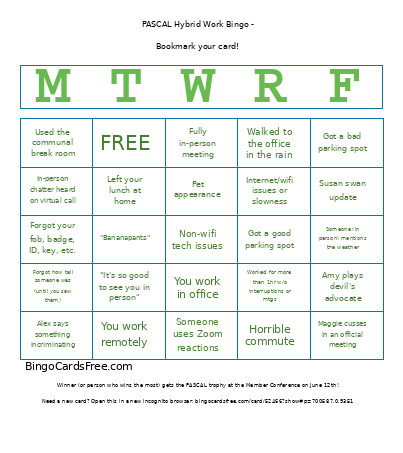 This PASCAL Hybrid Work Bingo Cards Game contains following Words or Phrases: "Bananapants", "It's so good to see you in person", Alex says something incriminating, Amy plays devil's advocate, Complained about the office temperature, Forgot how tall someone was (until you saw them), Forgot your fob, badge, ID, key, etc., Fully in-person meeting, Got a bad parking spot, Got a good parking spot, Horrible commute, In-person convo about work, Internet/wifi issues or slowness, Interrupted by an in-person thing during a virtual thing, KC interrupted/cut somebody off someone over Zoom, Left your lunch at home, Maggie cusses in an official meeting, Maggie doesn't wear pants, Non-wifi tech issues, Pet appearance, Snagged your favorite desk, Someone (in person) mentions the weather, Susan swan update, In-person chatter heard on virtual call, Someone uses Zoom reactions, Used the communal break room, Walked to the office in the rain, Worked for more than 1hr w/o interruptions or mtgs, You work in office, You work remotely.