PC Storytime Bingo Cards - Print Free or Customize
Print free PC Storytime bingo cards or adjust them,
unlimited prints! Choose from 42,600+ designs or use the bingo card generator.
Add numbers, phrases, photos, or mix them all.
Play using printable PDF, digital bingo cards,
and the digital bingo caller, or combine all formats.
About: This bingo card is perfect for Peace Corps Volunteers or anyone involved in international service, capturing the quirky, adventurous, and sometimes chaotic moments that come with living and working abroad. With a lighthearted tone, it encourages sharing experiences—from travel mishaps to project milestones—making it great for group events, reunions, or end-of-service celebrations.
How To: To get a PDF to print, click the Print button.
You can adjust the card quantity and other
printing options on the Print tab.
Grid items and free space content can be added on the Basic tab.
Appearance can be highly personalized on the
corresponding tabs, or you can quickly find any setting
using the 🔍 tab.
How to play PC Storytime Bingo Cards?
Virtual Players: Click on the Play button above, and then click on the 🎫 button.
Virtual Caller: Click on the Play button above.
Printed Players: Print PDF bingo cards and manually cross off the cards.
Printed Caller: Print PDF calling list & calling slips and manually pick the slips.
Hybrid Play: Pick any combination above.
For example, caller can be either Printed or Virtual.
And players can be Printed or Virtual or a combo of both.
Step-By-Step:
Start by saving the PC Storytime Bingo PDF by clicking on the "Print" button above.
Open the PDF and print a hard copy.
For random drawing, you can print another copy of the call list, cut, fold and then pull them randomly at play time.
Cut the bingo cards at the cut lines if there are greater than 1 bingo cards per page.
Give one card to each player. For marking, you can use markers. Crayons cost the least.
Pick one person to be the caller. If you are playing in a small group, the caller may as well play along with their own Bingo card.
The caller starts the game by randomly picking an item from the call list and calling out it to everyone.
The players look at their cards to see if they have the announced word. If they do, they dab that word.
The first player to finish a horizontal, vertical, or a diagonal line of crossed items announces "Bingo!" and wins the game.
The caller checks that the items crossed off form a proper line as per the Bingo card and call list.
You can play for varied patterns or a full card blackout for a longer game.
This PC Storytime Bingo Cards Game contains following Words or Phrases: Disastrously fumbled a social interaction ___________, Had a dangerous run-in with an animal ________, Knows a cool fact about Ghanaian history __________, Completed a PCPP project ________, Injured themselves in a comical manner __________, Discovered a "hidden gem" destination at or near site ____________, Had non-PC family or friends visit them at site ___________, Completed a sidequest ________, Introduced an American food or tradition that became popular at site ____________, Recently completed a significant accomplishment at site _____________, Has harvested crops from a personal farm or garden ___________, Discovered their new favourite book during service ___________, Broke down on the side of the road while travelling ___________, Travelled to a different country (not the USA) during service ___________, Visited home during service or between services ___________, Picked up a new hobby during service __________, Learned a lesson the hard way __________, Knows what they're going to do after COS __________, Has gone viral on their community's social media __________, Delivered a Health-focused workshop __________, Delivered an Ed-focused workshop __________, Delivered an Ag-focused workshop __________, Utilized a PACA tool in the past six months ___________, Has a best friend at site _________.

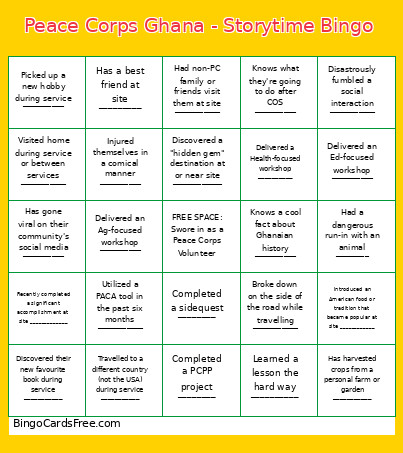 This PC Storytime Bingo Cards Game contains following Words or Phrases: Disastrously fumbled a social interaction ___________, Had a dangerous run-in with an animal ________, Knows a cool fact about Ghanaian history __________, Completed a PCPP project ________, Injured themselves in a comical manner __________, Discovered a "hidden gem" destination at or near site ____________, Had non-PC family or friends visit them at site ___________, Completed a sidequest ________, Introduced an American food or tradition that became popular at site ____________, Recently completed a significant accomplishment at site _____________, Has harvested crops from a personal farm or garden ___________, Discovered their new favourite book during service ___________, Broke down on the side of the road while travelling ___________, Travelled to a different country (not the USA) during service ___________, Visited home during service or between services ___________, Picked up a new hobby during service __________, Learned a lesson the hard way __________, Knows what they're going to do after COS __________, Has gone viral on their community's social media __________, Delivered a Health-focused workshop __________, Delivered an Ed-focused workshop __________, Delivered an Ag-focused workshop __________, Utilized a PACA tool in the past six months ___________, Has a best friend at site _________.