Print free People bingo cards or modify,
unlimited prints! Choose from 42,200+ templates or use our bingo card generator.
Add numbers, phrases, images, or mix them all.
Play using printable PDF, digital bingo cards,
and our digital bingo caller, or go hybrid.
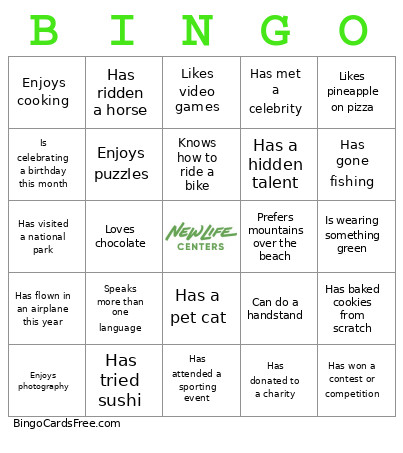
About: This bingo card is perfect for breaking the ice and sparking interesting conversations in any group setting, like a team meeting, family gathering, classroom or community event. Its fun mix of experiences, hobbies, and personal quirks encourages everyone to share stories and discover common ground in a relaxed, friendly atmosphere.
How To: To save a printable PDF, click the Print button.
You can change the card quantity and other
printing preferences on the Print tab.
Grid items and free space content can be edited on the Basic tab.
Appearance can be completely personalized on the
corresponding tabs, or you can quickly locate any option
on the 🔍 tab.
How to play People Bingo Cards?
Online Caller: Click on the Play button above.
Printed Players: Print PDF bingo cards and physically cross off the cards.
Printed Caller: Print PDF calling list & calling slips and physically choose the slips.
Online Players: Click on the Play button above, and then click on the 🎫 button.
Combo Play: Select any combination above.
For example, caller can be either Offline or Online.
And players can be Offline or Online or a combo of both.
Step-By-Step:
Start by saving the People Bingo PDF by clicking on the "Print" button above.
Open the PDF and print it.
For random drawing, you can print another copy of the call list, cut, fold and then pull them randomly at play time.
Cut the bingo cards at the cut marks if there are greater than 1 bingo cards per page.
Give one card to each player. For marking, you can use markers. Crayons are the cheapest.
Select one person to be the caller. If you are playing in a small group, the caller can also play along with their own Bingo card.
The caller opens the play by randomly pulling an item from the call list and calling out it to all players.
The players scan their cards to see if they have the announced word. If they do, they mark that word.
The first player to finish a horizontal, vertical, or a diagonal line of crossed items shouts "Bingo!" and wins the play.
The caller confirms that the items crossed off form a correct line according to the Bingo card and call list.
You can play for different patterns or a full card blackout for a longer play.
This People Bingo Cards Game contains following Words or Phrases: Has traveled to another country, Speaks more than one language, Has a pet dog, Has a pet cat, Is wearing blue, Was born in the same month as you, Loves coffee, Prefers tea over coffee, Plays a musical instrument, Has run a 5K or longer race, Knows how to swim, Has gone camping, Likes spicy food, Is left-handed, Has ridden a horse, Has been on a cruise, Has gone skydiving or wants to, Can whistle, Can juggle, Has broken a bone, Has never broken a bone, Has met a celebrity, Likes pineapple on pizza, Dislikes pineapple on pizza, Has watched a movie this week, Read a book this month, Enjoys board games, Likes video games, Has baked cookies from scratch, Can cook a favorite family recipe, Has visited a national park, Has lived in another state or country, Has moved more than three times, Is an only child, Has two or more siblings, Woke up before 6 a.m. today, Is celebrating a birthday this month, Likes to garden, Has planted a tree, Enjoys hiking, Has gone fishing, Has been to a concert, Has seen the ocean, Has seen snow, Prefers mountains over the beach, Prefers the beach over the mountains, Knows how to ride a bike, Can solve a Rubik's Cube, Has worn glasses or contacts, Likes to draw or paint, Has volunteered in the past year, Has donated to a charity, Enjoys puzzles, Can name all 50 U.S. states, Has ridden on a train, Has flown in an airplane this year, Prefers sunrise over sunset, Enjoys cooking, Has tried sushi, Has never eaten sushi, Loves chocolate, Prefers vanilla, Has completed a DIY project, Has won a contest or competition, Enjoys photography, Can do a handstand, Has watched the Olympics, Has attended a sporting event, Likes rainy days, Enjoys singing, Has a hidden talent, Can tell a good joke, Has learned something new this week, Is wearing something green, Made a new friend today.

 This People Bingo Cards Game contains following Words or Phrases: Has traveled to another country, Speaks more than one language, Has a pet dog, Has a pet cat, Is wearing blue, Was born in the same month as you, Loves coffee, Prefers tea over coffee, Plays a musical instrument, Has run a 5K or longer race, Knows how to swim, Has gone camping, Likes spicy food, Is left-handed, Has ridden a horse, Has been on a cruise, Has gone skydiving or wants to, Can whistle, Can juggle, Has broken a bone, Has never broken a bone, Has met a celebrity, Likes pineapple on pizza, Dislikes pineapple on pizza, Has watched a movie this week, Read a book this month, Enjoys board games, Likes video games, Has baked cookies from scratch, Can cook a favorite family recipe, Has visited a national park, Has lived in another state or country, Has moved more than three times, Is an only child, Has two or more siblings, Woke up before 6 a.m. today, Is celebrating a birthday this month, Likes to garden, Has planted a tree, Enjoys hiking, Has gone fishing, Has been to a concert, Has seen the ocean, Has seen snow, Prefers mountains over the beach, Prefers the beach over the mountains, Knows how to ride a bike, Can solve a Rubik's Cube, Has worn glasses or contacts, Likes to draw or paint, Has volunteered in the past year, Has donated to a charity, Enjoys puzzles, Can name all 50 U.S. states, Has ridden on a train, Has flown in an airplane this year, Prefers sunrise over sunset, Enjoys cooking, Has tried sushi, Has never eaten sushi, Loves chocolate, Prefers vanilla, Has completed a DIY project, Has won a contest or competition, Enjoys photography, Can do a handstand, Has watched the Olympics, Has attended a sporting event, Likes rainy days, Enjoys singing, Has a hidden talent, Can tell a good joke, Has learned something new this week, Is wearing something green, Made a new friend today.