Pharos House Bingo Cards - Print Free or Customize
Print free Pharos House bingo cards or personalize,
unlimited prints! Select from 40,600+ designs or use the bingo card generator.
Add numbers, words, photos, or all of them.
Play using PDF printouts, online bingo cards,
and the online bingo caller, or go hybrid.
About: This bingo card perfectly captures the unpredictable and often humorous challenges of working in a group home or residential facility. With a playful tone, it highlights both the quirky moments and daily struggles that staff face with residents and coworkers alike. It’s ideal for team meetings, staff trainings, or just some lighthearted bonding among residential staff members.
How To: To save a PDF to print, click the Print button.
You can modify the card quantity and other
print preferences on the Print tab.
Grid items and free space content can be added on the Basic tab.
Appearance can be fully customized on the
relevant tabs, or you can easily find any preference
using the 🔍 tab.
How to play Pharos House Bingo Cards?
Online Players: Click on the Play button above, and then click on the 🎫 button.
Paper Players: Print PDF bingo cards and manually mark the cards.
Paper Caller: Print PDF calling list & calling slips and manually select the slips.
Online Caller: Click on the Play button above.
Combo Play: Pick any combination above.
For instance, caller can be either Offline or Online.
And players can be Offline or Online or a mix of both.
Step-By-Step:
Start by saving the Pharos House Bingo PDF by clicking on the "Print" button above.
Open the PDF and print it.
For random drawing, you can print another copy of the call list, cut, fold and then pick them randomly at play time.
Cut the bingo cards at the cut marks if there are greater than 1 bingo cards per page.
Give one card to each player. For marking, you can use crayons. Crayons are the cheapest.
Pick one person to be the caller. If you are playing in a small group, the caller can as well play along with their own Bingo card.
The caller begins the play by randomly drawing an item from the call list and announcing it to all players.
The players scan their cards to see if they have the called word. If they do, they cross off that word.
The first player to complete a horizontal, vertical, or a diagonal line of crossed items shouts "Bingo!" and wins the play.
The caller verifies that the items marked form a proper line according to the Bingo card and call list.
You can play for varied patterns or a full card blackout for an extended play.
This Pharos House Bingo Cards Game contains following Words or Phrases: "Did you approve my pass?", "Celenia said I could…", "What's for dinner?", A resident walks up and starts talking at you without acknowledging you, A resident complains that a chore wasn't done but doesn't offer to do it themselves, A resident misses an appointment, A resident complains that we don't do our jobs, A resident asks if Tania got them a doctor's appointment, A resident makes their own doctor's appointment, A resident asks you to bend the rules "just for them" or "just this one time", "I should have stayed in prison", A resident forgets an arrival call, A staff member gets a parking ticket, Celenia yells at someone, Tim has third (or fourth) breakfast, A resident asks if "we beefin'?", Will tells a story that happened in the produce section, Tania arrives to work injured, Matt answers a question (not yes or no), Jason mentions one of his ex-wives, Patrick breaks a pen, Caroline says she is going to kill herself, Someone takes the keys home with them, Celenia doesn't lose anything all day, All chores are completed for your shift, "Nobody told me that was a rule/Nobody showed me how to do that", A resident signs out for the wrong pass, A resident forgets to return the bus pass, A resident says that their issues are more important, A resident complains about their roommate.

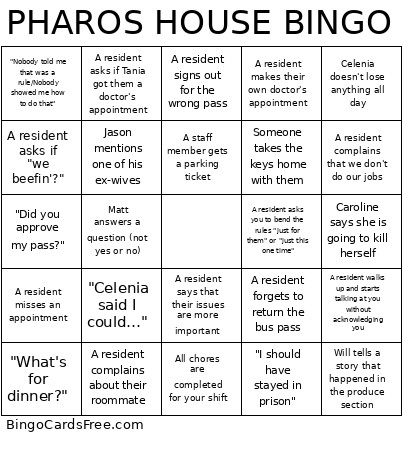 This Pharos House Bingo Cards Game contains following Words or Phrases: "Did you approve my pass?", "Celenia said I could…", "What's for dinner?", A resident walks up and starts talking at you without acknowledging you, A resident complains that a chore wasn't done but doesn't offer to do it themselves, A resident misses an appointment, A resident complains that we don't do our jobs, A resident asks if Tania got them a doctor's appointment, A resident makes their own doctor's appointment, A resident asks you to bend the rules "just for them" or "just this one time", "I should have stayed in prison", A resident forgets an arrival call, A staff member gets a parking ticket, Celenia yells at someone, Tim has third (or fourth) breakfast, A resident asks if "we beefin'?", Will tells a story that happened in the produce section, Tania arrives to work injured, Matt answers a question (not yes or no), Jason mentions one of his ex-wives, Patrick breaks a pen, Caroline says she is going to kill herself, Someone takes the keys home with them, Celenia doesn't lose anything all day, All chores are completed for your shift, "Nobody told me that was a rule/Nobody showed me how to do that", A resident signs out for the wrong pass, A resident forgets to return the bus pass, A resident says that their issues are more important, A resident complains about their roommate.