PI 6 Planning Bingo Cards - Print Free or Customize
Print free PI 6 Planning bingo cards or alter them,
unlimited cards! Pick from 41,500+ designs or use our bingo card generator.
Add numbers, phrases, photos, or mix them all.
Play using PDF prints, digital bingo cards,
and our digital bingo caller, or combine all formats.
About: This bingo card captures the excitement and energy of a large-scale healthcare IT event, especially one using Agile and SAFe practices. With references to teams, planning sessions, stakeholders, technology systems, and even fun fiesta elements, it’s perfect for engaging participants at a PI Planning session or a cross-functional healthcare IT workshop looking to boost collaboration and add some light-hearted competition.
How To: To save a PDF to print, click the Print button.
You can alter the card count and other
printing options on the Print tab.
Grid items and free space text can be edited on the Basic tab.
Appearance can be totally customized on the
corresponding tabs, or you can easily locate any preference
on the 🔍 tab.
How to play PI 6 Planning Bingo Cards?
Digital Players: Click on the Play button above, and then click on the 🎫 button.
Paper Caller: Print PDF calling list & calling slips and physically choose the slips.
Paper Players: Print PDF bingo cards and physically cross off the cards.
Digital Caller: Click on the Play button above.
Mixed Play: Select any combination above.
For example, caller can be either Printed or Digital.
And players can be Printed or Digital or a mix of both.
Step-By-Step:
Start by downloading the PI 6 Planning PDF by clicking on the "Print" button above.
Open the PDF and print a hard copy.
For random drawing, you can print another copy of the call list, cut, fold and then draw them randomly at play time.
Cut the bingo cards at the cut lines if there are more than 1 bingo cards per page.
Give one card to each player. For marking, you can use pens. Crayons are the cheapest.
Select one person to be the caller. If you are playing in a small group, the caller can also play along with their own Bingo card.
The caller starts the game by randomly drawing an item from the call list and saying it to all players.
The players check their cards to see if they have the announced word. If they do, they dab that word.
The first player to finish a horizontal, vertical, or a diagonal line of crossed items shouts "Bingo!" and wins the play.
The caller verifies that the items marked form a correct line according to the Bingo card and call list.
You can play for multiple patterns or a full card blackout for an extended play.
This PI 6 Planning Bingo Cards Game contains following Words or Phrases: "Relentless Improvement", 102 Tower, A Stakeholder Speaks, Access Teams, ADT/Reg, Agile, AI, Ambulatory, ART1, ART2, ART3, ARUP, Backlog, Billing, Breakout, Online, Capacity, Coding, Collaborate, Committed, Communicate, Confidence Vote, Coordinate, Core Team, Cross ART, CTH, CVSS, Daily Sync, Dependency, Dr. Carter, Dr. Reddy, Engagement, Epic Module by Name (i.e. Beaker, Willow, etc.), Epic Upgrade, Feature, Fiesta Theme Mention, HB, HIM, HMHI, Inpatient, Interfaces, Instructional Design (ID), Iteration Planning, Knowledge Base, Lab Team(s), Mention a Costume, Moran, MyChart, New Business or New DEP, Nova Notes, Nursing Informatics (NI), Objective(s), Operational Teams, Order Set, PB, Pharmacy, PI Planning, PI Planning Challenge, PO or PD, Provider(s), Provisioning Team, Radiology, Read Outs, Regulatory, Risk, SAFe, Sched Patient Access (SPA), Secure Chat, Shared Services, SharePoint, Someone Goes Over Their Time, Speaker in Full Costume, Speaker Wearing Sombrero, Sprint or Iteration, Stakeholder(s), Story/SFSTRY, Sublette, Team Agreement, Team Breakouts, Team Coach, Teams Meeting, Time/Timer, Train, Transparency, Unified Communications, West Valley Temp Clinic, Pivot, "Fiesta", Service Now, "Sombrero", University Health.

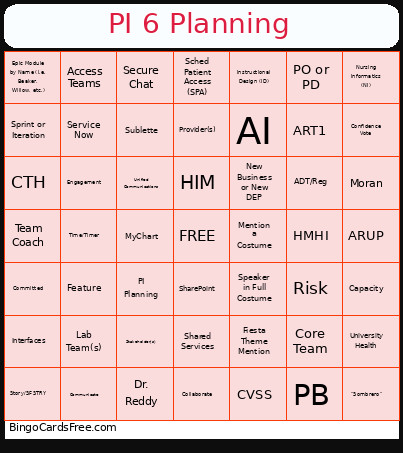 This PI 6 Planning Bingo Cards Game contains following Words or Phrases: "Relentless Improvement", 102 Tower, A Stakeholder Speaks, Access Teams, ADT/Reg, Agile, AI, Ambulatory, ART1, ART2, ART3, ARUP, Backlog, Billing, Breakout, Online, Capacity, Coding, Collaborate, Committed, Communicate, Confidence Vote, Coordinate, Core Team, Cross ART, CTH, CVSS, Daily Sync, Dependency, Dr. Carter, Dr. Reddy, Engagement, Epic Module by Name (i.e. Beaker, Willow, etc.), Epic Upgrade, Feature, Fiesta Theme Mention, HB, HIM, HMHI, Inpatient, Interfaces, Instructional Design (ID), Iteration Planning, Knowledge Base, Lab Team(s), Mention a Costume, Moran, MyChart, New Business or New DEP, Nova Notes, Nursing Informatics (NI), Objective(s), Operational Teams, Order Set, PB, Pharmacy, PI Planning, PI Planning Challenge, PO or PD, Provider(s), Provisioning Team, Radiology, Read Outs, Regulatory, Risk, SAFe, Sched Patient Access (SPA), Secure Chat, Shared Services, SharePoint, Someone Goes Over Their Time, Speaker in Full Costume, Speaker Wearing Sombrero, Sprint or Iteration, Stakeholder(s), Story/SFSTRY, Sublette, Team Agreement, Team Breakouts, Team Coach, Teams Meeting, Time/Timer, Train, Transparency, Unified Communications, West Valley Temp Clinic, Pivot, "Fiesta", Service Now, "Sombrero", University Health.