
Pitt party pt 2 Bingo Cards - Print Free or Customize
Print free Pitt party pt 2 bingo cards or modify, limitless prints! Choose from 41,500+ designs or use the bingo card generator. Add numbers, words, photos, or all of them. Play using printed PDF, digital bingo cards, and the digital bingo caller, or mix physical and digital.
About: Get ready for a wild ride through the chaotic world of hospital drama with this bingo card, perfect for fans of medical TV shows or a viewing party crowd. This card captures all the over-the-top moments and classic tropes you’d expect: workplace tension, emotional meltdowns, unexpected emergencies, and some hilarious mishaps. It’s ideal for healthcare insiders or anyone who loves poking fun at TV medicine’s most dramatic cliches.
How To: To get a PDF to print, click the Print button. You can alter the card count and other printing preferences on the Print tab. Grid items and free space text can be added on the Basic tab. Appearance can be exactly personalized on the relevant tabs, or you can quickly find any preference on the 🔍 tab.
How to play Pitt party pt 2 Bingo Cards?
- Printed Caller: Print PDF calling list & calling slips and manually choose the slips.
- Virtual Players: Click on the Play button above, and then click on the 🎫 button.
- Printed Players: Print PDF bingo cards and manually scratch the cards.
- Virtual Caller: Click on the Play button above.
- Mixed Mode: Select any combination above. For instance, caller can be either Printed or Virtual. And players can be Printed or Virtual or a mix of both.
Step-By-Step:
- Start by downloading the Pitt party pt 2 PDF by clicking on the "Print" button above.
- Open the PDF and print a hard copy.
- For random calling, you can print another copy of the call list, cut, fold and then draw them randomly at play time.
- Cut the bingo cards at the cut marks if there are more than 1 bingo cards per page.
- Distribute one card per player. For marking, you can use crayons. Crayons cost the least.
- Select one person to be the caller. If you are playing in a small group, the caller can as well play along with their own Bingo card.
- The caller opens the play by randomly picking an item from the call list and announcing it to all players.
- The players check their cards to see if they have the announced word. If they do, they cross off that word.
- The first player to complete a horizontal, vertical, or a diagonal line of crossed items announces "Bingo!" and wins the game.
- The caller validates that the items crossed off form a proper line according to the Bingo card and call list.
- You can play for multiple patterns or a full card blackout for a longer game.
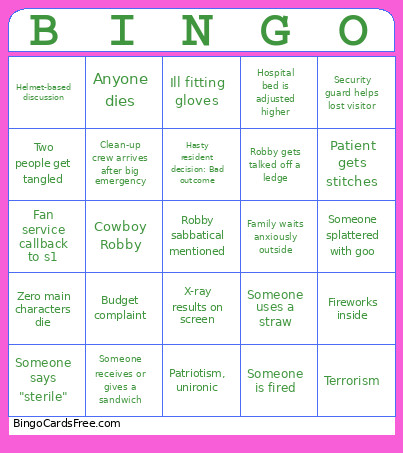 This Pitt party pt 2 Bingo Cards Game contains following Words or Phrases: "Why do we do this" type lament, AI is redeemed, Animal in ER, Ankle monitor gets some action 💦, Anyone dies, Bad charting consequence, Boob shown, Budget complaint, Business lady does some BS, Can't find a pen, Candy on screen, Character crying alone, Child draws picture, Child gets a cheer up gift, Clean-up crew arrives after big emergency, Close up on Goo, Comical injury, Cowboy Robby, Dana says baby Jane doe, Doc fights with other department (surgery, imaging, etc), Doctor writes on clipboard, Doctor wrong, Nurse right, Don't forget, we have a Social worker, Dr. Al-Hashimi is not like the other docs, she's a cool doc, Emergency lights flash outside hospital, Exposed butt, Family hugs after relief, Family waits anxiously outside, Fan service callback to s1, Farm boy gets new scrubs, Fireworks inside, Forgotten patient, Hasty resident decision: Bad outcome, Hasty resident decision: Good outcome, Helmet-based discussion, Hospital bed is adjusted higher, Hospital intercom makes announcement, Ill fitting gloves, In denial about death, Inappropriate flirtation, Langdon and Robby reconcile, Langdon returns, Main character dies, Main characters kiss, Massive building emergency, Mel admits her own neurodivergence, Mel cries, Mel in the clink, Mid level providers mentioned, Misdiagnosis from unconscious bias, Missing a paper, Motorcycle injury, New nurse faints, Newbie told to leave, NP actually gets to be an NP, Obvious "whoa they've changed since s1", Old school vs new school, Pager goes off loudly, Patient gets stitches, Patriotism, ironic, Patriotism, unironic, Plot line abandoned, Prodigy has angst with mom, Progressively messy hair to illustrate chaos, Resident gets advice from attending doctor, Robby gets talked off a ledge, Robby's back injury wreaks havoc, Santos finishes a chart, Santos is annoying, Santos receives comeuppance, Security guard helps lost visitor, Smoke break, Someone faints in waiting room, Someone is fired, Someone mentions Pittsburgh sports team, Someone quits, Someone receives or gives a sandwich, Someone says "I was wrong", Someone says "stat", Someone says "sterile", Someone says "We need more time", Someone says AI, Someone shouts CHEST COMPRESSIONS, Someone slips and falls, Someone splattered with goo, Someone uses a straw, Someone uses stethoscope, Substance abuse, Terrorism, Trump/political atmosphere mentioned, Two people get tangled, Understaffed / overworked complaint, Violence against healthcare workers is a national problem, We're not so different, you and I, X-ray results on screen, Zero main characters die.