Pivot Moment Bingo Cards - Print Free or Customize
Print free Pivot Moment bingo cards or adjust them,
unlimited cards! Select from 41,500+ designs or use the bingo card generator.
Add numbers, phrases, pictures, or all of them.
Play using PDF prints, online bingo cards,
and the online bingo caller, or combine all formats.
About: This bingo card is all about the ups and downs of growing up, especially as a student navigating school life and personal growth. It's perfect for a classroom icebreaker, a youth group discussion, or any teen-oriented event. The prompts encourage sharing real-life challenges, resilience, and those surprising moments when things work out in unexpected ways.
How To: To get a PDF to print, click the Print button.
You can alter the card quantity and other
print preferences on the Print tab.
Grid items and free space text can be edited on the Basic tab.
Appearance can be entirely personalized on the
corresponding tabs, or you can easily search any option
using the 🔍 tab.
How to play Pivot Moment Bingo Cards?
Online Caller: Click on the Play button above.
Paper Caller: Print PDF calling list & calling slips and manually pick the slips.
Online Players: Click on the Play button above, and then click on the 🎫 button.
Paper Players: Print PDF bingo cards and manually cross off the cards.
Mixed Mode: Choose any combination above.
For instance, caller can be either Paper or Online.
And players can be Paper or Online or a combo of both.
Step-By-Step:
Start by downloading the Pivot Moment Bingo PDF by clicking on the "Print" button above.
Open the PDF and print a hard copy.
For random calling, you can print another copy of the call list, cut, fold and then draw them randomly at play time.
Cut the bingo cards at the cut marks if there are more than 1 bingo cards per page.
Distribute one card per player. For marking, you can use crayons. Crayons cost the least.
Choose one person to be the caller. If you are playing in a small group, the caller can also play along with their own Bingo card.
The caller initiates the game by randomly picking an item from the call list and calling out it to everyone.
The players scan their cards to see if they have the called word. If they do, they cross off that word.
The first player to complete a horizontal, vertical, or a diagonal line of crossed items yells "Bingo!" and wins the play.
The caller validates that the items crossed off form a proper line as per the Bingo card and call list.
You can play for varied patterns or a full card blackout for a longer play.
This Pivot Moment Bingo Cards Game contains following Words or Phrases: changed subjects, failed a test/exam, did not get into a team i wanted to, tried a new hobby & hated it, got advice that changed my mind, got nervous about the future, felt like giving up but didn't, had to try something completely new, did something scary and survived, passed a test I did not even study for, tried a new hobby & loved it, felt unmotivated and had to push through, changed my mind about a career I wanted, took a risk and it worked out, tried something just because a friend did, discovered a hidden talent, got rejected but found something better, stayed up way too late for an assignment, moved schools, made a decision just because my friends were doing it, argued with my parents about my future, switched my dream career after one bad lesson, realised adults don't always have the answers, didn't get the grade I expected but it motivated me, took on a leadership role I didn't think I could handle, found out I was actually good at something I used to hate, had to start over on a project or assignment, changed who I looked up to as a role model, failed at something but learned more than I expected, helped someone else and realised I enjoyed it, realised a setback actually opened a new door, tried something scary and it became a new favourite.

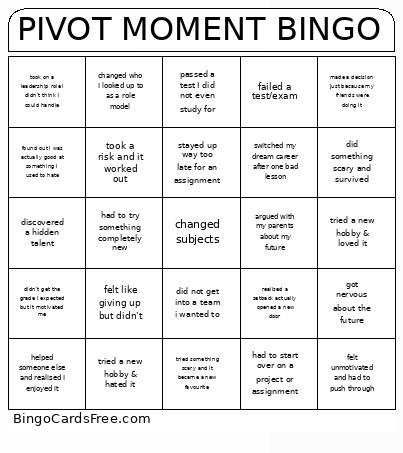 This Pivot Moment Bingo Cards Game contains following Words or Phrases: changed subjects, failed a test/exam, did not get into a team i wanted to, tried a new hobby & hated it, got advice that changed my mind, got nervous about the future, felt like giving up but didn't, had to try something completely new, did something scary and survived, passed a test I did not even study for, tried a new hobby & loved it, felt unmotivated and had to push through, changed my mind about a career I wanted, took a risk and it worked out, tried something just because a friend did, discovered a hidden talent, got rejected but found something better, stayed up way too late for an assignment, moved schools, made a decision just because my friends were doing it, argued with my parents about my future, switched my dream career after one bad lesson, realised adults don't always have the answers, didn't get the grade I expected but it motivated me, took on a leadership role I didn't think I could handle, found out I was actually good at something I used to hate, had to start over on a project or assignment, changed who I looked up to as a role model, failed at something but learned more than I expected, helped someone else and realised I enjoyed it, realised a setback actually opened a new door, tried something scary and it became a new favourite.