Print free Plus One bingo cards or modify,
unlimited prints! Pick from 41,500+ designs or use our bingo card generator.
Add numbers, words, images, or mix them all.
Play using PDF prints, virtual bingo cards,
and our virtual bingo caller, or mix physical and digital.
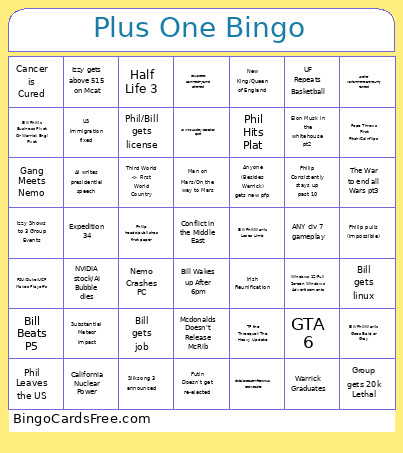
About: This bingo card is perfect for a close-knit group of friends who love to joke about tech trends, world events, and their own inside jokes. The tone is playful and tongue-in-cheek, blending wild predictions with personal milestones. It would be a great fit for a reunion, game night, or any event where shared memories and friendly rivalry shine.
How To: To download a PDF to print, click the Print button.
You can adjust the number of cards and other
print options on the Print tab.
Grid items and free space text can be edited on the Basic tab.
Appearance can be exactly customized on the
relevant tabs, or you can quickly find any preference
using the 🔍 tab.
How to play Plus One Bingo Cards?
Digital Players: Click on the Play button above, and then click on the 🎫 button.
Printed Players: Print PDF bingo cards and physically cross off the cards.
Printed Caller: Print PDF calling list & calling slips and physically pick the slips.
Digital Caller: Click on the Play button above.
Mixed Mode: Select any combination above.
For example, caller can be either Offline or Digital.
And players can be Offline or Digital or a mix of both.
Step-By-Step:
Start by getting the Plus One Bingo PDF by clicking on the "Print" button above.
Open the PDF and print a hard copy.
For random calling, you can print another copy of the call list, cut, fold and then pull them randomly at play time.
Cut the bingo cards at the cut marks if there are more than 1 bingo cards per page.
Give one card to each player. For marking, you can use pencils. Crayons are the cheapest.
Select one person to be the caller. If you are playing in a small group, the caller may as well play along with their own Bingo card.
The caller starts the play by randomly picking an item from the call list and announcing it to all players.
The players check their cards to see if they have the called word. If they do, they cross off that word.
The first player to complete a horizontal, vertical, or a diagonal line of marked items shouts "Bingo!" and wins the game.
The caller validates that the items marked form a correct line as per the Bingo card and call list.
You can play for varied patterns or a full card blackout for a longer game.
This Plus One Bingo Cards Game contains following Words or Phrases: The War to end all Wars pt3, NVIDIA stock/AI Bubble dies, Philip pulls (Impossible), AI writes presidential speech, Bill gets linux, Mcdonalds Doesn't Release McRib, Global Disease/infection/US Gets Measles, Bill gets job, Phil/Bill gets license, Nemo Crashes PC, Substantial Meteor impact, Man on Mars/On the way to Mars, Windows 12/Full Screen Windows Advertisements, US Immigration fixed, Pope Throws First Pitch/Coinflips, Elon Musk in the whitehouse pt2, New King/Queen of England, Expedition 34, Half Life 3, California Nuclear Power, GTA 6, Bill/Phil/Iz Business Pivot Or Warrick Engi Pivot, Group gets 20k Lethal, ANY civ 7 gameplay, TF the Threequel/The Heavy Update, Silksong 3 announced, Irish Reunification, Bill Beats P5, US Wins Hockey/Canadian Sport, Putin Doesn't get re-elected, Third World -> First World Country, Izzy Shows to 3 Group Events, Gang Meets Nemo, Warrick Graduates, Anyone (Besides Warrick) gets new pfp, Philip Consistently stays up past 10, Philip heads/publishes first paper, Izzy gets above 515 on Mcat, Another Warhammerer/Entire Army Painted, UF Repeats Basketball, FSU/Duke/UCF Makes Playoffs, Bill/Phil/War/Iz Loses Limb, Bill/Phil/War/Iz Goes Bald or Gray, Phil Hits Plat, Phil Leaves the US, Cancer is Cured, Group Gets Scammed/Pyramid Schemed, Bill Wakes up After 6pm.

 This Plus One Bingo Cards Game contains following Words or Phrases: The War to end all Wars pt3, NVIDIA stock/AI Bubble dies, Philip pulls (Impossible), AI writes presidential speech, Bill gets linux, Mcdonalds Doesn't Release McRib, Global Disease/infection/US Gets Measles, Bill gets job, Phil/Bill gets license, Nemo Crashes PC, Substantial Meteor impact, Man on Mars/On the way to Mars, Windows 12/Full Screen Windows Advertisements, US Immigration fixed, Pope Throws First Pitch/Coinflips, Elon Musk in the whitehouse pt2, New King/Queen of England, Expedition 34, Half Life 3, California Nuclear Power, GTA 6, Bill/Phil/Iz Business Pivot Or Warrick Engi Pivot, Group gets 20k Lethal, ANY civ 7 gameplay, TF the Threequel/The Heavy Update, Silksong 3 announced, Irish Reunification, Bill Beats P5, US Wins Hockey/Canadian Sport, Putin Doesn't get re-elected, Third World -> First World Country, Izzy Shows to 3 Group Events, Gang Meets Nemo, Warrick Graduates, Anyone (Besides Warrick) gets new pfp, Philip Consistently stays up past 10, Philip heads/publishes first paper, Izzy gets above 515 on Mcat, Another Warhammerer/Entire Army Painted, UF Repeats Basketball, FSU/Duke/UCF Makes Playoffs, Bill/Phil/War/Iz Loses Limb, Bill/Phil/War/Iz Goes Bald or Gray, Phil Hits Plat, Phil Leaves the US, Cancer is Cured, Group Gets Scammed/Pyramid Schemed, Bill Wakes up After 6pm.