Princeville Superbowl Party Bingo Cards - Print Free or Customize
Print free Princeville Superbowl Party bingo cards or personalize,
limitless prints! Select from 41,500+ designs or use the bingo card generator.
Add numbers, phrases, photos, or all of them.
Play using printed PDF, digital bingo cards,
and the digital bingo caller, or mix physical and digital.
About: This bingo card is built for NFL game day excitement, perfect for fans watching a high-energy matchup between the Seahawks and Patriots. It’s loaded with player milestones, unpredictable plays, and pivotal moments that keep viewers engaged from kickoff to overtime. Ideal for a watch party or friendly competition, it adds a fun layer to every drive and big play.
How To: To get a printable PDF, click the Print button.
You can adjust the card count and other
print settings on the Print tab.
Grid items and free space text can be changed on the Basic tab.
Appearance can be exactly customized on the
corresponding tabs, or you can easily find any option
on the 🔍 tab.
How to play Princeville Superbowl Party Bingo Cards?
Digital Players: Click on the Play button above, and then click on the 🎫 button.
Digital Caller: Click on the Play button above.
Printed Caller: Print PDF calling list & calling slips and manually choose the slips.
Printed Players: Print PDF bingo cards and manually scratch the cards.
Hybrid Play: Pick any combination above.
For example, caller can be either Offline or Digital.
And players can be Offline or Digital or a mix of both.
Step-By-Step:
Start by saving the Princeville Superbowl Party PDF by clicking on the "Print" button above.
Open the PDF and print it.
For random drawing, you can print another copy of the call list, cut, fold and then pull them randomly at play time.
Cut the bingo cards at the cut lines if there are greater than 1 bingo cards per page.
Give one card to each player. For marking, you can use pencils. Crayons cost the least.
Pick one person to be the caller. If you are playing in a small group, the caller can also play along with their own Bingo card.
The caller starts the game by randomly pulling an item from the call list and calling out it to everyone.
The players check their cards to see if they have the announced word. If they do, they dab that word.
The first player to complete a horizontal, vertical, or a diagonal line of crossed items shouts "Bingo!" and wins the game.
The caller confirms that the items crossed off form a proper line as per the Bingo card and call list.
You can play for multiple patterns or a full card blackout for a longer game.
This Princeville Superbowl Party Bingo Cards Game contains following Words or Phrases: 2 Point Conversion Attempt, 30+ Combined Points Scored, 50+ Combined Points Scored, 50+ Yard Field Goal, 60+ Combined Points Scored, Blocked Punt, Blocked Field Goal, Coin Toss - Heads, Coin Toss - Tails, Cooper Kupp 30.5+ Yards Receiving, Cooper Kupp 3.5+ Receptions, Cooper Kupp TD, Defensive/Special Teams TD, Drake Maye INT, Drake Maye Fumble, Drake Maye Sack, Game Goes to Overtime, Kenneth Walker 73.5+ Yards Rushing, Kenneth Walker TD, Missed Xtra Point Attempt, Onside Kick Attempt, Patriots Fumble, Patriots Missed Field Goal Attempt, Patriots Win Coin Toss, Rhamondre Stevenson 15+ Rushing Attempts, Rhamondre Stevenson TD, Safety, Sam Darnold 2+ Passing TDs, Sam Darnold Rushing TD, Sam Darnold 205.5+ Yards Passing, Seahawks 1.5+ Field Goals Made, Seahawks Coaches Challenge, Seahawks Fumble Recovery, Seahawks Missed Field Goal Attempt, Seahawks Passing TD, Seahawks Rushing TD, Seahawks Defense Sack QB, Seahawks Win Coin toss, JSN 99.5+ Yards Receiving, Smith-Njigba TD, Rhamondre Stevenson under 14.5 rushes, Seattle 4th Down Attempt, Settle scores first.

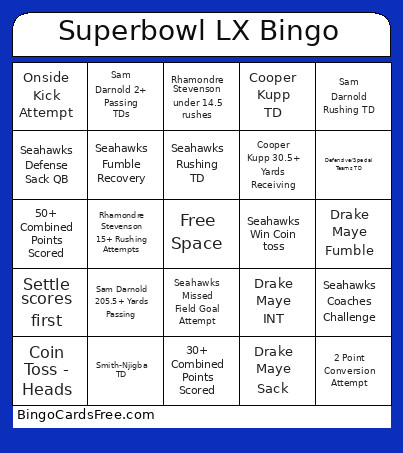 This Princeville Superbowl Party Bingo Cards Game contains following Words or Phrases: 2 Point Conversion Attempt, 30+ Combined Points Scored, 50+ Combined Points Scored, 50+ Yard Field Goal, 60+ Combined Points Scored, Blocked Punt, Blocked Field Goal, Coin Toss - Heads, Coin Toss - Tails, Cooper Kupp 30.5+ Yards Receiving, Cooper Kupp 3.5+ Receptions, Cooper Kupp TD, Defensive/Special Teams TD, Drake Maye INT, Drake Maye Fumble, Drake Maye Sack, Game Goes to Overtime, Kenneth Walker 73.5+ Yards Rushing, Kenneth Walker TD, Missed Xtra Point Attempt, Onside Kick Attempt, Patriots Fumble, Patriots Missed Field Goal Attempt, Patriots Win Coin Toss, Rhamondre Stevenson 15+ Rushing Attempts, Rhamondre Stevenson TD, Safety, Sam Darnold 2+ Passing TDs, Sam Darnold Rushing TD, Sam Darnold 205.5+ Yards Passing, Seahawks 1.5+ Field Goals Made, Seahawks Coaches Challenge, Seahawks Fumble Recovery, Seahawks Missed Field Goal Attempt, Seahawks Passing TD, Seahawks Rushing TD, Seahawks Defense Sack QB, Seahawks Win Coin toss, JSN 99.5+ Yards Receiving, Smith-Njigba TD, Rhamondre Stevenson under 14.5 rushes, Seattle 4th Down Attempt, Settle scores first.