Print free QUALITY BINGO cards or adjust them,
limitless prints! Select from 42,200+ designs or use our bingo card generator.
Add numbers, phrases, pictures, or any combination.
Play using printable PDF, digital bingo cards,
and our digital bingo caller, or combine all formats.
About: This bingo card is perfect for breaking the ice and sparking conversation at an Ivoclar team gathering or company event. It playfully celebrates personal quirks, professional milestones, and everyday habits unique to your workplace. The mix of work-related achievements and fun personal facts makes it a great way for colleagues to learn more about each other while having a few laughs.
How To: To get a PDF to print, click the Print button.
You can change the number of cards and other
printing preferences on the Print tab.
Grid items and free space text can be edited on the Basic tab.
Appearance can be fully personalized on the
relevant tabs, or you can easily find any preference
using the 🔍 tab.
How to play QUALITY BINGO Cards?
Printed Players: Print PDF bingo cards and manually scratch the cards.
Printed Caller: Print PDF calling list & calling slips and manually pick the slips.
Virtual Players: Click on the Play button above, and then click on the 🎫 button.
Virtual Caller: Click on the Play button above.
Hybrid Mode: Pick any combination above.
For example, caller can be either Printed or Virtual.
And players can be Printed or Virtual or a mix of both.
Step-By-Step:
Start by downloading the QUALITY BINGO PDF by clicking on the "Print" button above.
Open the PDF and print it.
For random drawing, you can print another copy of the call list, cut, fold and then pull them randomly at play time.
Cut the bingo cards at the cut marks if there are more than 1 bingo cards per page.
Give one card to each player. For marking, you can use crayons. Crayons are the cheapest.
Pick one person to be the caller. If you are playing in a small group, the caller may also play along with their own Bingo card.
The caller starts the game by randomly pulling an item from the call list and announcing it to all players.
The players check their cards to see if they have the announced word. If they do, they mark that word.
The first player to complete a horizontal, vertical, or a diagonal line of marked items shouts "Bingo!" and wins the game.
The caller confirms that the items marked form a correct line according to the Bingo card and call list.
You can play for varied patterns or a full card blackout for a longer game.
This QUALITY BINGO Cards Game contains following Words or Phrases: Started at Ivoclar this year, Approves production orders, At Ivoclar over 10yrs, HSE Team Meeting Member, Traveled to more than 2 countries, Starts their workday before 7:30am, REALLY likes Safwa coffee, Has at least 1 pet, Speaks more than 2 languages, Keeps their desk clean :), Can name 1 of the 5S's, Can play an instrument, Has at least 1 sibling, Prefers tea over coffee, Hates cilantro (tastes like soap), Enjoys spicy food, Is particular about desserts, Has never broken a phone screen, Has been on a cruise, Doesn't eat breakfast before work, Has used a fax machine, Prefers hot weather over cold, Has won a company giveaway, Uses an iPhone, Mainly works in Pierce, Lives more than 30min away, As at least 1 houseplant, Has completed a race, Has lived outside of NJ, Can name 3 zirconia products, Can troubleshoot computers, Visited movie theater at least once this year, Has the same favorite color as you, Born in the same month as you, Has a reusable water bottle, Prefers a late lunch (after 12:30), Has played a sport, Has won a non-athletic competition, Enjoys amusement parks, Has a certification, Has slept in a tent, Prefers the window seat on a plane, Usually walks over 5000 steps a day, Drives a 10year or older car.

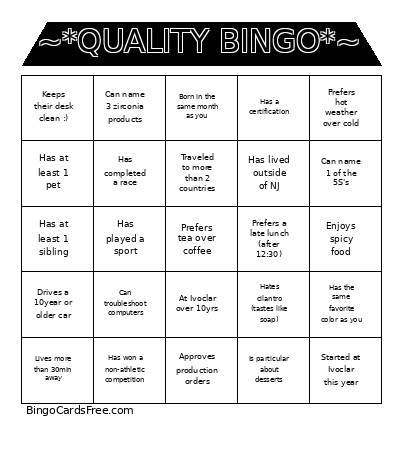 This QUALITY BINGO Cards Game contains following Words or Phrases: Started at Ivoclar this year, Approves production orders, At Ivoclar over 10yrs, HSE Team Meeting Member, Traveled to more than 2 countries, Starts their workday before 7:30am, REALLY likes Safwa coffee, Has at least 1 pet, Speaks more than 2 languages, Keeps their desk clean :), Can name 1 of the 5S's, Can play an instrument, Has at least 1 sibling, Prefers tea over coffee, Hates cilantro (tastes like soap), Enjoys spicy food, Is particular about desserts, Has never broken a phone screen, Has been on a cruise, Doesn't eat breakfast before work, Has used a fax machine, Prefers hot weather over cold, Has won a company giveaway, Uses an iPhone, Mainly works in Pierce, Lives more than 30min away, As at least 1 houseplant, Has completed a race, Has lived outside of NJ, Can name 3 zirconia products, Can troubleshoot computers, Visited movie theater at least once this year, Has the same favorite color as you, Born in the same month as you, Has a reusable water bottle, Prefers a late lunch (after 12:30), Has played a sport, Has won a non-athletic competition, Enjoys amusement parks, Has a certification, Has slept in a tent, Prefers the window seat on a plane, Usually walks over 5000 steps a day, Drives a 10year or older car.