EEEAAAASDDSAD Bingo Cards - Print Free or Customize
Print free EEEAAAASDDSAD bingo cards or personalize,
limitless prints! Choose from 41,500+ templates or use our bingo card generator.
Add numbers, words, photos, or all of them.
Play using PDF printouts, online bingo cards,
and our online bingo caller, or go hybrid.
About: Get ready for a high-energy session with this Tetris-themed bingo card, perfect for tournaments, live streams, or community game nights. The card is packed with technical moves, quirky moments, and hilarious fails that capture the fast-paced chaos of competitive Tetris. It’s ideal for dedicated fans, Twitch streamers, or anyone who loves seeing wild plays and unpredictable outcomes.
How To: To download a printable PDF, click the Print button.
You can change the card quantity and other
print settings on the Print tab.
Grid items and free space content can be added on the Basic tab.
Appearance can be totally personalized on the
relevant tabs, or you can quickly locate any setting
using the 🔍 tab.
How to play EEEAAAASDDSAD Bingo Cards?
Digital Players: Click on the Play button above, and then click on the 🎫 button.
Printed Caller: Print PDF calling list & calling slips and manually draw the slips.
Digital Caller: Click on the Play button above.
Printed Players: Print PDF bingo cards and manually mark the cards.
Hybrid Mode: Select any combination above.
For instance, caller can be either Paper or Digital.
And players can be Paper or Digital or a combo of both.
Step-By-Step:
Start by downloading the EEEAAAASDDSAD PDF by clicking on the "Print" button above.
Open the PDF and print it.
For random drawing, you can print another copy of the call list, cut, fold and then draw them randomly at play time.
Cut the bingo cards at the cut marks if there are more than 1 bingo cards per page.
Distribute one card per player. For marking, you can use crayons. Crayons cost the least.
Select one person to be the caller. If you are playing in a small group, the caller can as well play along with their own Bingo card.
The caller begins the play by randomly drawing an item from the call list and announcing it to everyone.
The players scan their cards to see if they have the announced word. If they do, they dab that word.
The first player to finish a horizontal, vertical, or a diagonal line of marked items announces "Bingo!" and wins the play.
The caller verifies that the items crossed off form a correct line as per the Bingo card and call list.
You can play for varied patterns or a full card blackout for an extended play.
This EEEAAAASDDSAD Bingo Cards Game contains following Words or Phrases: 1+ APP, 1000m above 2nd place, 11:00 Game, 12:00 Game, 15+ KOs, 180 T-Spin Single, 2 B2B J/L Spins, 2 B2B S/Z Spins, 2 PCs in quick succession, 2 Tetrises, 2+ Mods Enabled, 20+ Spectators, 3 KOs on screen at once, 3 Consecutive Spins, 3.5+ PPS, 30+ Surge, 4 B2B Tetrises, 4 B2B T-Spins, 4000m+, 60+ Spike, 8-1 Stacking, 9+ REN Downstack, Anonymous / Guest, Colour Clear, Cut Copy, Dies Before Breaking B2B, Dies within 10 seconds of spectating, DT Setup, Duos Game, Floaty Boi over 5w gap, Fractal, WR Badge, Hyperspeed, I spin Single+, I-Spin into Well, I5 piece, Incoming Garbage going off the screen, J Spin Triple, Less than 1.5 PPS, Max Climbing Speed, Mechanical Heart, Midgame 4w, Midgame PC, Misdrops I piece over/next to well, Neo/Fin, On Wylie's Friend List, Overhangless S/Z spin, Regularly Streams, Reversed Mod Enabled, Shares game in chat, Sick play makes Wylie get out of chair, Spinnin' the Washing Machine, SSL Winner, ST stacking, Sub 900m, Successful revive, Sucessful C Spin, Tops out on purpose, Trinity, Triple Clutch, Triple Rotator, TST Tower, TWC Player, Twitch Chatter Snipes, Glitch/Bug/DC, Wind up before F8, Wylie commentator curses them, WylieCan't Pronounce Name, Z Spin Triple.

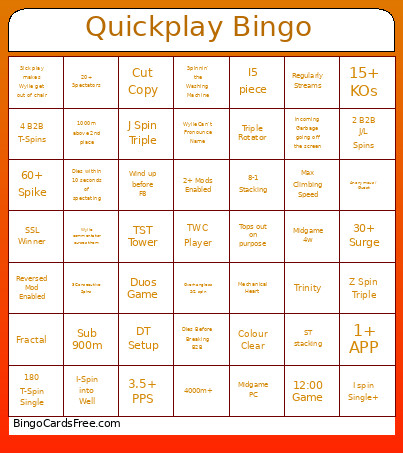 This EEEAAAASDDSAD Bingo Cards Game contains following Words or Phrases: 1+ APP, 1000m above 2nd place, 11:00 Game, 12:00 Game, 15+ KOs, 180 T-Spin Single, 2 B2B J/L Spins, 2 B2B S/Z Spins, 2 PCs in quick succession, 2 Tetrises, 2+ Mods Enabled, 20+ Spectators, 3 KOs on screen at once, 3 Consecutive Spins, 3.5+ PPS, 30+ Surge, 4 B2B Tetrises, 4 B2B T-Spins, 4000m+, 60+ Spike, 8-1 Stacking, 9+ REN Downstack, Anonymous / Guest, Colour Clear, Cut Copy, Dies Before Breaking B2B, Dies within 10 seconds of spectating, DT Setup, Duos Game, Floaty Boi over 5w gap, Fractal, WR Badge, Hyperspeed, I spin Single+, I-Spin into Well, I5 piece, Incoming Garbage going off the screen, J Spin Triple, Less than 1.5 PPS, Max Climbing Speed, Mechanical Heart, Midgame 4w, Midgame PC, Misdrops I piece over/next to well, Neo/Fin, On Wylie's Friend List, Overhangless S/Z spin, Regularly Streams, Reversed Mod Enabled, Shares game in chat, Sick play makes Wylie get out of chair, Spinnin' the Washing Machine, SSL Winner, ST stacking, Sub 900m, Successful revive, Sucessful C Spin, Tops out on purpose, Trinity, Triple Clutch, Triple Rotator, TST Tower, TWC Player, Twitch Chatter Snipes, Glitch/Bug/DC, Wind up before F8, Wylie commentator curses them, WylieCan't Pronounce Name, Z Spin Triple.