Print free Radius bingo cards or alter them,
unlimited prints! Pick from 41,500+ designs or use our bingo card generator.
Add numbers, words, photos, or all of them.
Play using PDF prints, digital bingo cards,
and our digital bingo caller, or go hybrid.
About: This bingo card is perfect for sparking fun conversations and new connections at a Radius or Society Sobriety social event. With activities that encourage mingling, using the Radius platform, and getting to know fellow attendees in lighthearted ways, it’s ideal for singles or newcomers hoping to break the ice and build community in a friendly, interactive setting.
How To: To download a PDF to print, click the Print button.
You can change the card count and other
print options on the Print tab.
Grid items and free space content can be changed on the Basic tab.
Appearance can be fully customized on the
relevant tabs, or you can easily find any setting
using the 🔍 tab.
How to play Radius Bingo Cards?
Printed Players: Print PDF bingo cards and manually cross off the cards.
Online Caller: Click on the Play button above.
Online Players: Click on the Play button above, and then click on the 🎫 button.
Printed Caller: Print PDF calling list & calling slips and manually draw the slips.
Mixed Play: Select any combination above.
For example, caller can be either Printed or Online.
And players can be Printed or Online or a combo of both.
Step-By-Step:
Start by getting the Radius PDF by clicking on the "Print" button above.
Open the PDF and print it.
For random drawing, you can print another copy of the call list, cut, fold and then pick them randomly at play time.
Cut the bingo cards at the cut marks if there are greater than 1 bingo cards per page.
Give one card to each player. For marking, you can use pencils. Crayons are the cheapest.
Select one person to be the caller. If you are playing in a small group, the caller may as well play along with their own Bingo card.
The caller opens the game by randomly drawing an item from the call list and announcing it to everyone.
The players check their cards to see if they have the announced word. If they do, they dab that word.
The first player to complete a horizontal, vertical, or a diagonal line of marked items yells "Bingo!" and wins the game.
The caller checks that the items marked form a correct line according to the Bingo card and call list.
You can play for different patterns or a full card blackout for an extended game.
This Radius Bingo Cards Game contains following Words or Phrases: Add a picture to your Radius profile, Ask someone about a show they are watching, Click on 5 profiles on Radius, Find a group for Janga, Find someone you matched with on Radius, Follow Society Sobriety on Instagram, Get a match's Instagram, Invite 5 people so they can have Radius free for life, Meet someone from New York, Tag Society Sobriety in a selfie with someone you matched with, Talk to someone 6 inches taller/shorter, Talk to someone about their fashionable outfit, Text 3 people about Radius (show proof), Trade corny pickup lines with someone you don't know, Give one flower by the end of the night, Do a dare in Janga, Do a truth in Janga, Buy someone a drink, Tag Radius on your Instagram story, Introduce yourself to Kayla from Society Sobriety, Meet someone from another Borough, Find someone with a unique hobby, Meet 3 matches, Talk to someone with awesome hair, See someone you already know, Register for another event with Society Sobriety, Kiss someone, Talk about the Knicks with someone, Share first date stories, Make plans to walk with someone home, Talk to someone bilingual, Meet someone paying too much for rent, Talk to someone sober, Follow Radius on Instagram, Delete a dating app (not Radius), Meet someone in your industry, Talk to someone in sports merchandise, Offer someone gum, Bring a friend, Find someone forced to be here.

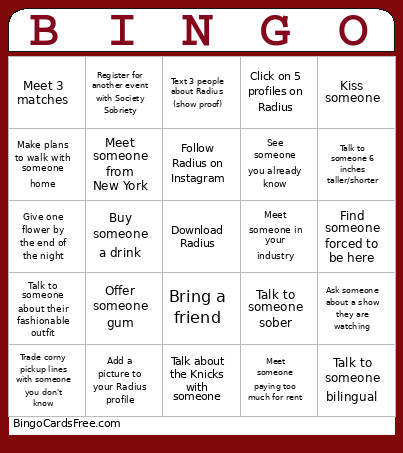 This Radius Bingo Cards Game contains following Words or Phrases: Add a picture to your Radius profile, Ask someone about a show they are watching, Click on 5 profiles on Radius, Find a group for Janga, Find someone you matched with on Radius, Follow Society Sobriety on Instagram, Get a match's Instagram, Invite 5 people so they can have Radius free for life, Meet someone from New York, Tag Society Sobriety in a selfie with someone you matched with, Talk to someone 6 inches taller/shorter, Talk to someone about their fashionable outfit, Text 3 people about Radius (show proof), Trade corny pickup lines with someone you don't know, Give one flower by the end of the night, Do a dare in Janga, Do a truth in Janga, Buy someone a drink, Tag Radius on your Instagram story, Introduce yourself to Kayla from Society Sobriety, Meet someone from another Borough, Find someone with a unique hobby, Meet 3 matches, Talk to someone with awesome hair, See someone you already know, Register for another event with Society Sobriety, Kiss someone, Talk about the Knicks with someone, Share first date stories, Make plans to walk with someone home, Talk to someone bilingual, Meet someone paying too much for rent, Talk to someone sober, Follow Radius on Instagram, Delete a dating app (not Radius), Meet someone in your industry, Talk to someone in sports merchandise, Offer someone gum, Bring a friend, Find someone forced to be here.