Print free Training bingo cards or alter them,
limitless prints! Select from 42,600+ designs or use the bingo card generator.
Add numbers, words, photos, or any combination.
Play using PDF prints, virtual bingo cards,
and the virtual bingo caller, or mix physical and digital.
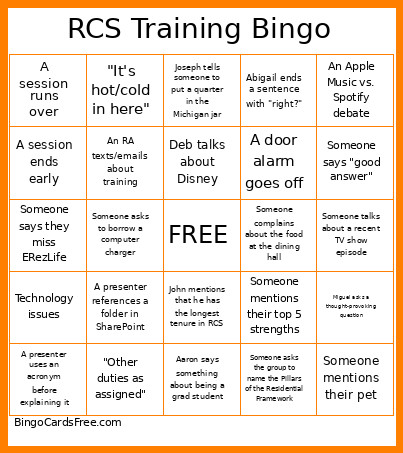
About: This bingo card perfectly captures the quirks and camaraderie of a Residence Life staff training or conference. With plenty of inside jokes, relatable tech hiccups, and classic meeting moments, it’s ideal for student affairs professionals or RAs looking to add some fun and friendly competition to their next department event.
How To: To download a PDF to print, click the Print button.
You can adjust the card quantity and other
print options on the Print tab.
Grid items and free space text can be edited on the Basic tab.
Appearance can be fully personalized on the
relevant tabs, or you can easily locate any option
using the 🔍 tab.
How to play Training Bingo Cards?
Digital Players: Click on the Play button above, and then click on the 🎫 button.
Digital Caller: Click on the Play button above.
Paper Players: Print PDF bingo cards and manually cross off the cards.
Paper Caller: Print PDF calling list & calling slips and manually choose the slips.
Hybrid Mode: Pick any combination above.
For instance, caller can be either Paper or Digital.
And players can be Paper or Digital or a mix of both.
Step-By-Step:
Start by downloading the Training Bingo PDF by clicking on the "Print" button above.
Open the PDF and print it.
For random calling, you can print another copy of the call list, cut, fold and then pull them randomly at play time.
Cut the bingo cards at the cut lines if there are more than 1 bingo cards per page.
Distribute one card per player. For marking, you can use markers. Crayons cost the least.
Pick one person to be the caller. If you are playing in a small group, the caller may as well play along with their own Bingo card.
The caller begins the play by randomly picking an item from the call list and calling out it to everyone.
The players scan their cards to see if they have the called word. If they do, they dab that word.
The first player to complete a horizontal, vertical, or a diagonal line of marked items announces "Bingo!" and wins the play.
The caller validates that the items marked form a correct line according to the Bingo card and call list.
You can play for different patterns or a full card blackout for an extended play.
This Training Bingo Cards Game contains following Words or Phrases: Someone needs to borrow a pen, Technology issues, A presenter uses an acronym before explaining it, The duty phone rings during a presentation, "At my previous institution...", Someone says they miss ERezLife, A session ends early, A session runs over, -c-, "Other duties as assigned", "It's hot/cold in here", An RA texts/emails about training, Someone doesn't have access to a StarRez tool, A presenter references a folder in SharePoint, Someone asks to borrow a computer charger, "Follow up with your supervisor", "I was confused about that when I started too", -c-, Zack asks if anyone wants to run out for a coffee, Erin references a student development theory, John mentions that he has the longest tenure in RCS, Aaron says something about being a grad student, Deb talks about Disney, Joseph tells someone to put a quarter in the Michigan jar, Someone references the post-lunch slump, -c-, Someone says "sense of belonging", Someone asks the group to name the Pillars of the Residential Framework, Abigail ends a sentence with "right?", Someone complains about the food at the dining hall, A presenter wears purple, Someone mentions their top 5 strengths, A door alarm goes off, Someone says they are hungry, -c-, Someone gives kudos to a fellow RCS member, Miguel asks a thought-provoking question, Someone says "to piggyback off of ___", Someone talks about a recent TV show episode, An Apple Music vs. Spotify debate, Someone mentions their pet, Someone says "good answer".

 This Training Bingo Cards Game contains following Words or Phrases: Someone needs to borrow a pen, Technology issues, A presenter uses an acronym before explaining it, The duty phone rings during a presentation, "At my previous institution...", Someone says they miss ERezLife, A session ends early, A session runs over, -c-, "Other duties as assigned", "It's hot/cold in here", An RA texts/emails about training, Someone doesn't have access to a StarRez tool, A presenter references a folder in SharePoint, Someone asks to borrow a computer charger, "Follow up with your supervisor", "I was confused about that when I started too", -c-, Zack asks if anyone wants to run out for a coffee, Erin references a student development theory, John mentions that he has the longest tenure in RCS, Aaron says something about being a grad student, Deb talks about Disney, Joseph tells someone to put a quarter in the Michigan jar, Someone references the post-lunch slump, -c-, Someone says "sense of belonging", Someone asks the group to name the Pillars of the Residential Framework, Abigail ends a sentence with "right?", Someone complains about the food at the dining hall, A presenter wears purple, Someone mentions their top 5 strengths, A door alarm goes off, Someone says they are hungry, -c-, Someone gives kudos to a fellow RCS member, Miguel asks a thought-provoking question, Someone says "to piggyback off of ___", Someone talks about a recent TV show episode, An Apple Music vs. Spotify debate, Someone mentions their pet, Someone says "good answer".