Print free Real Estate bingo cards or personalize,
limitless prints! Choose from 42,200+ designs or use our bingo card generator.
Add numbers, phrases, pictures, or mix them all.
Play using printable PDF, digital bingo cards,
and our digital bingo caller, or mix physical and digital.
About: This bingo card captures the hectic, hilarious, and all-too-relatable moments of life as a real estate agent. It’s perfect for team meetings, industry mixers, or just bonding with colleagues who know the wild ride of showing homes, closing deals, and answering emails at all hours. It’s a lighthearted way to celebrate the daily adventures of realtors everywhere.
How To: To download a PDF to print, click the Print button.
You can change the card count and other
printing preferences on the Print tab.
Grid items and free space text can be added on the Basic tab.
Appearance can be highly customized on the
relevant tabs, or you can quickly locate any option
using the 🔍 tab.
How to play Real Estate Bingo Cards?
Printed Players: Print PDF bingo cards and manually cross off the cards.
Digital Players: Click on the Play button above, and then click on the 🎫 button.
Digital Caller: Click on the Play button above.
Printed Caller: Print PDF calling list & calling slips and manually choose the slips.
Combo Play: Select any combination above.
For instance, caller can be either Paper or Digital.
And players can be Paper or Digital or a combo of both.
Step-By-Step:
Start by getting the Real Estate PDF by clicking on the "Print" button above.
Open the PDF and print it.
For random calling, you can print another copy of the call list, cut, fold and then pull them randomly at play time.
Cut the bingo cards at the cut lines if there are more than 1 bingo cards per page.
Distribute one card per player. For marking, you can use crayons. Crayons cost the least.
Select one person to be the caller. If you are playing in a small group, the caller can as well play along with their own Bingo card.
The caller starts the game by randomly picking an item from the call list and calling out it to everyone.
The players scan their cards to see if they have the announced word. If they do, they dab that word.
The first player to finish a horizontal, vertical, or a diagonal line of crossed items yells "Bingo!" and wins the play.
The caller validates that the items crossed off form a correct line as per the Bingo card and call list.
You can play for varied patterns or a full card blackout for an extended play.
This Real Estate Bingo Cards Game contains following Words or Phrases: Survived on coffee and adrenaline, Wrote a contract in your car, Said "just 5 more minutes" and it turned into an hour, Got lost showing homes in a new neighborhood, Used your phone's flashlight during a showing, Said "location, location, location" unironically, Negotiated at 10 p.m. on a Sunday, Helped your clients move a couch, Refreshed MLS way too many times, Closed a deal that almost fell apart 3 times, Hammered in your own yard sign, Took a call during "vacation", Got barked at by a very protective dog, Found your client's dream home on the first try (rare!), Explained earnest money… again, Showed homes in 100° heat or freezing rain, Waited for perfect light to take a listing photo, Woke up to 37 new emails overnight, Grabbed a broom or Windex before a showing, Said "I'll send that right over!" while already typing it, Celebrated a closing day with happy clients, Printed the wrong version of the contract… twice, Drove past the house because the numbers were hidden, Said "this is my slow season" and immediately got slammed with work.

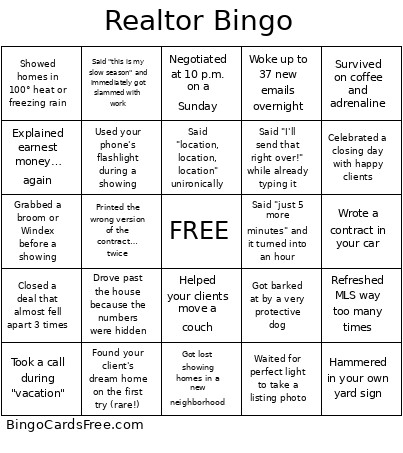 This Real Estate Bingo Cards Game contains following Words or Phrases: Survived on coffee and adrenaline, Wrote a contract in your car, Said "just 5 more minutes" and it turned into an hour, Got lost showing homes in a new neighborhood, Used your phone's flashlight during a showing, Said "location, location, location" unironically, Negotiated at 10 p.m. on a Sunday, Helped your clients move a couch, Refreshed MLS way too many times, Closed a deal that almost fell apart 3 times, Hammered in your own yard sign, Took a call during "vacation", Got barked at by a very protective dog, Found your client's dream home on the first try (rare!), Explained earnest money… again, Showed homes in 100° heat or freezing rain, Waited for perfect light to take a listing photo, Woke up to 37 new emails overnight, Grabbed a broom or Windex before a showing, Said "I'll send that right over!" while already typing it, Celebrated a closing day with happy clients, Printed the wrong version of the contract… twice, Drove past the house because the numbers were hidden, Said "this is my slow season" and immediately got slammed with work.