
Retreat Bingo Cards - Print Free or Customize
Print free Retreat bingo cards or adjust them, unlimited prints! Choose from 42,200+ designs or use the bingo card generator. Add numbers, phrases, pictures, or all of them. Play using PDF prints, virtual bingo cards, and the virtual bingo caller, or mix physical and digital.
About: This bingo card is packed with fun, relatable prompts perfect for a Korean-American college mixer or cultural club event. It focuses on shared experiences, quirky habits, and pop culture moments that many in the community will recognize. The tone is playful yet nostalgic, making it a great icebreaker for sparking laughter and memorable conversations.
How To: To get a PDF to print, click the Print button. You can modify the card count and other print preferences on the Print tab. Grid items and free space content can be added on the Basic tab. Appearance can be totally customized on the corresponding tabs, or you can easily find any option using the 🔍 tab.
How to play Retreat Bingo Cards?
- Virtual Players: Click on the Play button above, and then click on the 🎫 button.
- Paper Caller: Print PDF calling list & calling slips and physically pick the slips.
- Virtual Caller: Click on the Play button above.
- Paper Players: Print PDF bingo cards and physically scratch the cards.
- Hybrid Mode: Pick any combination above. For instance, caller can be either Paper or Virtual. And players can be Paper or Virtual or a mix of both.
Step-By-Step:
- Start by getting the Retreat PDF by clicking on the "Print" button above.
- Open the PDF and print a hard copy.
- For random drawing, you can print another copy of the call list, cut, fold and then draw them randomly at play time.
- Cut the bingo cards at the cut lines if there are more than 1 bingo cards per page.
- Give one card to each player. For marking, you can use markers. Crayons are the cheapest.
- Pick one person to be the caller. If you are playing in a small group, the caller can also play along with their own Bingo card.
- The caller starts the play by randomly drawing an item from the call list and announcing it to all players.
- The players scan their cards to see if they have the announced word. If they do, they mark that word.
- The first player to complete a horizontal, vertical, or a diagonal line of marked items announces "Bingo!" and wins the play.
- The caller validates that the items marked form a proper line according to the Bingo card and call list.
- You can play for multiple patterns or a full card blackout for an extended play.
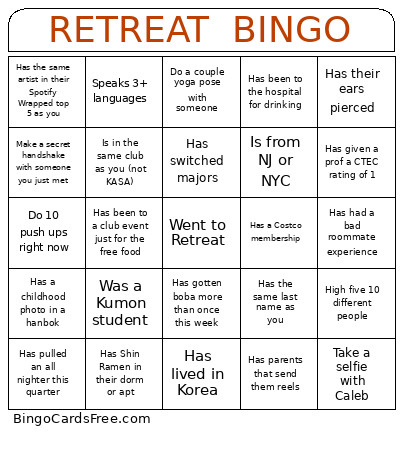 This Retreat Bingo Cards Game contains following Words or Phrases: Was not born in the US, Has the same last name as you, Is fluent in Korean, Speaks 3+ languages, Played piano growing up, Was a Kumon student, Is from California, Is from NJ or NYC, Wears glasses, Wears contacts, Watched Ryan Higa growing up, Was in band or orchestra, Is wearing Stussy or Essentials right now, Has a crusty white dog, Got a 1600 SAT or 36 ACT, Is not Korean, Has the same artist in their Spotify Wrapped top 5 as you, Lived in the same first year dorm as you, Has the same favorite Korean food as you, Has a different legal name than their nickname, Has a perm, Looks like a celebrity (show picture for comparison), Has instant rice in their dorm or apt, Has their ears pierced, Hates kimchi, Has a dog named after food, Is in the same club as you (not KASA), Is in the same class as you, Got BTS tickets, Has parents that send them reels, Did Taekwondo growing up, Do 10 push ups right now, Do a 3 person triangle push up, Play cham cham cham with someone, Take a selfie with Caleb, Take a selfie with Joseph, Take a selfie with Minsong, Uses KakaoTalk to talk to their parents, Do a couple yoga pose with someone, Sing the Korean national anthem out loud, Has their mom or dad cut their hair, Has lived in Korea, Has been to the hospital for drinking, Has accompanied someone to the hospital, Has a Korean middle name, Has a Costco membership, Has Shin Ramen in their dorm or apt, Has Buldak Ramen in their dorm or apt, Has gone to KBBQ for a birthday dinner, Has made kimchi from scratch, Watched Running Man growing up, Has a collection of plastic bags in their dorm or apt, Has a drawer of random cables and batteries at home, Has a childhood photo in a hanbok, Has a parent that only drinks hot water, Has used Google Translate to text a relative, Has a playlist that is only Korean indie, Has gotten boba more than once this week, Uses chopsticks to eat chips, Has pulled an all nighter this quarter, Never shows up to a specific class, Has switched majors, Has been to a club event just for the free food, Has had a bad roommate experience, Has gotten kicked out of a study room this week, Has given a prof a CTEC rating of 1, Has eaten 2am ramen this week, Hold a plank with someone else for 20 seconds, Beat someone at thumb war, Make a secret handshake with someone you just met, Is from Normal, IL, Is from Maryland, Is from Georgia, Has the same outfit colors as you, Take a selfie with someone both doing your best kdrama surprised face, High five 10 different people, Has the same phone case color as you.