Print free RHR bingo cards or alter them,
unlimited cards! Select from 42,600+ templates or use the bingo card generator.
Add numbers, phrases, pictures, or all of them.
Play using PDF prints, digital bingo cards,
and the digital bingo caller, or go hybrid.
About: This bingo card perfectly captures the chaos, quirks, and memorable moments of working in or visiting a busy family-style restaurant or steakhouse. With each square representing classic customer requests, server struggles, and kitchen mix-ups, it’s a fun way for staff or regulars to bond and laugh during team meetings, shift parties, or staff appreciation events.
How To: To save a printable PDF, click the Print button.
You can alter the number of cards and other
print options on the Print tab.
Grid items and free space content can be edited on the Basic tab.
Appearance can be exactly customized on the
relevant tabs, or you can quickly search any preference
on the 🔍 tab.
How to play RHR Bingo Cards?
Online Caller: Click on the Play button above.
Online Players: Click on the Play button above, and then click on the 🎫 button.
Paper Caller: Print PDF calling list & calling slips and physically draw the slips.
Paper Players: Print PDF bingo cards and physically cross off the cards.
Mixed Mode: Pick any combination above.
For instance, caller can be either Printed or Online.
And players can be Printed or Online or a mix of both.
Step-By-Step:
Start by getting the RHR Bingo PDF by clicking on the "Print" button above.
Open the PDF and print a hard copy.
For random drawing, you can print another copy of the call list, cut, fold and then pull them randomly at play time.
Cut the bingo cards at the cut marks if there are more than 1 bingo cards per page.
Give one card to each player. For marking, you can use pens. Crayons are the cheapest.
Pick one person to be the caller. If you are playing in a small group, the caller can also play along with their own Bingo card.
The caller begins the game by randomly picking an item from the call list and calling out it to everyone.
The players scan their cards to see if they have the announced word. If they do, they mark that word.
The first player to complete a horizontal, vertical, or a diagonal line of crossed items shouts "Bingo!" and wins the play.
The caller validates that the items marked form a proper line according to the Bingo card and call list.
You can play for different patterns or a full card blackout for an extended play.
This RHR Bingo Cards Game contains following Words or Phrases: "We're just going to share", Adult kids meal, More baskets than people, Double fry side, Chili and salad, Well done steak prio, Ceaser sub ranch, White claw, Regular butter, Oil and vinn, "Blooming onion", Mispronounce sirloin, Hot water, Baker no salt, Ready to order at greet, Vegplate chili and salad, Chili bowl app, Ranch with blossom, Bbq chicken sandwich, Prime rib (were sold out), Virgin drink, Server drops food try or drinks, Tweaker tweaking, Expo can't read, Uncut potato, Does smother cost extra, Shrimp as a side, Large milk/juice, 3 top+ teenagers, "Ribeye was all fat", "Does this look (temp) to you", "We need ice", "RUNNERS!" (There's two trays), Ran same server tray 3+ times, Boh running food, Out of bread, Two top at six top, What happen, Lots of peanuts on floor, Where are the menus, Bucket used as trash, "Can you take this" (referring ziosk or bucket), Incomplete party (late), Good tip From foreigner (accent), Piña colada, 3 bar drinks to same person, Basket to the bar, Other servers table asks you to do something, Server asks you to do their birthday, can I get a different table, "Would you like steak sauce" "I better not", Music too loud/change tv channel, Name, Kids chocolate milk, Grilled cheese, Kids Mac side mac, Mini burger +lto, Table orders wrong ("can I get two mini cheese burger"), Person refuses saddle, Yeehaw before count, Water no ice, Water not touched, Senior discount, No ID, Old person, Take home 50% of meal, Not using high chair, Musical chairs, Wrong party size, Split booth party, Bottle beer with glass, Side salad for dinner, Side mush or onion, "What comes on it" (meaning what's free), Side gravy/side load, "Country fried steak", Salad before meal, Parents order for kid (Old), Tip share > tip, Tables time over 1:30, an Employee comes in to eat.

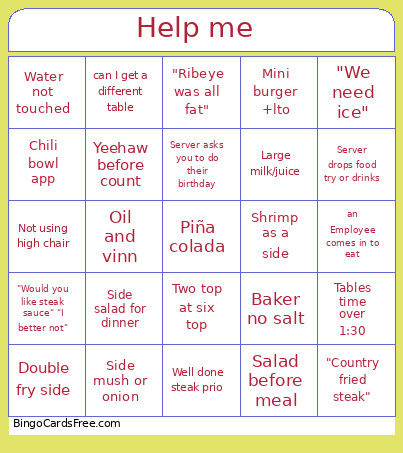 This RHR Bingo Cards Game contains following Words or Phrases: "We're just going to share", Adult kids meal, More baskets than people, Double fry side, Chili and salad, Well done steak prio, Ceaser sub ranch, White claw, Regular butter, Oil and vinn, "Blooming onion", Mispronounce sirloin, Hot water, Baker no salt, Ready to order at greet, Vegplate chili and salad, Chili bowl app, Ranch with blossom, Bbq chicken sandwich, Prime rib (were sold out), Virgin drink, Server drops food try or drinks, Tweaker tweaking, Expo can't read, Uncut potato, Does smother cost extra, Shrimp as a side, Large milk/juice, 3 top+ teenagers, "Ribeye was all fat", "Does this look (temp) to you", "We need ice", "RUNNERS!" (There's two trays), Ran same server tray 3+ times, Boh running food, Out of bread, Two top at six top, What happen, Lots of peanuts on floor, Where are the menus, Bucket used as trash, "Can you take this" (referring ziosk or bucket), Incomplete party (late), Good tip From foreigner (accent), Piña colada, 3 bar drinks to same person, Basket to the bar, Other servers table asks you to do something, Server asks you to do their birthday, can I get a different table, "Would you like steak sauce" "I better not", Music too loud/change tv channel, Name, Kids chocolate milk, Grilled cheese, Kids Mac side mac, Mini burger +lto, Table orders wrong ("can I get two mini cheese burger"), Person refuses saddle, Yeehaw before count, Water no ice, Water not touched, Senior discount, No ID, Old person, Take home 50% of meal, Not using high chair, Musical chairs, Wrong party size, Split booth party, Bottle beer with glass, Side salad for dinner, Side mush or onion, "What comes on it" (meaning what's free), Side gravy/side load, "Country fried steak", Salad before meal, Parents order for kid (Old), Tip share > tip, Tables time over 1:30, an Employee comes in to eat.