Print free Rbingo cards or modify,
limitless cards! Pick from 41,500+ templates or use our bingo card generator.
Add numbers, words, images, or all of them.
Play using PDF printouts, virtual bingo cards,
and our virtual bingo caller, or combine all formats.
About: This bingo card is perfect for an adventurous road trip or travel challenge with friends or family. It encourages creativity, exploration, and humor as you complete quirky photo ops, taste local flavors, and hunt for odd souvenirs. Ideal for a group looking to make unforgettable memories and add a playful twist to a journey together.
How To: To download a PDF to print, click the Print button.
You can alter the card count and other
print options on the Print tab.
Grid items and free space content can be added on the Basic tab.
Appearance can be exactly customized on the
corresponding tabs, or you can easily locate any option
using the 🔍 tab.
How to play RBingo Cards?
Digital Caller: Click on the Play button above.
Digital Players: Click on the Play button above, and then click on the 🎫 button.
Printed Caller: Print PDF calling list & calling slips and physically pick the slips.
Printed Players: Print PDF bingo cards and physically cross off the cards.
Mixed Mode: Pick any combination above.
For instance, caller can be either Printed or Digital.
And players can be Printed or Digital or a combo of both.
Step-By-Step:
Start by saving the RBingo PDF by clicking on the "Print" button above.
Open the PDF and print it.
For random calling, you can print another copy of the call list, cut, fold and then pick them randomly at play time.
Cut the bingo cards at the cut lines if there are more than 1 bingo cards per page.
Give one card to each player. For marking, you can use pencils. Crayons are the cheapest.
Pick one person to be the caller. If you are playing in a small group, the caller can as well play along with their own Bingo card.
The caller starts the play by randomly drawing an item from the call list and calling out it to everyone.
The players scan their cards to see if they have the announced word. If they do, they mark that word.
The first player to finish a horizontal, vertical, or a diagonal line of crossed items yells "Bingo!" and wins the game.
The caller verifies that the items crossed off form a correct line as per the Bingo card and call list.
You can play for different patterns or a full card blackout for an extended game.
This RBingo Cards Game contains following Words or Phrases: Take a silloette selfie at sunrise, Take a selfie at a high point with a carrot, Aquire a Mascot for the vehicle, Try a new local food, Take a picture infront of 4 village/town name signs, Have a souvenir of each day, Purchase and wear an unusual hat, Take a selfie in a body over water (up to knees), Gift someone the most unusual secondhand book, Shake the hand of a statue, Make and eat a sandwich with six fillings, Make a tower of stones (30 cm height), Take a picture with 3 different flags (1st thumb up with 1, 2 thumbs up with 2nd, 3 thumbs up with 3rd), Have a lime hidden on you from dawn till dusk, Walk backwards around three monuments, Declare 'Time to hide'. Everyone must hide in 30 seconds and you must find them within 5 minutes, Make a large fruit into a face and seatbelt him/her into anothers car, Cross a river without using a bridge, Send yourself a postcard in 3rd person, Look wistfully upon a ruin (x2) Photo needed, Enter five churches, Gift everyone something beggining with the first letter of their name, Take a photo with a name plaque with every letter of the alphabet, Make, buy or acquire a spoon and put your name on it, Place hands on opposite shoulders, stare up at the sky in five unique locations (Photo).

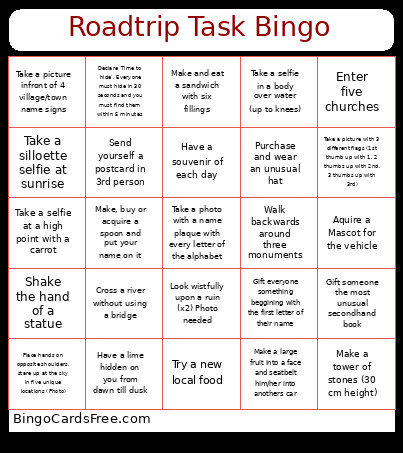 This RBingo Cards Game contains following Words or Phrases: Take a silloette selfie at sunrise, Take a selfie at a high point with a carrot, Aquire a Mascot for the vehicle, Try a new local food, Take a picture infront of 4 village/town name signs, Have a souvenir of each day, Purchase and wear an unusual hat, Take a selfie in a body over water (up to knees), Gift someone the most unusual secondhand book, Shake the hand of a statue, Make and eat a sandwich with six fillings, Make a tower of stones (30 cm height), Take a picture with 3 different flags (1st thumb up with 1, 2 thumbs up with 2nd, 3 thumbs up with 3rd), Have a lime hidden on you from dawn till dusk, Walk backwards around three monuments, Declare 'Time to hide'. Everyone must hide in 30 seconds and you must find them within 5 minutes, Make a large fruit into a face and seatbelt him/her into anothers car, Cross a river without using a bridge, Send yourself a postcard in 3rd person, Look wistfully upon a ruin (x2) Photo needed, Enter five churches, Gift everyone something beggining with the first letter of their name, Take a photo with a name plaque with every letter of the alphabet, Make, buy or acquire a spoon and put your name on it, Place hands on opposite shoulders, stare up at the sky in five unique locations (Photo).