
RRR Watch party movie bingo Cards - Print Free or Customize
Print free RRR Watch party movie bingo cards or personalize, limitless prints! Pick from 42,200+ templates or use our bingo card generator. Add numbers, words, pictures, or mix them all. Play using PDF printouts, virtual bingo cards, and our virtual bingo caller, or go hybrid.
About: This bingo card celebrates the wild, over-the-top energy of a Bollywood blockbuster night, perfect for a group movie marathon or a rowdy watch party of action-packed Indian films. Expect dramatic stunts, soaring emotions, and audience reactions that are just as entertaining as what's on screen. It's ideal for fans who love high-octane fun and unapologetic melodrama.
How To: To download a printable PDF, click the Print button. You can change the card quantity and other printing preferences on the Print tab. Grid items and free space text can be changed on the Basic tab. Appearance can be exactly customized on the corresponding tabs, or you can easily find any preference using the 🔍 tab.
How to play RRR Watch party movie bingo Cards?
- Virtual Caller: Click on the Play button above.
- Virtual Players: Click on the Play button above, and then click on the 🎫 button.
- Printed Caller: Print PDF calling list & calling slips and physically draw the slips.
- Printed Players: Print PDF bingo cards and physically cross off the cards.
- Mixed Mode: Select any combination above. For example, caller can be either Paper or Virtual. And players can be Paper or Virtual or a mix of both.
Step-By-Step:
- Start by downloading the RRR Watch party movie bingo PDF by clicking on the "Print" button above.
- Open the PDF and print it.
- For random calling, you can print another copy of the call list, cut, fold and then pull them randomly at play time.
- Cut the bingo cards at the cut marks if there are greater than 1 bingo cards per page.
- Give one card to each player. For marking, you can use markers. Crayons cost the least.
- Select one person to be the caller. If you are playing in a small group, the caller may as well play along with their own Bingo card.
- The caller begins the play by randomly picking an item from the call list and calling out it to everyone.
- The players check their cards to see if they have the announced word. If they do, they dab that word.
- The first player to complete a horizontal, vertical, or a diagonal line of marked items announces "Bingo!" and wins the game.
- The caller confirms that the items marked form a correct line as per the Bingo card and call list.
- You can play for different patterns or a full card blackout for a longer game.
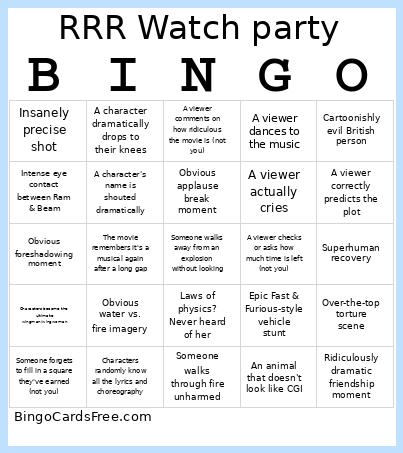 This RRR Watch party movie bingo Cards Game contains following Words or Phrases: Someone walks through fire unharmed, Wild animal absolutely wrecks someone, Superhuman feat of strength, Laws of physics? Never heard of her, Slow motion for absolutely no reason (can't be during an action scene), Breaks into song mid-scene, Intense eye contact between Ram & Beam, A moment where the main characters have undeniable sexual chemistry, Indian flag waving in full glory, Cartoonishly evil British person, Emotional flashback, Characters randomly know all the lyrics and choreography, Over-the-top torture scene, Over-the-top rescue sequence, Characters become the ultimate wingman/wingwoman, A character's name is shouted dramatically, Insanely precise shot, Superhuman recovery, Obvious water vs. fire imagery, Ridiculously dramatic friendship moment, Random explosion, Reaction shots stacked back-to-back, Obvious applause break moment, Parkour!, Two characters move in perfect sync, Intense patriotism, A viewer asks or talks about historical events related to the movie, A viewer checks or asks how much time is left (not you), Someone breaks and laughs during a super serious moment (not you), MacGyver moment!, War crime, Callback to an earlier scene, A viewer correctly predicts the plot, An animal that doesn't look like CGI, Epic Fast & Furious-style vehicle stunt, Cool weapon reload trick, A viewer actually cries, Someone comments the leads should just get together already, A character simps like their life depends on it, A viewer comments on how ridiculous the movie is (not you), The movie remembers it's a musical again after a long gap, Someone forgets to fill in a square they've earned (not you), A viewer sings part of a song from the movie, A misunderstanding that could've been solved with clear communication, A viewer talks about how good the movie is (not you), Group claps or cheers during a scene, A viewer dances to the music, A character dramatically drops to their knees, Obvious foreshadowing moment, Someone walks away from an explosion without looking.