
SAFETY WEEK BINGO Cards - Print Free or Customize
Print free SAFETY WEEK BINGO cards or customize, unlimited prints! Select from 41,500+ designs or use the bingo card generator. Add numbers, words, images, or mix them all. Play using PDF prints, online bingo cards, and the online bingo caller, or combine all formats.
About: This bingo card is all about workplace safety and best practices on the shop floor. It’s perfect for safety training sessions or team meetings in industrial settings, helping employees stay alert and refreshed on important protocols. The tone is proactive and supportive, making safety engagement more interactive for workers in manufacturing or warehouse environments.
How To: To download a PDF to print, click the Print button. You can modify the number of cards and other printing preferences on the Print tab. Grid items and free space text can be added on the Basic tab. Appearance can be totally personalized on the corresponding tabs, or you can easily locate any setting on the 🔍 tab.
How to play SAFETY WEEK BINGO Cards?
- Digital Caller: Click on the Play button above.
- Paper Players: Print PDF bingo cards and physically write on the cards.
- Paper Caller: Print PDF calling list & calling slips and physically pick the slips.
- Digital Players: Click on the Play button above, and then click on the 🎫 button.
- Mixed Mode: Select any combination above. For instance, caller can be either Paper or Digital. And players can be Paper or Digital or a mix of both.
Step-By-Step:
- Start by saving the SAFETY WEEK BINGO PDF by clicking on the "Print" button above.
- Open the PDF and print it.
- For random calling, you can print another copy of the call list, cut, fold and then pick them randomly at play time.
- Cut the bingo cards at the cut lines if there are more than 1 bingo cards per page.
- Give one card to each player. For marking, you can use pens. Crayons are the cheapest.
- Select one person to be the caller. If you are playing in a small group, the caller can also play along with their own Bingo card.
- The caller begins the game by randomly pulling an item from the call list and saying it to all players.
- The players check their cards to see if they have the called word. If they do, they cross off that word.
- The first player to complete a horizontal, vertical, or a diagonal line of marked items shouts "Bingo!" and wins the game.
- The caller validates that the items marked form a proper line as per the Bingo card and call list.
- You can play for different patterns or a full card blackout for a longer game.
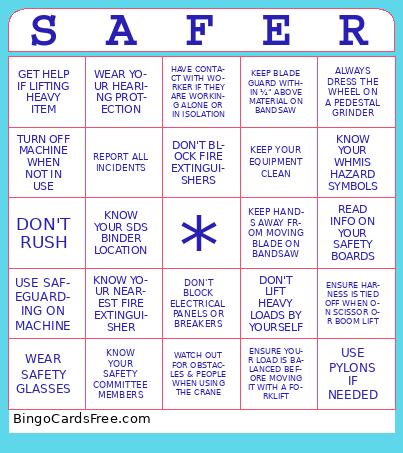 This SAFETY WEEK BINGO Cards Game contains following Words or Phrases: WEAR SAFETY GLASSES, LOCKOUT / TAG OUT, TURN OFF MACHINE WHEN NOT IN USE, STORE CHEMICALS CORRECTLY, PUT RESPIRATOR IN BAG WHEN NOT IN USE, WEAR SEATBELT WHILE IN FORKLIFT, AVOID LOOSE CLOTHING, DON'T RUN, DON'T RUSH, INSPECT YOUR LIFTING DEVICE, KEEP AREA CLEAN, CLEAN UP SPILLS, GET HELP IF LIFTING HEAVY ITEM, USE SAFEGUARDING ON MACHINE, KNOW YOUR FIRST AID RESPONDERS, -c-, DON'T USE DEFECTIVE TOOLS, ENSURE PAINT DRUMS ARE GROUNDED, HONK YOUR HORN WHEN NEAR PEOPLE, GROUND MATERIAL WHEN WELDING, WEAR YOUR HEARING PROTECTION, WEAR YOUR SAFETY SHOES, KNOW YOUR NEAREST FIRE EXTINGUISHER, KNOW YOUR SDS BINDER LOCATION, 3-POINT CONTACT WHEN CLIMBING LADDERS, WEAR GLOVES WHEN USING UTILITY KNIFE, ENSURE UTILITY KNIFE BLADE IS RETRACTED BACK WHEN NOT IN USE, KNOW THE HAZARDS OF YOUR WORK PROCESS, REPORT ALL INCIDENTS, IF YOU DON'T KNOW WHAT TO DO - ASK!, KNOW YOUR SAFETY COMMITTEE MEMBERS, -c-, KNOW YOUR WORKER RIGHTS, RESPECT YOUR CO-WORKERS, WALK SLOWLY ON ICY SURFACES, WATCH OUT FOR OBSTACLES & PEOPLE WHEN USING THE CRANE, ONLY AUTHORIZED PERSONS IN TEST DEPT, GET SPOTTER WHEN MOVING LARGER TANKS WITH CRANE OR FORKLIFT, HAVE CONTACT WITH WORKER IF THEY ARE WORKING ALONE OR IN ISOLATION, DON'T STAND OR WALK UNDER SUSPENDED LOADS, STAND TO THE SIDE WHEN FORKLIFT IS PASSING BY, LOOK BOTH WAYS WHEN STEPPING INTO MAIN AISLES, DON'T BLOCK FIRE EXTINGUISHERS, DON'T BLOCK ELECTRICAL PANELS OR BREAKERS, PUT TOOLS AWAY WHEN NOT IN USE, DON'T LEAVE RAGS ON THE FLOOR, KNOW YOUR EMERGENCY MUSTER POINT, -c-, WEAR GLOVES WHEN HANDLING CORE STEEL, KEEP HANDS AWAY FROM MOVING BLADE ON BANDSAW, KEEP BLADE GUARD WITHIN ¼" ABOVE MATERIAL ON BANDSAW, ENSURE SPRAY BOTTLES & CONTAINERS HAS A WORKPLACE LABEL, DON'T WEAR JEWLERY OR HANGING STRINGS FROM HOODIES, COMPLETE YOUR DAILY INSPECTIONS, 5S YOUR AREA, ENSURE YOUR LOAD IS BALANCED BEFORE MOVING IT WITH A FORKLIFT, KNOW YOUR NEAREST EMERGENCY EXIT, WASH YOUR HANDS BEFORE YOU EAT, KEEP YOUR EQUIPMENT CLEAN, TIE BACK LONG HAIR, BE CLEAN SHAVEN WHEN WEARING RESPIRATOR, NEVER REACH INTO RUNNING MACHINE, DON'T LIFT HEAVY LOADS BY YOURSELF, -c-, WEAR YOUR PPE WHEN ON THE SHOP FLOOR, ENSURE WELD CURTAINS ARE CLOSED WHEN WELDING, ENSURE YOU ARE TRAINED, READ & UNDERSTAND YOUR SSOP, ENSURE HARNESS IS TIED OFF WHEN ON SCISSOR OR BOOM LIFT, DON'T STACK PARTS TOO HIGH, ENSURE BOXES ARE PROPERLY PLACED ON SHELF, READ INFO ON YOUR SAFETY BOARDS, RECORD ITEMS USED IN FIRST AID KITS, USE SAFETY CAGE WHEN WORKING UNDER SUSPENDED TANK, USE PYLONS IF NEEDED, KNOW YOUR WHMIS HAZARD SYMBOLS, STAY HYDRATED DURING WARMER TEMPERATURES, ALWAYS DRESS THE WHEEL ON A PEDESTAL GRINDER, WEAR A FACESHIELD WHEN GRINDING.