Salkehatchie Bingo Cards - Print Free or Customize
Print free Salkehatchie bingo cards or adjust them,
limitless cards! Select from 41,900+ designs or use the bingo card generator.
Add numbers, phrases, photos, or mix them all.
Play using printed PDF, digital bingo cards,
and the digital bingo caller, or mix physical and digital.
About: This bingo card is the perfect icebreaker for a group gathering, especially for events where people might not know each other well—think orientations, retreats, or large family reunions. The mix of travel, personal quirks, and local connections sets a playful tone that encourages conversation and helps participants discover surprising things they have in common.
How To: To download a printable PDF, click the Print button.
You can adjust the card count and other
printing preferences on the Print tab.
Grid items and free space content can be edited on the Basic tab.
Appearance can be entirely personalized on the
relevant tabs, or you can easily search any setting
using the 🔍 tab.
How to play Salkehatchie Bingo Cards?
Printed Caller: Print PDF calling list & calling slips and manually pick the slips.
Printed Players: Print PDF bingo cards and manually scratch the cards.
Digital Caller: Click on the Play button above.
Digital Players: Click on the Play button above, and then click on the 🎫 button.
Mixed Play: Choose any combination above.
For instance, caller can be either Offline or Digital.
And players can be Offline or Digital or a combo of both.
Step-By-Step:
Start by saving the Salkehatchie PDF by clicking on the "Print" button above.
Open the PDF and print it.
For random calling, you can print another copy of the call list, cut, fold and then draw them randomly at play time.
Cut the bingo cards at the cut lines if there are greater than 1 bingo cards per page.
Distribute one card per player. For marking, you can use pencils. Crayons are the cheapest.
Choose one person to be the caller. If you are playing in a small group, the caller may as well play along with their own Bingo card.
The caller starts the play by randomly drawing an item from the call list and calling out it to everyone.
The players scan their cards to see if they have the announced word. If they do, they dab that word.
The first player to complete a horizontal, vertical, or a diagonal line of crossed items announces "Bingo!" and wins the game.
The caller checks that the items crossed off form a proper line according to the Bingo card and call list.
You can play for different patterns or a full card blackout for an extended game.
This Salkehatchie Bingo Cards Game contains following Words or Phrases: Someone who has been to the world's most populated country, Someone whose middle name starts with an S, Someone who is a lefty, 1 person who lives in Greenwood, Someone who grew up in North Carolina, 1 person who lives outside South Carolina, 1 person who goes by a shortened version of their name, 1 person who is ordained, 1 USC grad, Someone with or pursuing a business degree, 1 person who has been to Salkehatchie 5+ years, 1 person on a swim team, 1 person who has lived in another country, Someone who is conversational in another language, Someone who hates eating mushrooms, Someone who has never used a hammer, Someone who plays football, Someone who has ridden a real train, Someone who has run a marathon, Someone with a cat, Someone with a pet named after food, Someone who was/is in a fraternity/sorority, Someone who works at Heathwood Hall, Someone who has worked for a hospital, Someone who has passed an AP class, Someone who has never been to Beaufort, Someone who has met a real celebrity, Someone who shares your birth month, Someone who attended prom this year, Someone who can drive a stick shift, Someone who can confidently work a nail gun, Someone who has been to 4 or more continents, Someone who has never broken a bone.

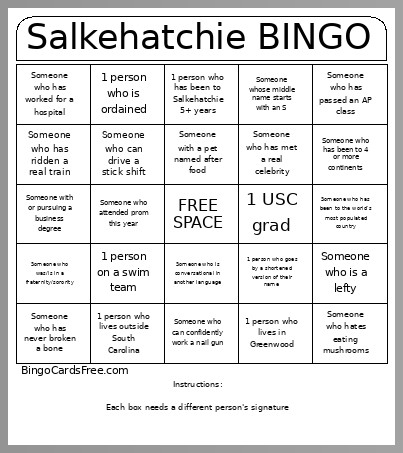 This Salkehatchie Bingo Cards Game contains following Words or Phrases: Someone who has been to the world's most populated country, Someone whose middle name starts with an S, Someone who is a lefty, 1 person who lives in Greenwood, Someone who grew up in North Carolina, 1 person who lives outside South Carolina, 1 person who goes by a shortened version of their name, 1 person who is ordained, 1 USC grad, Someone with or pursuing a business degree, 1 person who has been to Salkehatchie 5+ years, 1 person on a swim team, 1 person who has lived in another country, Someone who is conversational in another language, Someone who hates eating mushrooms, Someone who has never used a hammer, Someone who plays football, Someone who has ridden a real train, Someone who has run a marathon, Someone with a cat, Someone with a pet named after food, Someone who was/is in a fraternity/sorority, Someone who works at Heathwood Hall, Someone who has worked for a hospital, Someone who has passed an AP class, Someone who has never been to Beaufort, Someone who has met a real celebrity, Someone who shares your birth month, Someone who attended prom this year, Someone who can drive a stick shift, Someone who can confidently work a nail gun, Someone who has been to 4 or more continents, Someone who has never broken a bone.