
SCOUT Bingo Cards - Print Free or Customize
Print free SCOUT bingo cards or alter them, unlimited cards! Choose from 41,500+ designs or use our bingo card generator. Add numbers, phrases, images, or mix them all. Play using printable PDF, online bingo cards, and our online bingo caller, or mix physical and digital.
About: This bingo card is all about breaking the ice and sparking connections in a lively group setting, perfect for workshops, team retreats, or campus socials. The challenges range from silly dares to genuine conversations, encouraging everyone to mingle, laugh, and step out of their comfort zones. It’s designed for a fun-loving, open-minded crowd ready to make new memories together.
How To: To save a printable PDF, click the Print button. You can adjust the card quantity and other printing options on the Print tab. Grid items and free space content can be added on the Basic tab. Appearance can be highly personalized on the relevant tabs, or you can easily find any setting using the 🔍 tab.
How to play SCOUT Bingo Cards?
- Virtual Caller: Click on the Play button above.
- Virtual Players: Click on the Play button above, and then click on the 🎫 button.
- Printed Players: Print PDF bingo cards and manually cross off the cards.
- Printed Caller: Print PDF calling list & calling slips and manually choose the slips.
- Hybrid Mode: Pick any combination above. For instance, caller can be either Printed or Virtual. And players can be Printed or Virtual or a combo of both.
Step-By-Step:
- Start by getting the SCOUT PDF by clicking on the "Print" button above.
- Open the PDF and print it.
- For random calling, you can print another copy of the call list, cut, fold and then pull them randomly at play time.
- Cut the bingo cards at the cut marks if there are greater than 1 bingo cards per page.
- Give one card to each player. For marking, you can use crayons. Crayons cost the least.
- Pick one person to be the caller. If you are playing in a small group, the caller can also play along with their own Bingo card.
- The caller starts the game by randomly pulling an item from the call list and saying it to all players.
- The players scan their cards to see if they have the announced word. If they do, they dab that word.
- The first player to finish a horizontal, vertical, or a diagonal line of crossed items yells "Bingo!" and wins the game.
- The caller verifies that the items marked form a correct line as per the Bingo card and call list.
- You can play for multiple patterns or a full card blackout for an extended game.
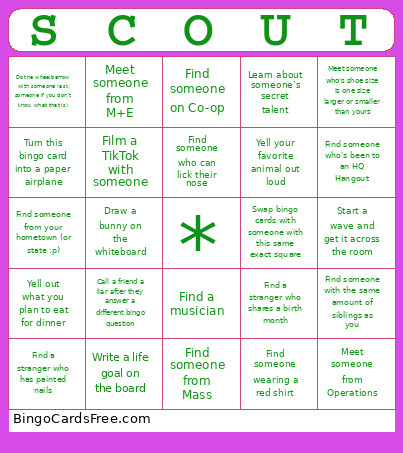 This SCOUT Bingo Cards Game contains following Words or Phrases: Talk to someone about a recent concert they've been to, Find a musician, Get 5 LinkedIn connections, Yell your favorite animal out loud, Give Kiana a high seven (figure it out), Give a stranger a compliment, Find someone older than you, Find someone from your hometown (or state :p), Find a stranger who has studied abroad, Create a secret handshake, Laugh REALLY loudly for 5 seconds!!, Find a stranger who has painted nails, Find a stranger who can speak 2+ languages, Meet someone from Studio, Meet someone from Labs, Meet someone from M+E, Meet someone from Community, Meet someone from Media, Meet someone from Conference, Meet a left-handed person, Meet someone from Management, Meet someone from Operations, Meet someone who's shoe size is one size larger or smaller than yours, Meet someone without a middle name, Find a person taller or shorter than you, Find someone who has a car they can bring to retreat…, Find someone from New Jersey, Find someone from California, Find someone from Mass, Talk to a stranger about your weirdest dream, Yell out what you plan to eat for dinner, Draw a bunny on the whiteboard, Shake a stranger hand when the minutes on the clock are divisible by 5, Find someone wearing a red shirt, Go to the front of the room and jump in a circle, Start/join a conga line, Win in rock paper scissors, Write a life goal on the board, Yell out your dream vacation destination, Win a staring contest with someone across the room, Get someone's best celebrity impression, Find someone who can lick their nose, Whistle, Find someone who's favorite color is the same as yours, Do the wheelbarrow with someone (ask someone if you don't know what that is), Sing a duet, Film a TikTok with someone, Film and post an IG reel with someone, Film a Facebook Reels with someone, Post on your instagram story about Scout, Go on Snapchat Live and find the 2016 dog filter, Find an E-board member from another club, Turn this bingo card into a paper airplane, Learn about someone's secret talent, Ask a stranger their major they are, Tell a blatant lie to help someone with their bingo sheet (only ONCE!), Call a friend a liar after they answer a different bingo question, Ask someone what their childhood dream job was, Find someone with the same amount of siblings as you, Start a wave and get it across the room, Find someone who's been to an HQ Hangout, Swap bingo cards with someone with this same exact square, Meet someone in DMSB, Meet someone in COS, Share with a stranger a niche reference/meme you quote often, Use the microphone in the front of the room—freestyle rap., Sit and meditate. Moment of peace, Ask someone about their favorite show/movie/book, Find someone who knows how to do origami, Make lunch plans with someone, Share your favorite recipe with someone, Show a stranger photo from your favorites album, Find someone on Co-op, Find someone who has a pet, yell out the pet's name, Find a stranger who shares a birth month, Find someone wearing Northeastern merch.